FROM AGREEMENT TO ACTION
How to set up contract reminders in ContraxAware
- Bring in the agreement. Upload a PDF or Word contract. Review proposed dates beside the original using AI Contract Data Extraction.
- Confirm the deadline that requires action. Record the notice deadline separately from expiration and renewal. Check the source wording and any amendments.
- Assign owners and configure reminders. Choose the people responsible and set the reminder plan around the verified date. Allow time for an internal decision before notice is due.
- Review and follow through. Open the agreement, record the renewal decision, and keep any required notice and evidence with the contract.
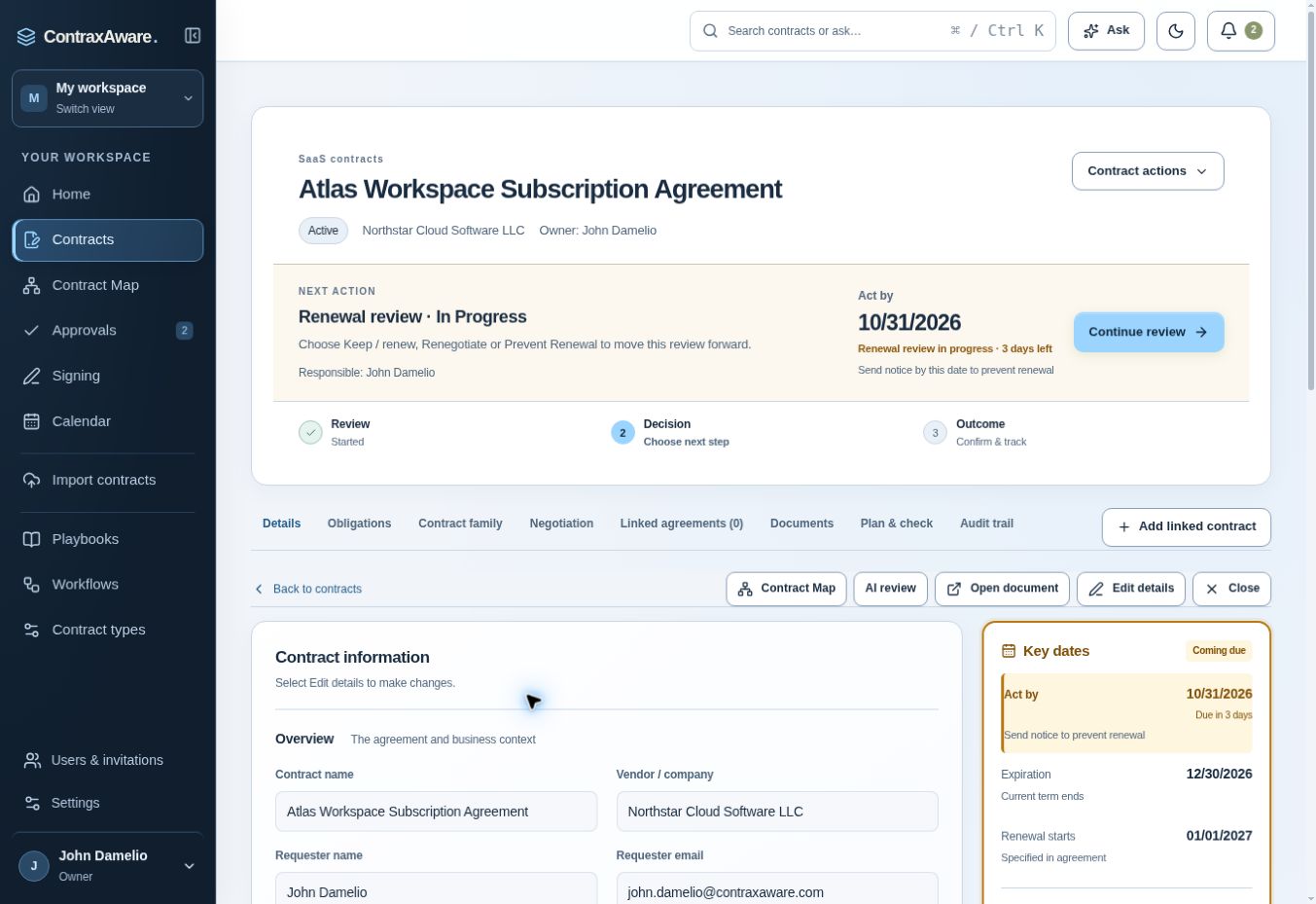
See the real renewal decision screen ↑ · Compare Complete and Enterprise pricing →
Planning the process for your team? Use our contract renewal reminder checklist to decide what to record and who needs to act.
A reminder before the notice deadline
Illustrative example: an agreement ends December 31, but its verified non-renewal notice deadline is November 1. Set an internal review for October 1 and configure reminders around the action deadline. A December expiration reminder alone would leave the team too late to prevent renewal. Verify dates and delivery requirements from the actual agreement.
Plan your contract renewal reminders
Look up the notice deadline in your signed agreement. Enter that date below to see when the owner should start the review and when a second person should follow up. Both offsets use calendar days.
Example schedule for an April 15, 2027 notice deadline
- Owner starts review
- Second person follows up
- Notice deadline
To put the plan into practice, add the dates to your calendar or set reminders on the contract record. Check the agreement for the delivery method, recipient and any weekend or holiday rules.
01
Separate the three dates that matter
An expiration date marks the end of a contract term. A renewal date marks when another term may begin. A notice deadline is the date by which a party may need to give notice to avoid renewal or exercise a contractual right. Those dates can be different.
Use the renewal notice deadline guide to review the dates and terms to capture on the contract record. If the agreement automatically renews, review its notice language and the alert setup carefully. Delivery methods, receipt requirements, and other terms may affect what your team must do.
02
Give the decision an owner
Renewal tracking works best as part of a clear contract management process. Assign the contract owner and renewal decision responsibility, then set up reminders around the notice deadline and an earlier internal review date.
Give the team time to compare usage, costs, service quality, and upcoming needs. Start the renewal review, then choose Keep / Renew, Renegotiate, or Prevent Renewal. A non-renewal decision leads to notice planning, review, delivery tracking, and outcome recording. It does not immediately terminate the agreement.
03
See dates in the view that fits your work
Use Month view for the upcoming portfolio, Week view for a team planning session, and Day view for the immediate workload. Contract filters help narrow the calendar to the agreements you are working on.
Open a calendar item to see its context and return to the contract. Contract Map connects recorded dates to the agreement, approvals, related agreements, and obligations. Google Calendar integration can connect selected contract dates once the account is configured.
04
Keep the record current after a renewal
Keep contract management records current when a renewal or amendment changes the term. Check the dates, reminders, and responsible people against the executed document. Contract lifecycle tracking should reflect the agreement your team is actually managing.
An amendment can be stored as a linked agreement with its own document and approval process. Review executed amendments before applying proposed changes to the parent agreement. Do not assume every addendum extends the main contract.
A FEW USEFUL ANSWERS
Questions about contract reminder software
What is contract reminder software?
Contract reminder software connects agreement dates with responsible people and scheduled reminders. ContraxAware keeps the original document, renewal decision and follow-up together so the team can check the wording before acting.
Can we track existing signed contracts?
Yes. Import your PDF or Word agreements, review the recorded dates against the originals, assign owners and configure reminders. You do not need to create a new contract to track an existing agreement.
Is a renewal date the same as a notice deadline?
No. A contract may require notice before the next term starts. Review the agreement and record both the renewal date and the action deadline.
Does the calendar have month, week, and day views?
Yes. Contract calendar views include Month, Week, and Day, with filters to narrow the agreements shown.
Does a cancellation decision send legal notice?
Do not treat a recorded decision or reminder as proof of delivery. Follow the agreement’s notice requirements and retain the communication.
Can we keep an old agreement for reference?
Yes. Record a historical outcome, actual end date and reason. The record stays available while everyday views omit it unless Include historical contracts is selected. An agreement without an expiration requirement does not need an invented end date.
Use contract reminder software for hospital equipment and physician services agreements as well as supplier contracts. Our healthcare contract management software connects these renewal decisions to the agreement, service owner and reviewers.