CONTRACT MAP
Visual contract map. See every connection—and the source.
See an agreement’s documents, approvals, signatures, obligations, dates and linked agreements together. Open Contract Lens to compare the workspace record with matching contract text and a cited AI explanation.
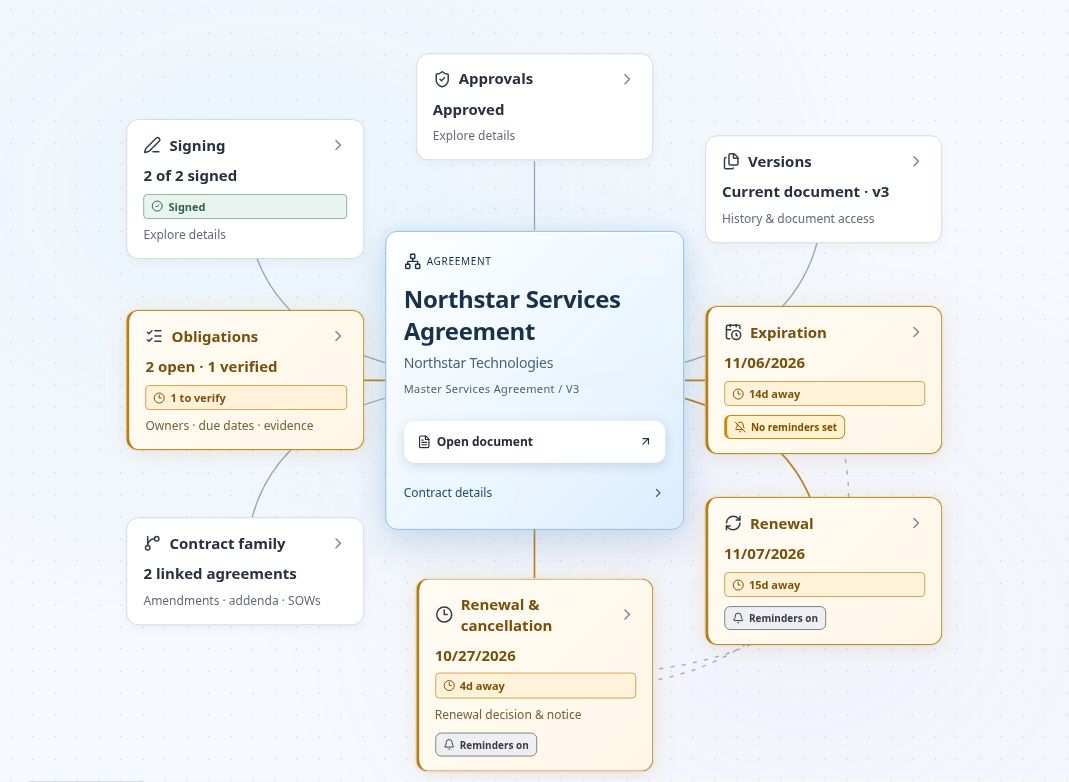 View full screenshot
Watch a contract map in action
Which deadline needs attention first? Follow the Northstar agreement from its map to the notice date, then open an obligation to see who owns it and where it came from.
Read the walkthrough
Open an agreement’s map and select a tile to see its record. In this example, notice is due October 27 and the next term starts November 7. The obligation shows the owner, the due date and the wording behind the task.
Once you have checked the notice date, use the contract reminder planner to schedule the internal decision. To try the same handoff across departments, evaluate a contract management system with a sample agreement.
See the full contract lifecycle around one agreement
A master agreement rarely stands alone. Amendments, statements of work and service commitments can change what your team needs to do next. Contract lifecycle tracking becomes easier to explain when those records are connected. Use Contract Map to see the agreement’s approvals, signing status, versions and linked agreements, then open the detail you need.
Move from the map to the wording behind it
Select a connection such as term end, renewal, notice, approvals, signing, contract family or obligations to open Contract Lens. It keeps the workspace record separate from the agreement’s wording, finds matching text in the saved document and presents a source-linked AI explanation. Open a cited passage as highlighted text and review what still needs checking. Contract Lens is a review aid, not a complete legal review.
Contract renewal management starts before expiry
A contract’s expiration date and its notice deadline can be different. Contract renewal management starts with checking when your team must decide and how notice must be given. Inspect the renewal date, cancellation notice deadline, outstanding obligations and linked amendments together. Dates, Reminders & Renewals helps your team record verified dates and plan the follow-up.
Manage expiring contracts with clear owners and reminders
For expiring contracts, bring the document, notice deadline, renewal date and outstanding obligations into the same review. Use contract expiration tracking and contract reminders to give the responsible person time to assess the next term. Check the source agreement for notice requirements before deciding what to renew.
Keep connected records in one contract management system
A contract management system is more useful when people can move from the signed document to the work around it. From Contract Map, follow the agreement’s versions, approvals, electronic signatures and linked agreements. Use your central contract repository and AI-Powered Contract Search to find the agreement first, then open its map for context.
Track contract obligations and hand over the context
Contract obligation management continues after signature. Inspect open commitments, responsible people and evidence of completion alongside the agreement. When ownership changes, walk the next person through the linked records and outstanding actions. Contract tracking works better when the next owner can check the source instead of relying on a separate explanation.
A FEW PRACTICAL QUESTIONS
Questions about Contract Map
How does a contract management map help with renewals?
It brings the agreement, linked amendments, obligations and renewal dates into the same visual review. Check the notice deadline before the term ends, confirm the wording in the source document and use Dates, Reminders & Renewals to plan the next action.
Does Contract Map replace my contract repository?
No. Contract Map is a visual view of the records around an agreement in ContraxAware. Keep the source documents in your contract repository, use search to find the agreement and use the map to understand its connections.
Does Contract Lens replace legal review?
No. Contract Lens helps a reviewer compare workspace data with matching text and cited AI explanations from readable saved passages. Review the original agreement, surrounding wording and related documents before making a legal or business decision.
Is this a geographic map?
No. Contract Map visualizes relationships within and around an agreement. Use fields and saved views to organize agreements by physical location.
Is Contract Map included in both plans?
Yes. Contract Map is included in Complete and Enterprise.
LET’S TALK ABOUT YOUR WORKFLOW
Bring your agreements.
We’ll help you find the next step.
See how the documents, people, dates, and commitments fit together for your team.