01
Give existing agreements a structured first pass
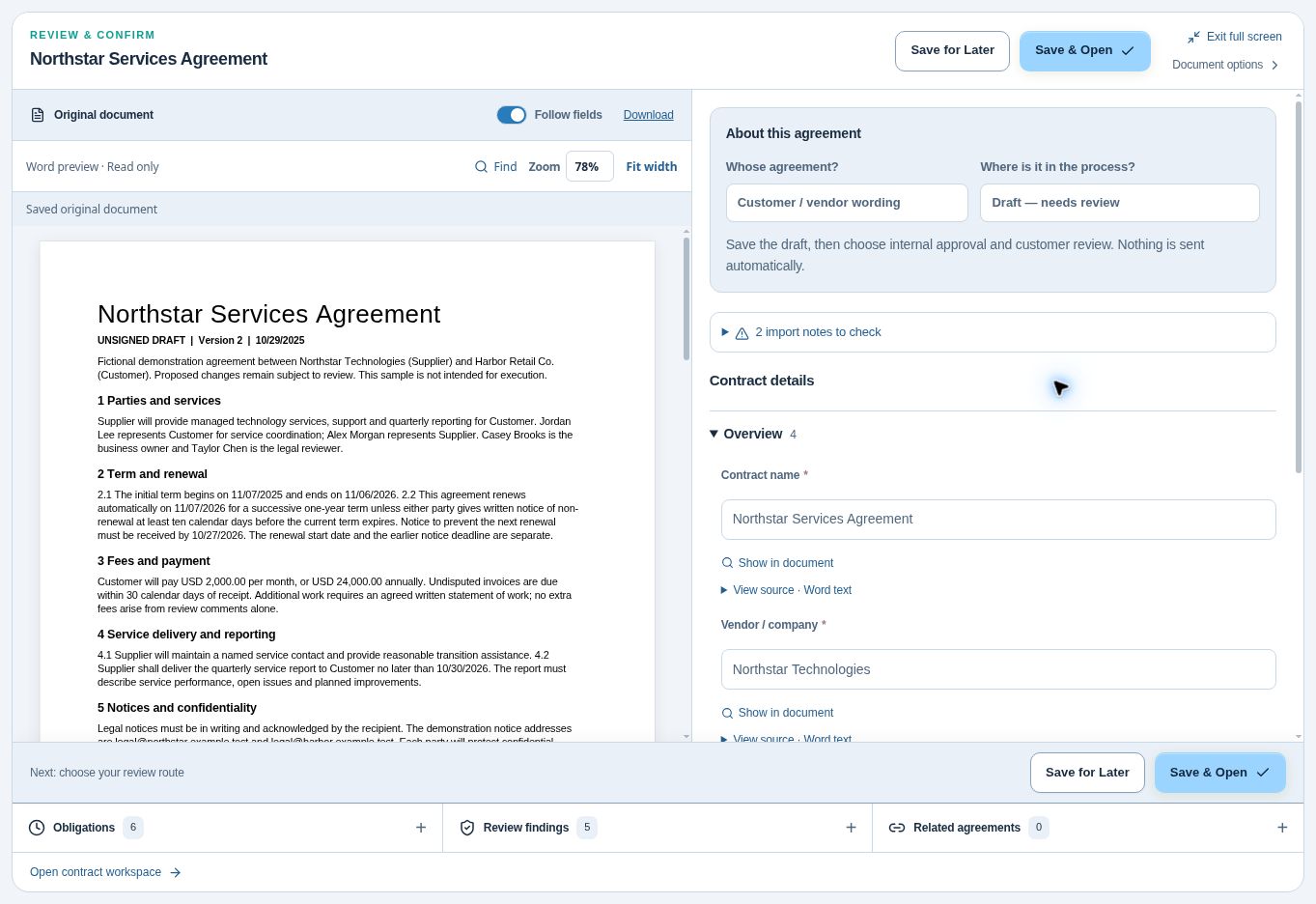
Contract management depends on more than a saved file. The agreement type, term dates, values, and responsibilities need a structured record. CLM software brings those details together while keeping the original available for checking.
AI contract data extraction prepares proposed details from supported PDF and Word agreements. Use the import review to examine the document and extracted fields together. The original stays attached so the record can be checked against the actual agreement later.
02
Check dates that have different meanings
An expiration date, renewal start, and non-renewal notice deadline answer different questions. Confusing them can leave the team reviewing an agreement after its opportunity to act has already passed.
Inspect the source wording behind suggested dates and renewal terms. Confirm or correct values before using them for contract deadline reminders. When the agreement specifies a date that differs from a calculation, verify the language rather than assuming a calculated value should replace the written term.
03
Keep responsibilities attached to the clause
Useful contract management connects extracted information to the work it creates. An agreement may require a certificate, training, a service report, or another deliverable. Give each responsibility an owner and a way to show what happened.
Review suggested obligations and their source excerpts during import. Confirm the due date or triggering event, assign the people responsible, and decide what completion evidence is needed. Later, the obligation can retain the clause context alongside reported work and verification.
04
Make review part of the workflow
As contract volume grows, keep extraction review in your contract management process. Results depend on document wording, readability, and structure. A missing suggestion does not prove a term is absent, and a proposed field still needs checking.
Use the review queue to correct values and handle flagged items. Distinguish drafts, agreed copies, signed originals, and historical records before choosing the next process. AI prepares the first pass; your team confirms the information that will guide approval, signing, reminders, and follow-up.
FROM A CLAUSE TO A USEFUL RECORD
What does contract data extraction look like?
Consider this fictional service agreement excerpt. It illustrates the information a reviewer should check; it is not a claim about extraction accuracy or a customer result.
“The agreement begins January 1, 2027 and expires December 31, 2027. It renews for successive one-year terms unless either party gives written notice at least 60 days before the current term ends. The supplier must provide an insurance certificate before services begin.”
- Term dates: check January 1 and December 31 against the full agreement and any amendment. An effective date and a signature date may differ.
- Renewal terms: confirm the one-year renewal period and the 60-day notice requirement. Verify how the agreement counts days and requires notice to be delivered before setting a deadline.
- Obligation: confirm that the supplier must provide the certificate, what coverage is required, and when services begin. Assign an owner and retain the evidence.
- Missing context: this excerpt does not identify the parties, price, or notice address. Inspect the complete document rather than treating a missing suggestion as proof that a term is absent.
In ContraxAware, review proposed fields and source wording together, correct the details, and keep the original in your central contract repository. Configure contract renewal reminders and obligation follow-up after the responsible person has checked the terms.
Contract extraction and AI contract review answer different questions
Extraction helps turn agreement wording into structured information: parties, dates, terms, and responsibilities. AI contract review against playbooks helps examine wording against your team's guidance. Neither step approves the agreement or replaces the reviewer’s judgment.
Evaluating contract data extraction software? Start with a small set of supported PDF or Word agreements using batch contract import. Compare proposed values with the originals, correct ambiguous details, and check the saved record before expanding the import. For a broader evaluation of AI contract management software, test one agreement from extraction through approval and renewal. You can explore the workflow during a 14-day free trial with no credit card required.
Starting with a chat tool? Read our contract data extraction guide with a ChatGPT and Claude prompt, manual review checklist, and workflow example.
AI extraction is one part of the larger contract process. Explore AI contract management software for search, review, approvals, and follow-up.
Questions about AI contract data extraction
Which document types can be imported?
Supported import workflows accept PDF and Word agreements. Review the available text and proposed values before relying on the result.
Does AI extraction approve the contract?
No. Extracting details, approving wording, signing, and activating an agreement are separate actions.
Can I correct extracted details?
Yes. The review screen lets your team examine proposed values beside the original and correct the record.
For hospital and medical group operations, test extraction with a sample vendor agreement containing no patient information. Our healthcare contract management software checklist connects source review to approvals, renewal dates and obligations.