Preview the impact.
Compare proposed dates and amounts before preparing a separate amendment. Keep the original agreement intact.
AI-Powered Contract Management Software
Stop chasing contract dates, digging through documents, and managing complicated workflows. ContraxAware is contract management software that makes it easy to organize, track, approve, sign, and renew your agreements.
Free trial: no credit card required.
Unlimited users · Free migration · 14-day trial
Unlimited electronic signatures with Collaborate & Complete
LESS SEARCHING. MORE MOVING FORWARD.
Import PDF and Word agreements, or let us help migrate them at no additional cost.
Explore featureType “List all my SaaS agreements” or “Show me the Express Sign agreement” and let ContraxAware find it for you. Refine your results with powerful filters and grouping, then save your view for next time.
Explore featureConnect notice deadlines, expiration dates, responsible people, and renewal decisions.
Explore featureCreate unlimited contract types, each with connected intake forms and Word merge templates. Let AI help you get started, then customize them to fit your needs.
Explore featureEdit unsigned Word drafts, review proposed changes, and compare saved versions before moving the wording forward.
Explore featureReview proposed dates, terms, types, and obligations beside the source. Quickly confirm the details and make any adjustments.
Explore featureReview cited findings, preferred terms, and suggested wording against your company playbook.
Explore featureConnect requests, drafts, approvals, signing, activation, and renewal decisions—with the document and people behind each step.
Explore featureConnect Google Drive, Gmail, and Google Calendar. Outlook and Microsoft 365 integrations are planned—tell us what your team needs.
Explore featureRequest signatures, track progress, and keep the completed agreement with its signing history. Signers can review and sign without creating an account.
Explore featureExplore a visual map of your agreement, from key dates and obligations to approvals, signatures, and related contracts. Click a connection to see the details.
Explore featureConnect conditions, approvals, signatures, and reminders in a visual designer. Describe your workflow to AI, then customize and test it before putting it to work.
Explore featurePART OF YOUR CONTRAXAWARE WORKSPACE
See dates, obligations, and related agreements in one connected view.
Bring your contracts into a free trial to explore the whole product.
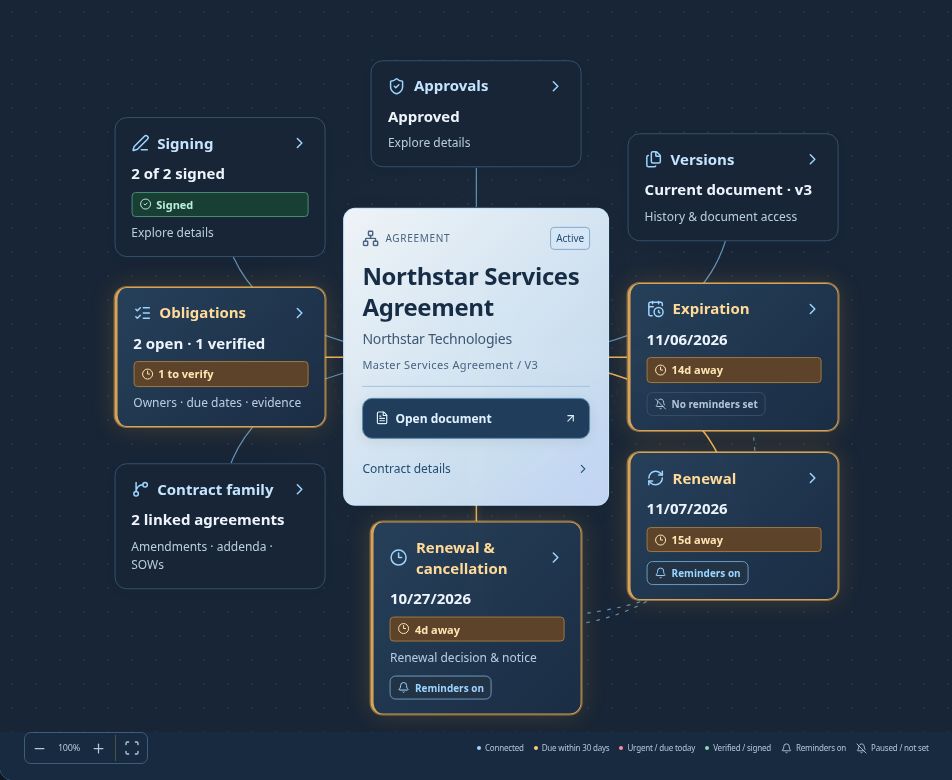
Select a tile to explore its details. Fictional Northstar agreement · Demo timeline: October 23, 2026
KNOW WHAT TO DO NEXT
AGREEMENT PRICING
Build a pricing schedule, reuse saved items, and include the details in a draft Word agreement.
Explore agreement pricing →A CLEARER WAY TO BUILD
YOUR CONTRACTS ARE READY. SO ARE WE.
BATCH IMPORT BRING YOUR WHOLE LIBRARYYour agreements already exist. Your contract workspace shouldn’t take weeks to catch up.
Bring PDF and Word agreements into your contract repository, from drafts to signed contracts and historical records. Our contract management software proposes contract types, dates, amounts, and obligations for you to review beside the originals.
Import your PDF and Word agreements, including signed contracts. Keep importing as your library grows, with no limit on the number of imports. Your plan determines total contract capacity.
Identify types, pull out dates and terms, and surface obligations with their source wording.
Confirm the stage and extracted details, check suggested links and findings, then choose the right review route or reminder plan.
IMPORT & ORGANIZE
“Saved · needs review” is part of Contracts saved, not an additional or failed import.
Processing has finished. Open a saved contract below to review its details, or choose New import.
Product import overview · sample batch shown. Review extracted details before relying on them.
PDF & Word today. TIFF/TIF support is planned for older scanned agreements.
Forward PDF or Word contracts to your ContraxAware email address. We’ll extract the key details for you to review.
THE PRODUCT. IN ONE MINUTE.
Follow one agreement through the real product.
See import and extraction, Word redlining, approvals, signing, and the contract map in action.
Real product screens with one fictional Northstar agreement shown at different stages. Edited for clarity. Includes music and on-screen explanations.
Try it with your contractsEvery contract. All connected. A real look inside ContraxAware, following one fictional Northstar agreement from draft to follow-through.
Import, extract, review. Import PDF and Word agreements. Keep the original beside the key details, then review the extracted values and their source links.
Review the words. See a real tracked change increasing the draft’s insurance limit from USD 1,000,000 to USD 2,000,000, with the reviewer’s discussion beside it. This is an unsigned draft.
Route the decision. Choose internal approvers or external reviewers, set who must approve, and use sequential or parallel steps.
Keep signing connected. A later, signed snapshot of the Northstar example shows signing status and the recorded signed original attached to the agreement.
Explore Contract Map. Select real map tiles to reveal related agreements and obligations. The details change with the selection.
Act before renewal. The notice deadline is separate from the renewal date. In this example, notice is due by 10/27/2026 and the next term starts 11/07/2026. The map’s demonstration timeline is fixed at 10/23/2026.
Follow through. See the obligation owner, deadline, and exact saved source clause together.
Try your own contract. Start a 14-day ContraxAware trial at contraxaware.com. Bring your agreements and explore the whole product. No credit card required.
ONE CONNECTED CONTRACT LIFECYCLE
Real product screens.
Clear next steps throughout the lifecycle.
Import a PDF or Word agreement and let AI extract dates, financial terms, and obligations for review. Or start from a Word template or department request. Keep edits, versions, and comments with the agreement.
Try it with your contracts ↗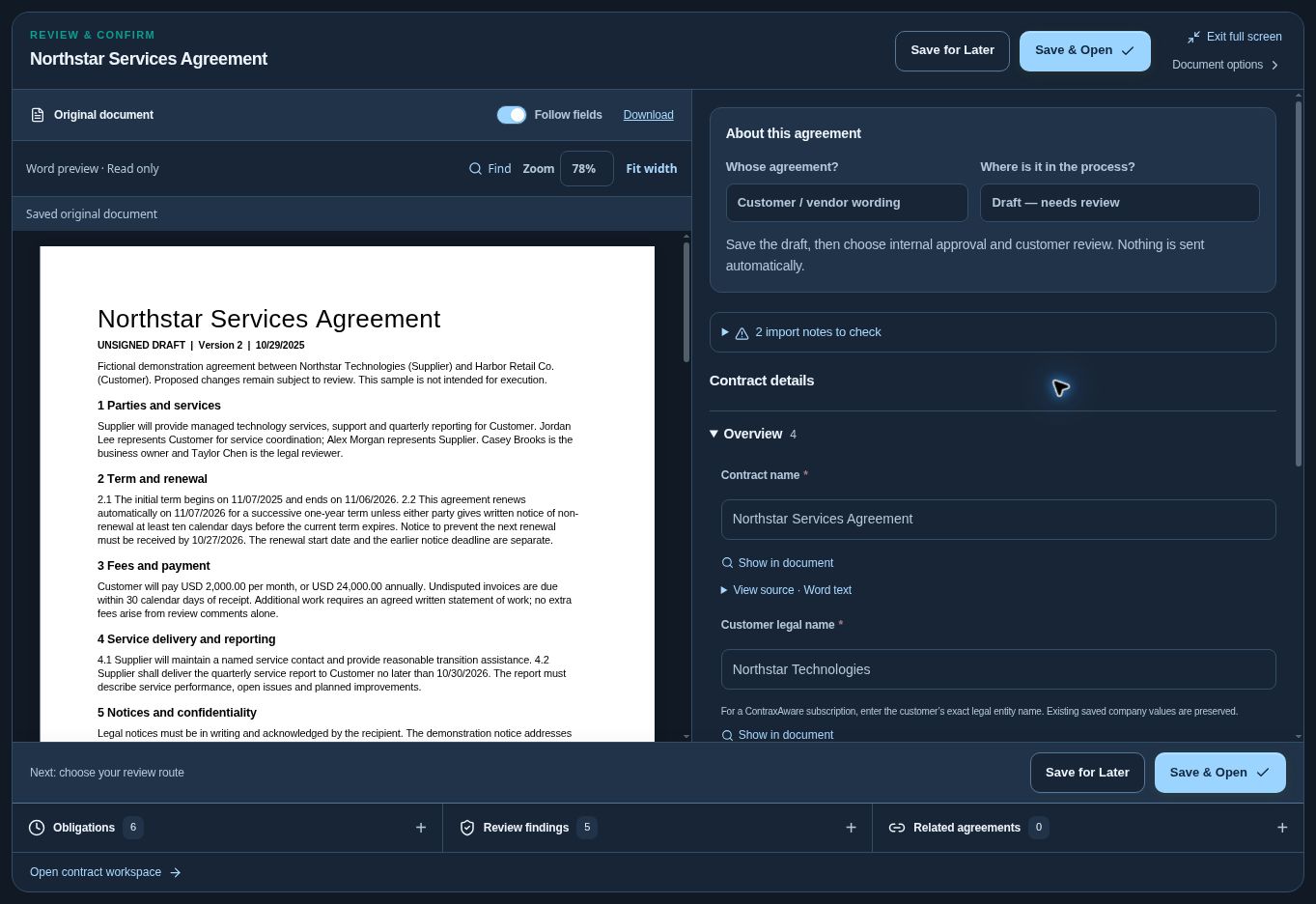
Northstar Services Agreement · Unsigned draft, extracted fields, source links, and obligations ready to review.
YOUR STANDARDS. A SMARTER SECOND LOOK.
Make AI contract review part of everyday contract management. Set your preferred terms once, then examine flagged departures from the selected playbook and the source citations behind each finding.
Commercial general liability coverage of at least USD 2,000,000.
“Supplier shall maintain commercial general liability insurance of at least USD 1,000,000.”
Northstar Services Agreement · § 6.1 · draft wordingSupplier shall maintain commercial general liability insurance of at least USD 2,000,000.
Illustrative playbook check on the Northstar draft. Suggested wording requires human review.
REVIEW THE WORDING. KEEP THE ORIGINAL.
Redline unsigned Word drafts, compare returned versions, and choose whether reviewers can view, comment, or suggest changes.

An unsigned draft with a proposed insurance change. Later lifecycle examples show the same fictional agreement after approval and signing.
LOOK BEYOND THE NEXT REMINDER.
Compare proposed dates and amounts before preparing a separate amendment. Keep the original agreement intact.
Review a proposal, invoice, or pasted sales commitments against the agreement, with source wording behind the findings.
Assign obligations, attach the clause and completion evidence, and distinguish reported work from verified completion.
Explore obligationsTHE AGREEMENT IS ONLY THE BEGINNING.
Connect fields, conditions, approvals, signatures, and reminders in a visual workflow. Describe a process to AI, then refine and test it before activation. Contract lifecycle management (CLM) software connects each step to the people doing the work.
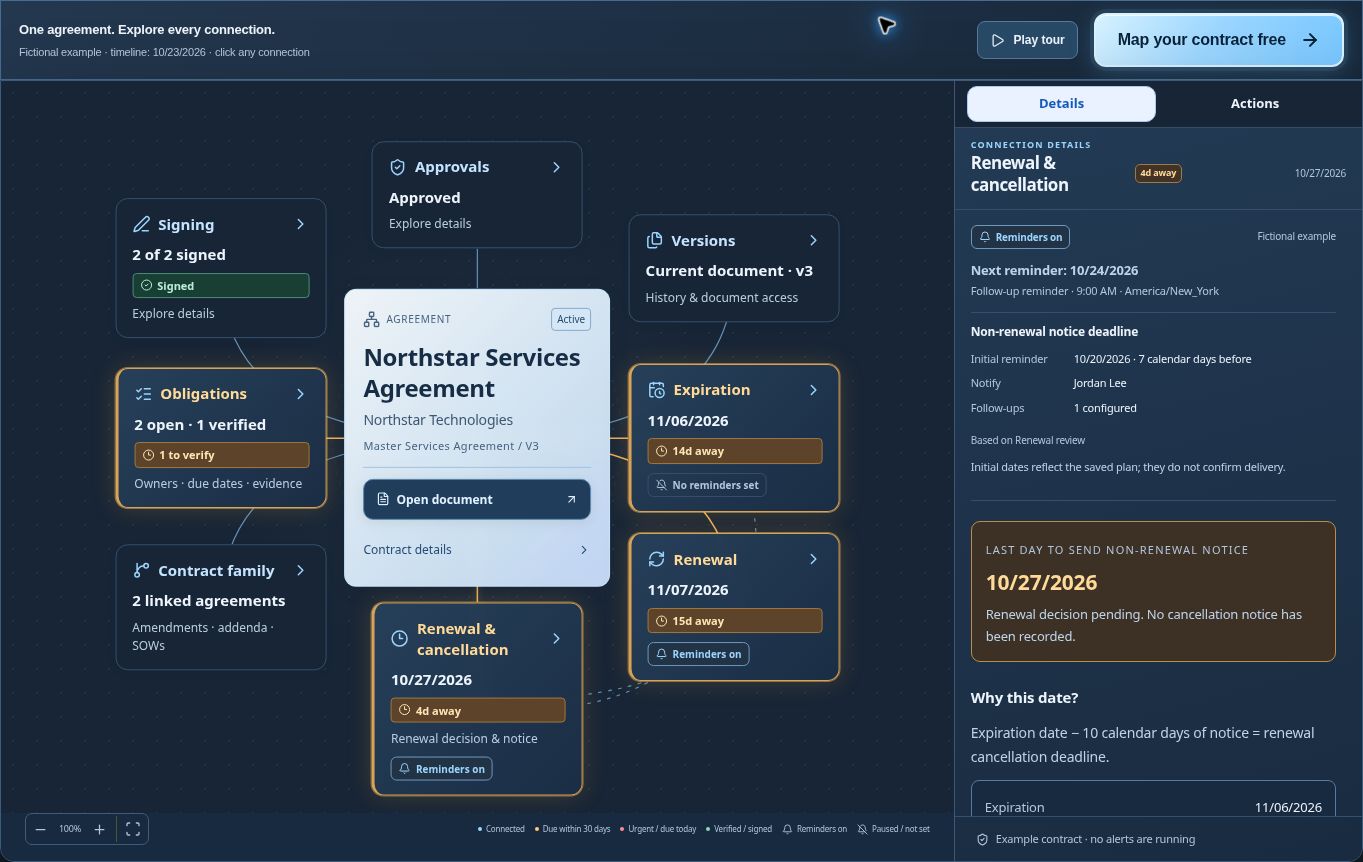 View full screenshot ↗
See the renewal notice deadline alongside the agreement, with the calculation behind the date.
THE BIG PICTURE, WITHOUT THE HUNT.
Keep contract management connected as an agreement changes. Link amendments, addenda, and statements of work to the original, with their own documents, approvals, and signatures.
ONE PLACE TO ASK. ONE PLACE TO ACT.
Give colleagues a simple portal to request an agreement and follow its progress. Your contract management system brings the request, document, and responsible team together so the next step is clear.
Start with your agreement, or ask the contract team to prepare one.
Submitted · With the contract team
Illustrative request flow. Portal visibility follows the access assigned in your workspace.
SIMPLE TO START. ROOM TO GO DEEPER.
See what needs a decision, who owns it, and when to act. Start with existing contracts and keep the next step visible.
Clear deadlines · A focused daily viewOrganize imports, reuse templates and approval flows, and track renewals, obligations, insurance, and related agreements.
Saved views · Reusable defaults · Follow-throughCompare versions, redline Word drafts, review company playbooks, and control reviewer access. Keep the wording and decisions connected.
Source citations · Version-bound approvalImport selected Google Drive files and export completed signed PDFs. Connect Gmail for contract correspondence and send selected dates to Google Calendar.
Explore importsA FEW THINGS WORTH KNOWING.
Yes. Import your DOCX and PDF agreements, including signed contracts, and keep adding more as your library grows. There is no limit on the number of imports; your plan determines the total contract volume you can store.
Bring existing agreements into one workspace instead of entering them one by one. Choose automatic contract-type detection or a specific type, use alert templates, and let the batch process extract details and surface obligations. Track progress, check duplicates, and handle exceptions in a focused review queue. Processing time depends on the number, length, and readability of your documents and the review they need.
Yes. Customize playbooks with your preferred positions, approved clauses, fallback wording, and escalation rules. You can start from example rules or ask AI to suggest a draft from a reference agreement, then review and approve it.
Yes. Contract Portal gives colleagues a guided way to request company paper or submit customer and vendor agreements, look up available contracts, and follow their requests. The contract team handles review, approvals, and signing.
Yes. Invite your customer to their private signing link. They can verify their invited email, review the agreement, and sign without creating a ContraxAware account. The completed copy and signing history stay with the contract. Explore the agreement lifecycle.
Choose the people who need to approve the agreement, then prepare the approved version for signature. Signers can sign in order or at the same time, and your team can review the completed agreement before activation. Request a demo to see the process for your team.
The completed agreement stays with its signing history. Track renewals, notice deadlines, and obligations. Build reminders around events such as signing or actual payment, and keep related agreements and supporting files together.
Yes. Share a version-specific review with invited external people. Choose view-only, comments, or suggested redlines for an unsigned Word draft. Email verification lets an invited reviewer enter without joining the workspace. PDFs support viewing, comments, and approval; Word drafts support tracked changes.
Approvals belong to the reviewed version. Adopted redlines create a new version that needs fresh approval. Your team reviews the final copy before requesting signatures, and signed originals remain preserved.
Yes. Record a historical outcome, actual end date, and reason. Historical agreements remain available, while normal searches and contract views leave them out unless you choose Include historical contracts.
Start a 14-day trial with no credit card. Sign up with Google or email, set up your company, and bring in an agreement to try the process with your own work.
YOUR NEXT AGREEMENT DESERVES A CLEARER PATH.