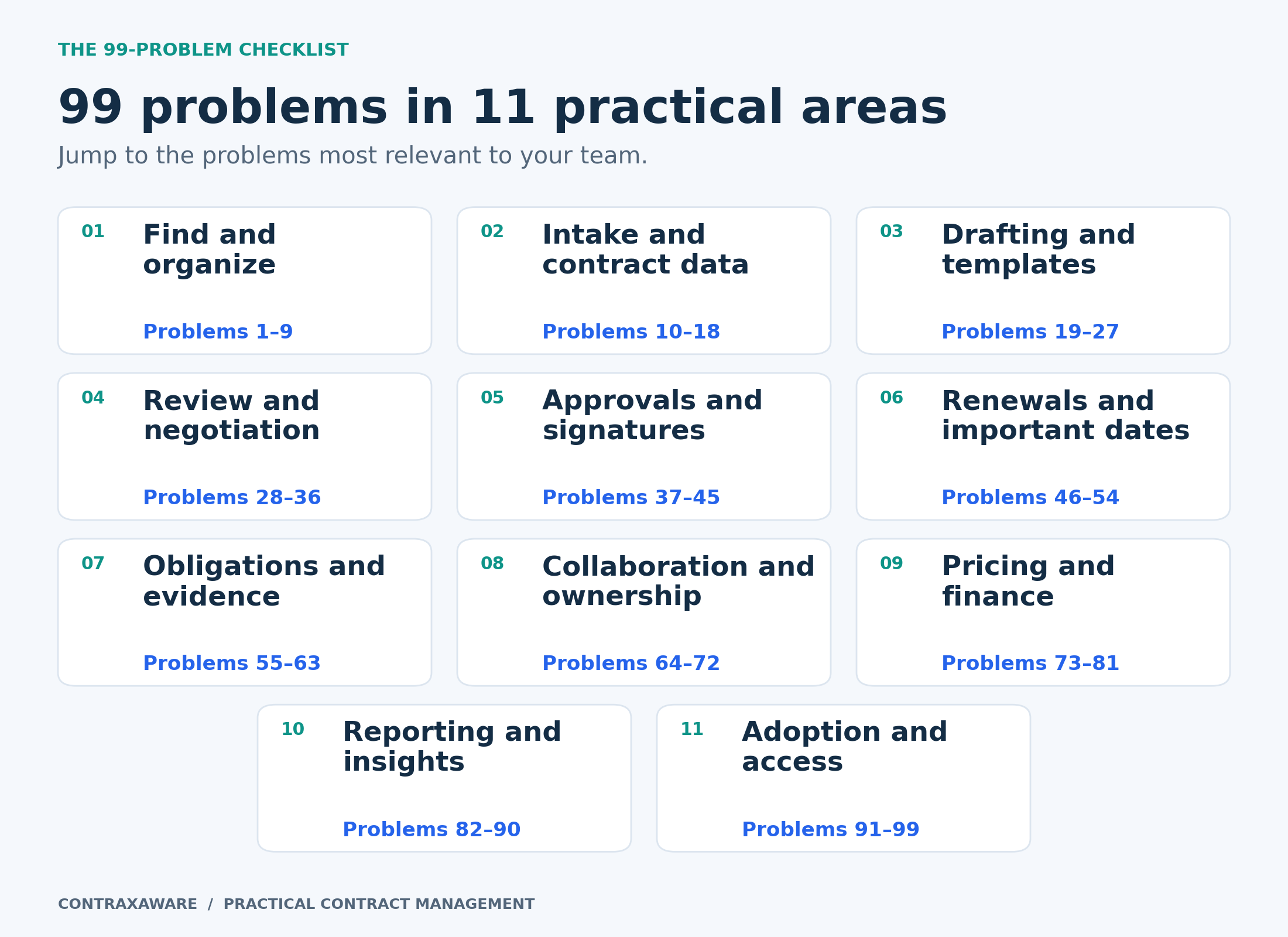
Start with the problems that interrupt your work
Your inbox is full. A vendor needs an answer. Finance wants the renewal numbers. Someone in sales is asking whether the agreement has been signed. Then comes the question that should have been easy: Where is the contract?
With a nod to Jay-Z’s familiar song title, here are 99 contract management problems worth taking off your team’s list. They range from missing documents and confusing drafts to forgotten obligations, crowded renewal calendars, and difficult handoffs. Each entry explains how a contract management system can help and how to approach the task in ContraxAware.
This is a working guide for administrators, legal and procurement teams, finance leaders, and anyone who finds themselves responsible for an agreement after the signing celebration is over. You do not need to tackle all 99 at once. Start with the problems that regularly interrupt your work or create the most consequential uncertainty.
Every entry includes a relevant product page or professional resource. Current capabilities, configurable processes, and planned features are identified where the distinction matters. The software helps organize the information and the work; your people remain responsible for the decisions and for checking the underlying agreement.
Use this guide as a working checklist
- Choose your three most troublesome problems. For each, name the owner, the desired outcome, and one representative agreement you can use to test the process.
- Read the general approach first, then examine the ContraxAware workflow. Follow the linked source when you need product details, professional guidance, or a clearly described alternative.
- Use the screenshots and video to understand the interface. They show genuine product screens with demonstration data. The charts and planning dates are explicitly illustrative, not customer performance results.
See the connected workflow
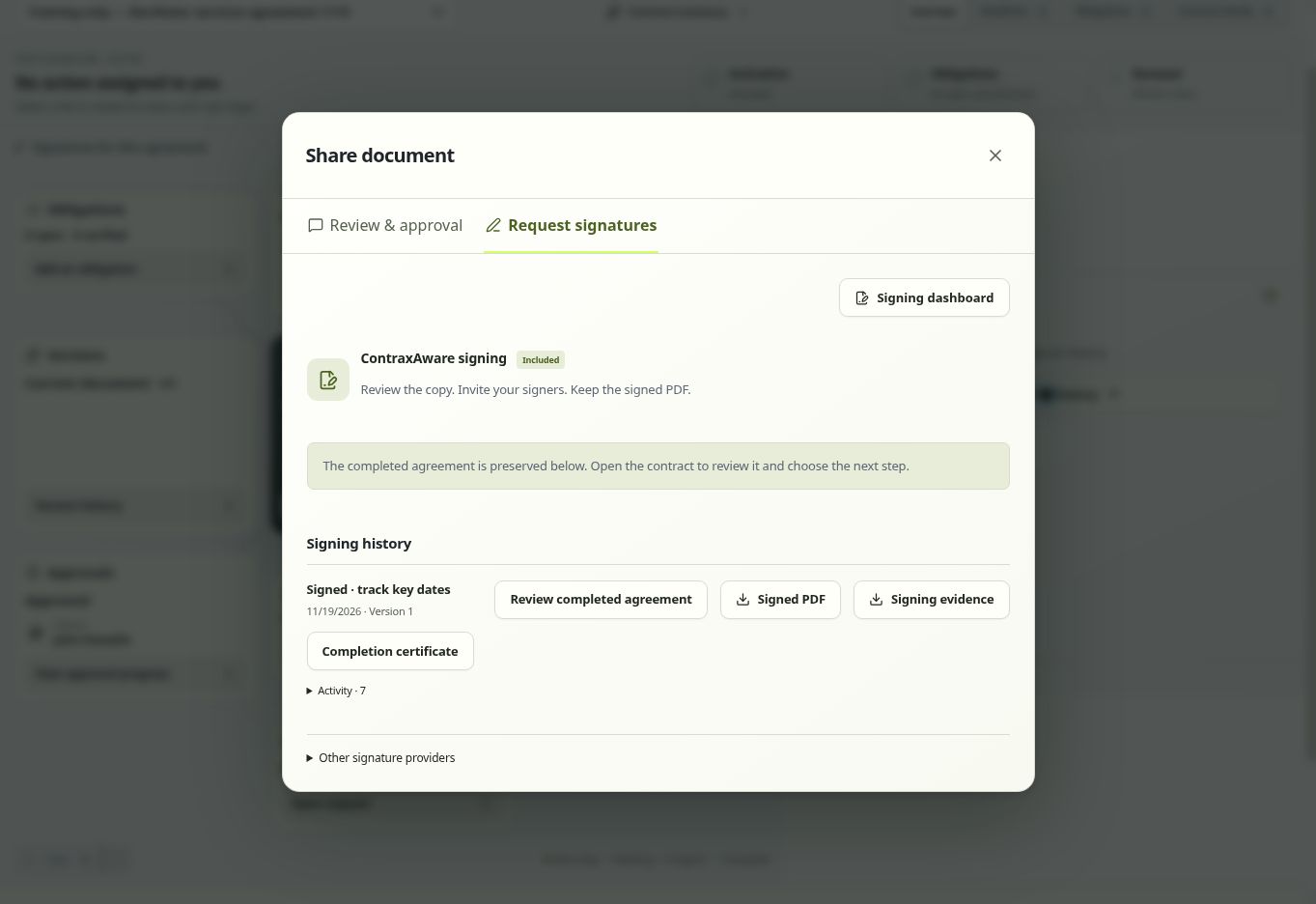
A 78-second captioned visual tour using 7 genuine product captures: import review, document review, approval setup, completed signing history, renewal planning, obligations, and Contract Map.
Silent edited visual tour with on-screen text and English captions. Labeled fictional examples show separate records and workflow states, not one uninterrupted live transaction.
Read the video transcript
78-second silent visual tour · genuine product screens · fictional examples
00:00:00–00:00:06
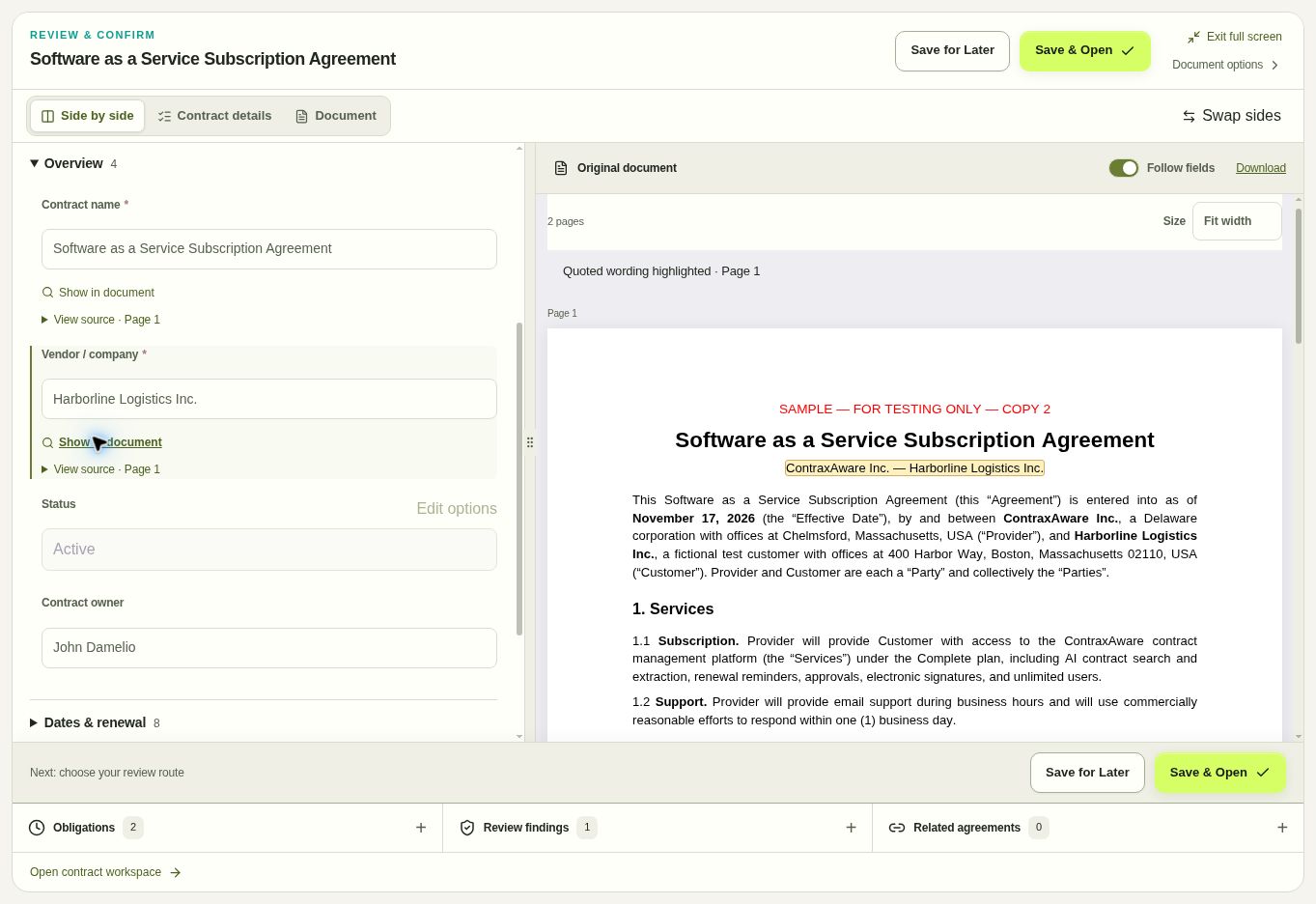
99 Problems and Contract Management Is Not One of Them. A visual tour of real product screens with fictional examples.
00:00:06–00:00:15
Check the source. Keep proposed contract details beside the original wording. Confirm the source before using a field. Harborline Saas: Fictional Sample.
00:00:15–00:00:24
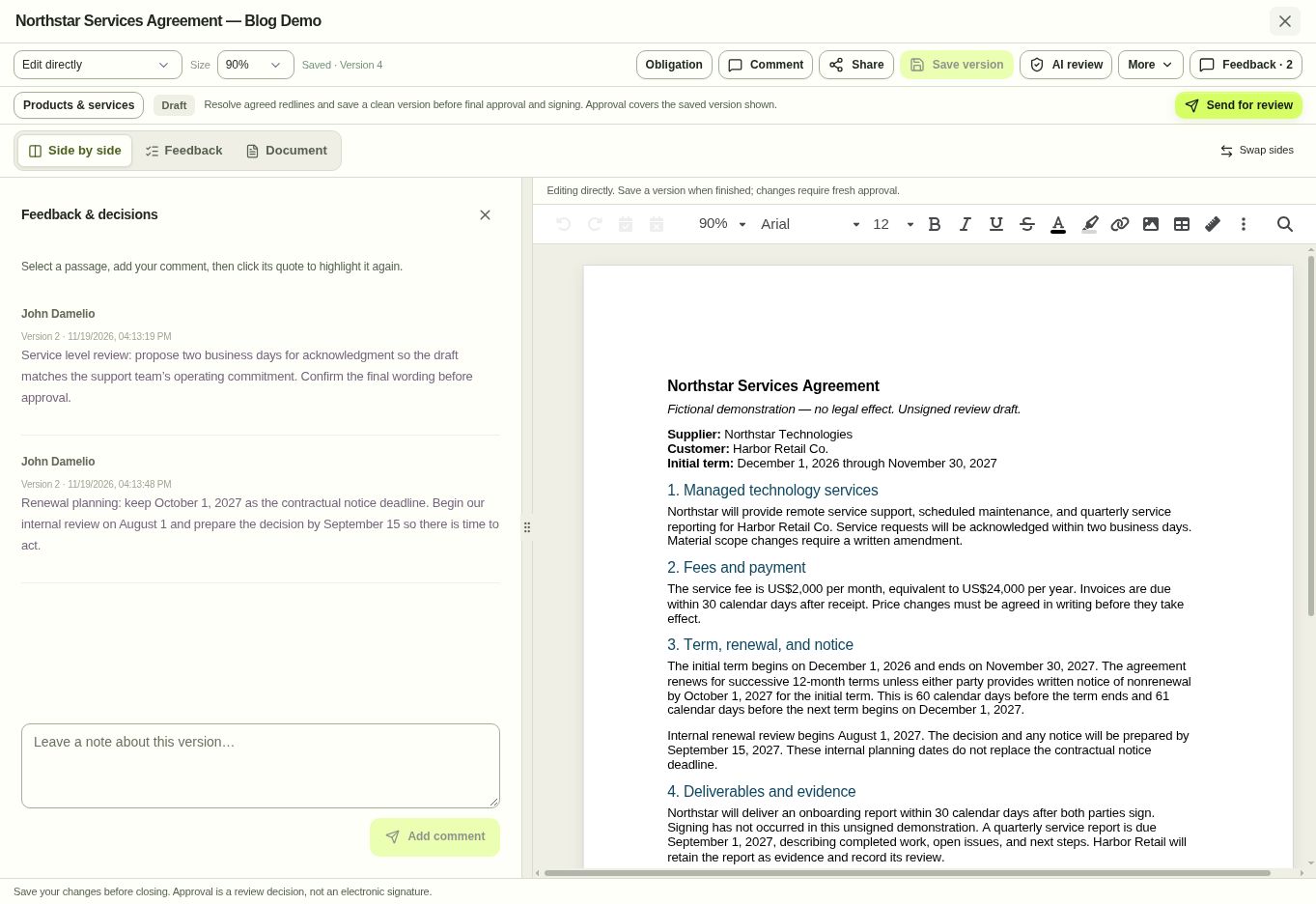
Keep the review context. Read saved service-level and renewal comments beside the current clean draft. Confirm the saved version before requesting approval. Northstar: Unsigned Draft V4.
00:00:24–00:00:34
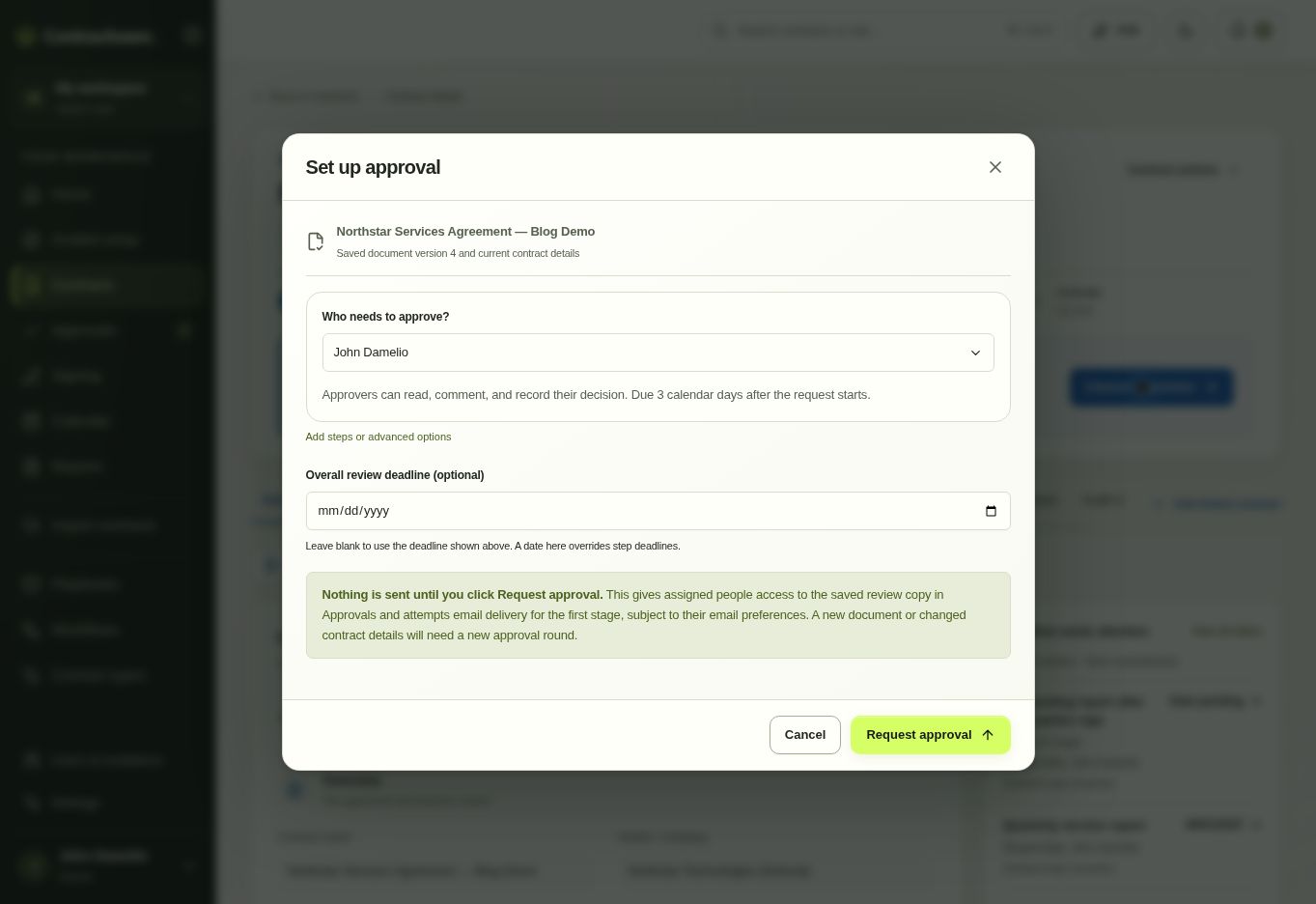
Name the reviewer. Connect the reviewer and approval request to a saved document version. This setup has not been submitted. Northstar: Approval Setup.
00:00:34–00:00:43
Keep the signed record. Return to the completed agreement, signing evidence, and completion certificate in the signing history. Northstar: Separate Training Record.
00:00:43–00:00:53
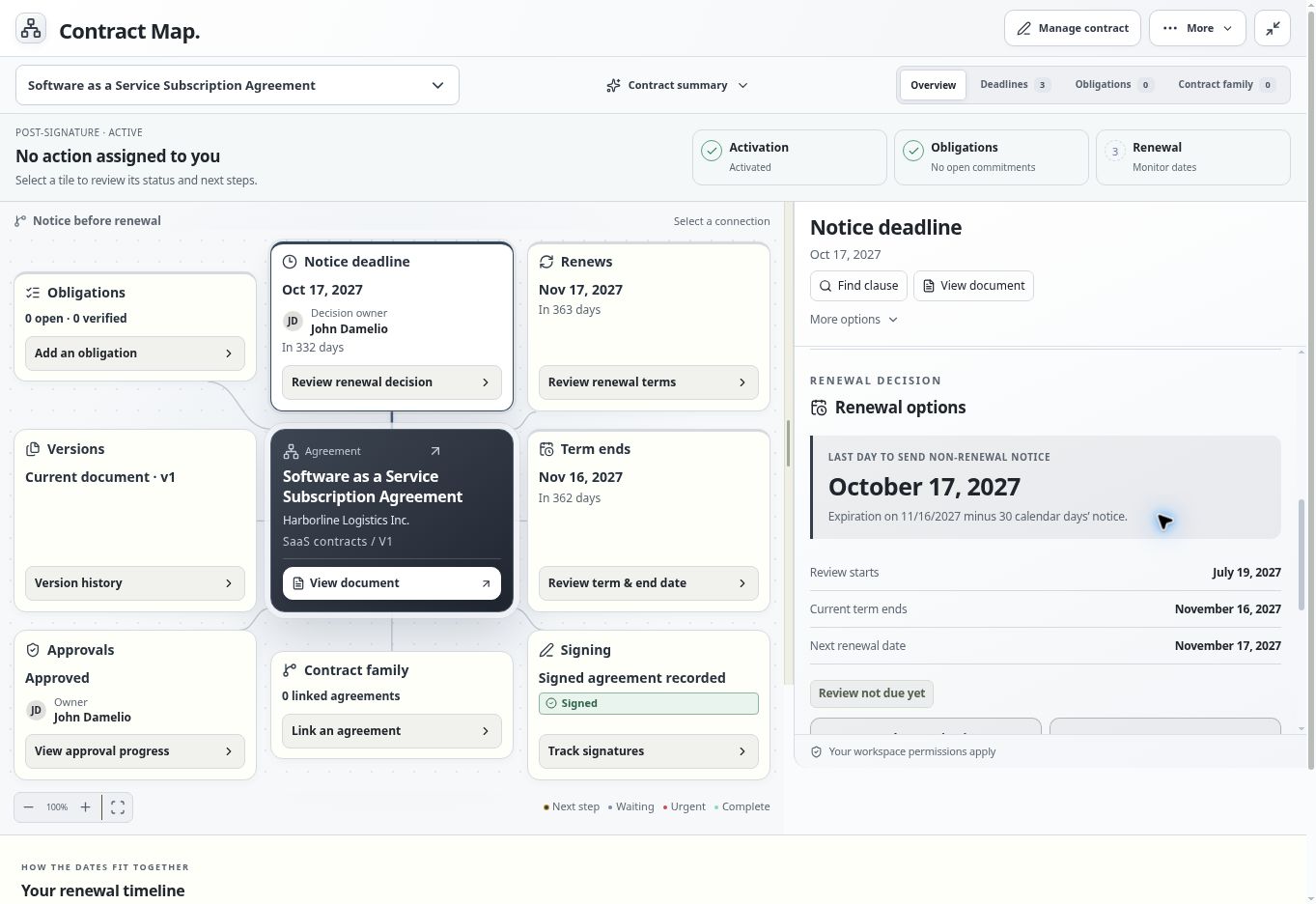
Act before renewal. Read the notice deadline, its calculation, and the renewal timeline together. A recorded decision does not send notice. Harborline Saas: Fictional Sample.
00:00:53–00:01:02
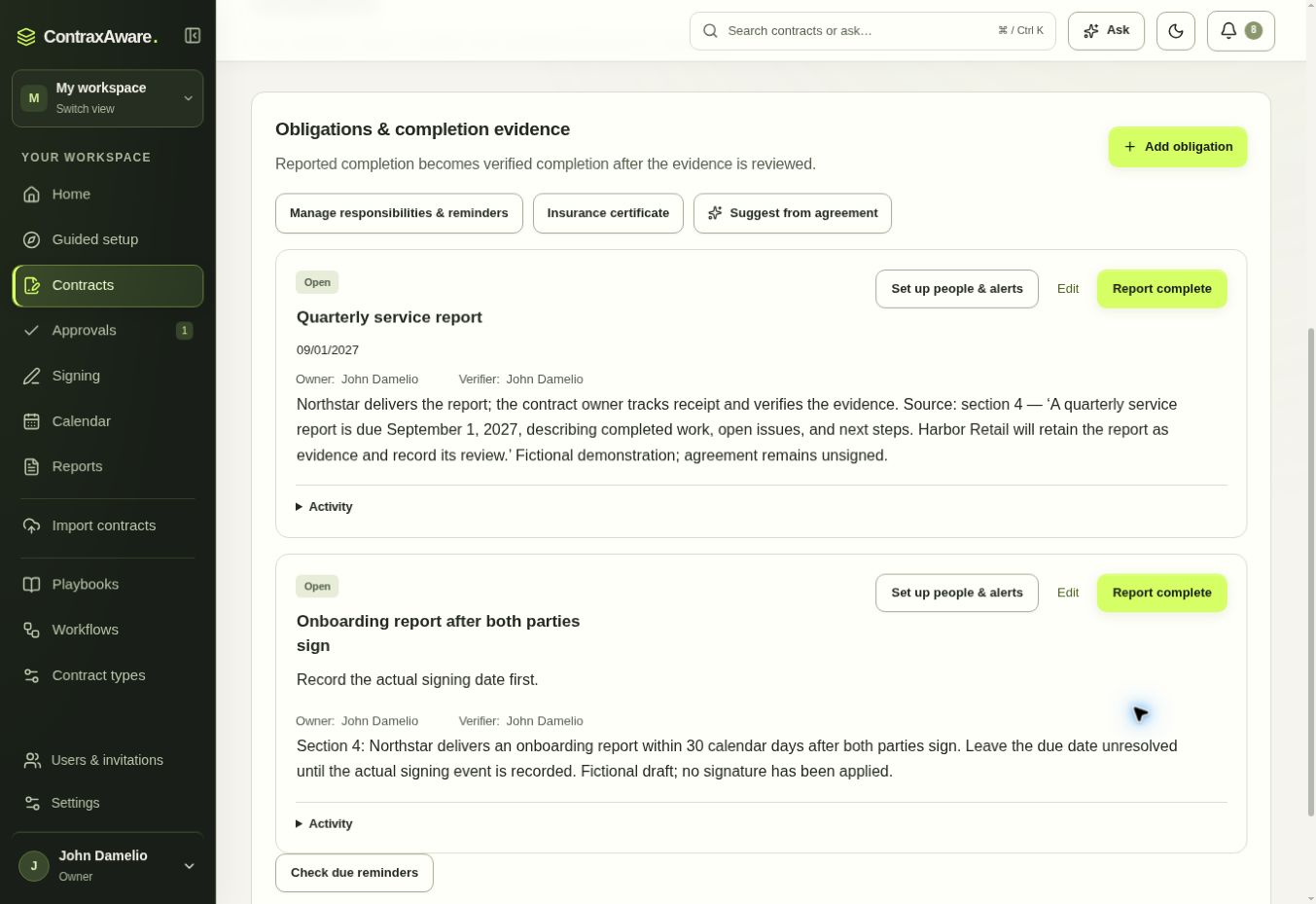
Make the next step clear. A fixed report date and a signing-dependent commitment show why the source, owner, and trigger belong together. Northstar: Two Open Obligations.
00:01:02–00:01:12
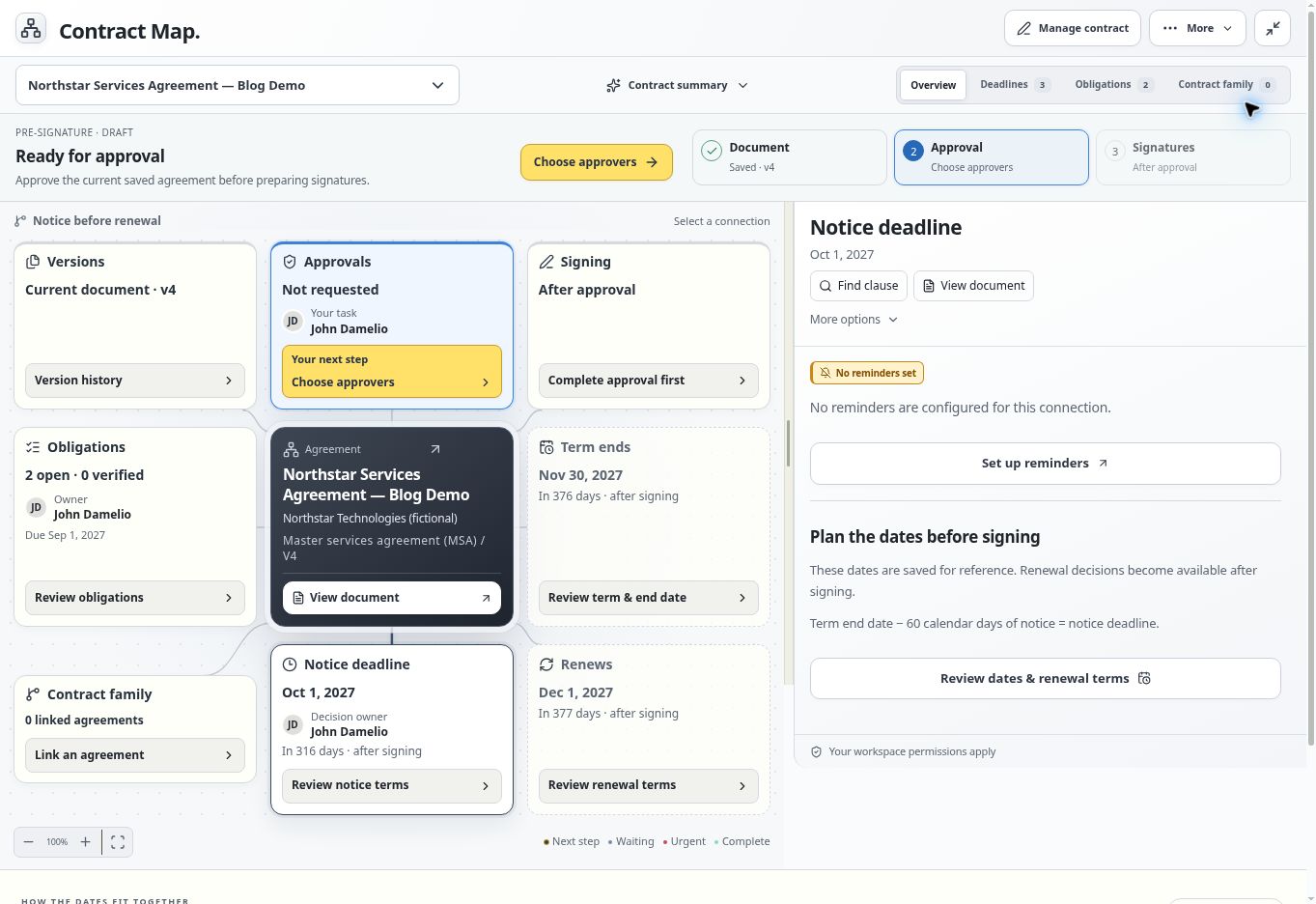
See the whole agreement. Connect the document, approval and signature steps, open obligations, and proposed dates in one contract map. Northstar: Unsigned Draft.
00:01:12–00:01:18
Choose three problems. Build a clearer process. Read the complete 99-problem guide at contraxaware.com.
Problems 1–9
Finding and organizing agreements
Start with a basic test: can someone who did not negotiate the agreement find the correct documents and understand how they fit together? These first nine problems are about making that possible.
01The contract is somewhere in somebody’s inbox
How a system helps. Give agreements a shared, searchable home with consistent record names and the original documents attached. Collect the active agreements first, identify missing files, and agree who will maintain each record. A repository becomes useful when another person can navigate it without asking its creator for help.
In ContraxAware. Import existing PDF and Word agreements into ContraxAware, keep the original attached, and review the proposed details before using the record. Start with one department’s active contracts.
02You remember the wording but not the filename
How a system helps. Search available contract text for a phrase, obligation, product, or counterparty. Open the matching passage and read its context before treating a search result as an answer. Search quality depends on the text the system can actually read, especially with older scans.
In ContraxAware. Use ContraxAware’s contract search to locate agreements and relevant wording. Check the saved document behind a result instead of relying on a filename or a short summary.
03You found the agreement but missed the amendment
How a system helps. Connect amendments to their parent agreement and identify the terms each one changes. Keep the signed originals and a clear record of which document supports the current amount, date, or obligation. Otherwise, an organized folder can still give the team an outdated answer.
In ContraxAware. Link amendments and addenda to the parent in ContraxAware. Each related agreement retains its own record and history, and the relationship is available through Contract Map.
04The file says FINAL but nobody knows whether it is signed
How a system helps. Separate draft status from execution status. A filename is not evidence that every required party signed. Make the executed copy easy to identify and flag incomplete signature sets for follow-up before operations starts work based on an unfinished document.
In ContraxAware. ContraxAware keeps signing progress and the completed agreement with its record. For imported contracts, review the document and choose its actual status instead of assuming import means execution.
05One supplier appears under several different names
Configure and review
How a system helps. Use consistent counterparty information, while preserving the distinction between a legal entity and a trading name. A good process also checks subsidiaries and abbreviations before combining records. The objective is to find related work without accidentally treating separate organizations as the same party.
In ContraxAware. Record the verified legal entity and familiar trading name in ContraxAware company details and custom fields. Review potential matches manually before treating records as the same counterparty.
06The same contract was uploaded three times
How a system helps. Review potential duplicates before they generate conflicting owners, dates, or reports. Compare the actual documents and their associated history before consolidating anything. Similar filenames can describe different amendments, while different filenames can hide identical copies of the same agreement.
In ContraxAware. ContraxAware flags potential duplicates during import for review. Resolve the flagged records deliberately and preserve relevant attachments; duplicate detection supports the decision rather than making it final.
07The signed agreement refers to an attachment nobody received
How a system helps. Keep schedules, statements of requirements, pricing exhibits, and supporting files with the agreement. Record missing attachments as follow-up work. Before relying on a clause that refers elsewhere, confirm that the referenced document exists and is the correct version for that contract.
In ContraxAware. Keep supporting documents with the ContraxAware record and use a linked agreement when an exhibit has its own terms or history. Assign the missing-document follow-up to a responsible person.
08Nobody can tell which statement of work belongs to which master agreement
How a system helps. Represent the relationship between the master agreement and its statements of work, orders, and addenda. This lets reviewers examine the correct document family and its order-of-precedence language. Matching vendor names alone does not establish which terms apply to a particular project.
In ContraxAware. ContraxAware supports parent and related agreement records. Contract Map provides a way to follow those connections while keeping the individual documents available for inspection.
09The filing system only makes sense to the person who built it
How a system helps. Organize contracts around fields that colleagues understand: agreement type, department, counterparty, owner, and stage. Let teams use different views of the same underlying records. A procurement user and a finance user should not need separate, conflicting filing systems to find relevant work.
In ContraxAware. Configure the columns, filters, sorting, and grouping in ContraxAware’s contract register. Save useful portfolio views so colleagues can return to a familiar way of working.
Problems 10–18
Intake and reliable contract data
A contract process becomes harder when the request arrives without context or the record contains an unverified assumption. Capture the right information early, and make uncertainty visible while someone can still resolve it.
10New requests arrive through six different channels
How a system helps. Create a clear intake route that captures the requester, transaction, business purpose, and supporting documents together. Explain which requests belong there and who monitors the queue. A shared starting point helps the team see new work before someone starts chasing an email attachment.
In ContraxAware. ContraxAware’s Contract Portal gives colleagues a guided way to request an agreement or submit incoming wording. Capture the agreement type and business context with the request.
11The reviewer has to chase basic information before starting
How a system helps. Use forms tailored to the agreement type, with clear labels and instructions. Ask for information that changes the next step, such as the contracting entity, services, budget owner, and target date. Review the form with real requesters so required fields do not become another source of confusion.
In ContraxAware. Customize ContraxAware’s contract forms and fields for each type of agreement. Test a sample request with a department user to check that the information reaches the contract team clearly.
12Every request is urgent and none explains why
Configure and review
How a system helps. Capture the requested completion date and the event driving it: a service launch, expiring agreement, customer commitment, or purchasing deadline. Give the reviewer enough context to prioritize. An urgency label alone cannot explain the consequences of delay or whether another dependency is already late.
In ContraxAware. Add fields for the business deadline, reason, and priority, then use ContraxAware’s filtered contract views to discuss the queue. Assign priorities according to the business impact and work required.
13People keep typing the same details into different places
How a system helps. Carry verified request information into the working record and draft where the system supports it. Define which value is authoritative and who can change it. Reusing the wrong value efficiently is still an error, so review critical details before they travel further through the workflow.
In ContraxAware. ContraxAware connects intake forms with Word merge templates. Enter the transaction details once, then review the generated wording and contract record before circulation.
14A contract value has no clear meaning
How a system helps. Distinguish total commitment, annual cost, recurring charge, one-time fees, and currency. Use labels that make those definitions explicit. When different teams enter different interpretations of “contract value,” portfolio totals can look precise while comparing fundamentally different amounts.
In ContraxAware. Use custom contract fields and the pricing schedule to keep commercial amounts and billing frequency clear. Agree your reporting definitions before combining the values in a portfolio review.
15An AI-extracted date was accepted without anyone checking it
How a system helps. Treat extraction as a first pass. Verify the date against its source, identify the event it describes, and check for amendments or exceptions. A perfectly recognized date can still be assigned to the wrong field, such as a notice deadline being mistaken for an expiration date.
In ContraxAware. ContraxAware presents proposed contract details for review alongside the source document. Confirm the important fields and correct uncertain results before configuring reminders or obligations.
16Nobody can explain where a recorded obligation came from
How a system helps. Keep a source reference close to important contract information. Record the clause, document version, and relevant context where possible. A colleague should be able to check the requirement without repeating the entire review or assuming that a short task title captures every condition.
In ContraxAware. Create or link an obligation from selected Word or searchable PDF text in ContraxAware. Retain the source wording and location with the obligation for follow-up.
17An import error quietly leaves part of the portfolio unfinished
How a system helps. Make processing exceptions visible and assign someone to resolve them. Distinguish successfully imported documents from unreadable files, incomplete records, and items awaiting review. A migration is complete when the resulting records are usable, not simply when the upload progress bar reaches the end.
In ContraxAware. ContraxAware’s import queue shows progress and exceptions for review. Resolve failed items and inspect the saved records before treating the batch as ready for ongoing management.
18The archive contains TIFF scans the system cannot import directly
Planned capability
How a system helps. Evaluate the actual formats in your archive before selecting an import process. Direct image upload, OCR indexing, document viewing, and field extraction are separate capabilities. Test representative scans, including poor copies, rather than assuming every supported file type produces a complete, accurate record.
In ContraxAware. ContraxAware currently supports PDF and Word imports; TIFF/TIF support is planned with no release date stated. ContractSafe documents direct TIFF/TIF upload and OCR indexing, with viewer and email-import limitations.
Bulk contract import and data review · ContractSafe TIFF upload and OCR support
Problems 19–27
Drafting and templates
Good templates remove repetitive setup while leaving room for the facts of the transaction. The goal is a complete draft that the right people can review without first repairing avoidable inconsistencies.
19Someone started with last year’s template
How a system helps. Give requesters an obvious source for the current approved template. Retire superseded versions from everyday selection and assign responsibility for updates. A controlled starting point helps prevent old notice periods, outdated company details, or abandoned commercial language from returning in a new agreement.
In ContraxAware. Maintain reusable Word templates by contract type in ContraxAware. Put a named administrator in charge of keeping the selected template current and checking newly generated drafts.
20The wrong agreement was chosen for the transaction
How a system helps. Guide users by what they are doing and which role the organization plays. A buyer-side services agreement may need different wording from a customer subscription. Include enough explanation to help a non-lawyer choose, and direct uncertain cases to a reviewer before drafting begins.
In ContraxAware. Use ContraxAware contract types and their connected forms and templates to provide clear starting points. Review the setup with the departments that will request those agreements.
21The previous customer’s details survive in the new draft
How a system helps. Start from a controlled template and replace transaction-specific content deliberately. Check free-text sections, exhibits, and signature details for information carried over from an earlier agreement. Merge fields help with structured values, while copied prose still needs a careful review before another customer receives the draft.
In ContraxAware. Start with the contract type’s Word template and verified merge values in ContraxAware. Review the finished document and attachments, including wording entered outside the connected fields.
22The drafter does not know which clause alternative is acceptable
How a system helps. Make approved positions and fallback language available with guidance on when each applies. Record who can approve an exception. A useful clause resource explains the decision as well as the wording, so colleagues can recognize when their transaction needs additional review.
In ContraxAware. ContraxAware playbooks can hold preferred positions, fallback wording, and escalation guidance. The reviewer still selects suitable language and checks how it interacts with the rest of the agreement.
AI contract review and playbooks · WorldCC Contracting Principles
23Legal rewrites the same routine language for every agreement
How a system helps. Maintain reusable language for recurring issues, with clear ownership and review dates. Reuse should start a review efficiently while allowing transaction-specific changes. A clause that worked in one unusual negotiation should not automatically become the organization’s standard for all future contracts.
In ContraxAware. Build reusable Word templates and company playbooks in ContraxAware. When AI proposes rules from a reference agreement, review them before accepting them as company standards.
24Copying text from an old document breaks the formatting
How a system helps. Use consistent document styles and a suitable editing environment. Check headings, numbering, defined terms, cross-references, and exhibits after substantive edits. Formatting can affect whether readers can follow the agreement, so the final preview belongs in the review process rather than being left to chance.
In ContraxAware. ContraxAware provides a familiar Word-style editor for unsigned Word drafts. Bring a representative document into your evaluation and check its formatting through editing, saving, and review.
25A new draft is circulated with the wrong set of exhibits
Process checkpoint
How a system helps. Create a document-package checklist for the agreement type. Confirm that each referenced exhibit is included and that names, dates, and numbering match the main agreement. A missing schedule may leave the other party reviewing incomplete pricing, scope, service levels, or implementation requirements.
In ContraxAware. Keep supporting files with the ContraxAware agreement and make an approver responsible for checking the complete document package before it moves forward.
26The contract still contains INSERT COMPANY NAME
Process checkpoint
How a system helps. Review unresolved placeholders before circulation. A system with preflight checks can flag blank values, while a consistent final preview catches wording that automated checks miss. Check optional sections too: deleting a field without adjusting the surrounding sentence can leave an equally confusing draft.
In ContraxAware. Review entered values in ContraxAware’s connected form and the resulting Word draft. Check remaining placeholders, optional sections, and surrounding wording before sharing the document.
27The pricing table and the contract summary disagree
How a system helps. Build pricing from reviewed inputs and reconcile quantities, unit prices, discounts, tax, and billing periods before approval. Compare the structured schedule with narrative payment terms and attached proposals. The same numbers can describe different commitments when one section uses monthly amounts and another uses annual totals.
In ContraxAware. ContraxAware can save pricing schedules and include them in a draft Word agreement. Preview the resulting document and confirm that its narrative terms agree with the schedule.
Problems 28–36
Review and negotiation
A review should make the proposed changes and remaining decisions easier to understand. Keep the wording, the discussion, and the people who can decide close together.
28The other party changed more than the price
How a system helps. Compare the returned draft with the previous version before accepting it. Review additions, deletions, and changed definitions in context. A short email saying “only a few changes” does not replace checking the document, particularly when revisions affect linked clauses or supporting schedules.
In ContraxAware. Use saved-version comparison and tracked Word redlines in ContraxAware to inspect the changes. Decide which proposed wording to adopt before moving the agreement to its next review.
29Review feedback is scattered across email threads
How a system helps. Keep comments beside the relevant wording and preserve the reviewed version. Specific comments make it easier to understand what question is being asked and which passage should change. Avoid creating a separate, disconnected discussion for every reviewer when the issue concerns the same clause.
In ContraxAware. ContraxAware supports comments alongside Word wording and PDF review. Invite the relevant people with appropriate permissions so the contract team can collect their feedback with the document.
30Nobody knows which review questions remain unresolved
Configure and review
How a system helps. Track the open issues that prevent progress, including the decision needed and its owner. Separate an unanswered business question from a requested wording change. At the next review, the team should be able to identify what is blocking agreement without rereading every historical comment.
In ContraxAware. Keep unresolved questions in the ContraxAware document discussion, record the next action and responsible reviewer, and review those questions before closing the negotiation round.
31The agreement is reviewed from the wrong side of the deal
How a system helps. A customer agreement and a supplier agreement may call for different review positions. Identify the organization’s role and select the applicable guidance before assessing the terms. Otherwise, a reviewer can flag acceptable wording or overlook an unfavorable obligation by applying a standard intended for the other side.
In ContraxAware. Select the ContraxAware playbook that matches the agreement and your organization’s role, then assess its findings against the wording. Keep buyer-side and supplier-side guidance clearly identified.
AI contract review and playbooks · WorldCC Contracting Principles
32Reviewers spend too long looking for possible exceptions
How a system helps. AI assistance can help surface wording that may depart from defined guidance. Give reviewers the supporting passage and an explanation, then let them assess the issue. The useful outcome is a more focused review queue, with uncertain results investigated rather than silently accepted.
In ContraxAware. ContraxAware compares saved contract text with a selected playbook and provides cited findings. A person checks the source and decides whether to accept, revise, or escalate.
33A short summary hides an important condition
How a system helps. Keep access to the complete clause and related definitions when using summaries or answers. Check limitations, exceptions, cross-references, and amendments. A summary that omits one condition can change the practical meaning of an otherwise accurate description of the agreement.
In ContraxAware. Use ContraxAware’s source-linked questions and review findings to return to the saved wording. Contract Lens also separates record details, matching contract text, and an AI explanation.
34Two clauses seem to promise different things
How a system helps. Search for the related provisions and review them together. Record the inconsistency, identify the decision-maker, and resolve the wording before signature. The issue may involve an exhibit, order-of-precedence clause, or amendment, so checking one isolated paragraph may not be enough.
In ContraxAware. Use ContraxAware search, related agreements, and comments to assemble the relevant wording for review. The software supports investigation; resolving the contractual effect remains a reviewer’s decision.
Contract search and source wording · WorldCC checklists and guides
35A redline was accepted and nobody remembers why
How a system helps. Keep the rationale for a material exception with the reviewed version. Record the commercial context, approval, and any conditions that made the decision acceptable. Future teams can then evaluate a renewal or dispute without assuming an unusual clause represents the organization’s normal policy.
In ContraxAware. ContraxAware retains saved versions, comments, and approval history. Use those records to explain the adopted wording and keep the relevant decision with the agreement.
36Several people need to edit the same document live
Planned capability
How a system helps. Live coediting can support a drafting session where authorized participants see one another’s changes. Evaluate how permissions, version history, comments, and final approval work in that mode. Parallel review of separate copies is a different workflow and should be assessed on its own terms.
In ContraxAware. ContraxAware currently supports parallel review of saved copies; live coediting is planned with no release date stated. For an immediate requirement, Ironclad documents real-time collaboration through its Word Online integration.
Word redlining and document comments · Ironclad editing through Word Online
Problems 37–45
Approvals and signatures
Approval, document readiness, and signature are connected but different decisions. Make it clear who is reviewing what, which version is approved, and what must happen before the agreement moves forward.
37The contract is waiting for an unidentified approver
How a system helps. Define the review roles and route the agreement to named people. Explain what each person is expected to assess, such as budget, service commitments, or legal wording. A visible stage and responsible reviewer make the next action understandable to both the contract team and the requester.
In ContraxAware. Set up ContraxAware approval stages with the appropriate participants and decision rules. Keep the review route connected to the saved agreement and its current stage.
38Independent reviews happen one after another
How a system helps. Run reviews in parallel when the decisions do not depend on one another. Keep sequential steps where an earlier decision genuinely determines what happens next. The process should reflect the transaction rather than making every agreement wait through the longest possible chain of approvals.
In ContraxAware. ContraxAware supports sequential and parallel review stages. Configure the route for the agreement and specify whether everyone, any one person, or a set number must approve.
39Approval exists only in a forwarded email
How a system helps. Record the decision with the document, including who approved and any relevant conditions. Keep the context available when the contract is prepared for signature. An email saying “looks good” may leave uncertainty about the version, scope of review, or outstanding business questions.
In ContraxAware. Use ContraxAware’s recorded approval decisions and review history. Confirm that the approval applies to the version you intend to sign and that any conditions have been addressed.
40Someone approved a version that has since changed
How a system helps. Associate approval with the reviewed wording and revisit approval when changes affect it. Preserve the earlier version so reviewers can see what changed. This prevents an old decision from being treated as permission to sign a materially different document without another assessment.
In ContraxAware. Adopted Word redlines create a new version in ContraxAware that requires fresh approval. Review the changed document through the appropriate route before preparing the signing copy.
41Nobody knows whether the signer has responded
How a system helps. Track each outstanding signing step with the agreement. Give the contract owner a clear view of the participants and current status so follow-up reaches the right person. A sent email is only one event in the process; it does not mean the agreement has been completed.
In ContraxAware. ContraxAware keeps signature requests and progress in the agreement workspace. Open the request to see the outstanding steps and retain the completed document with its record.
42The signing request reaches people in the wrong order
How a system helps. Identify the intended signers and sequence before sending. Some agreements require a particular party to sign first; others allow signatures in parallel. Make that choice explicit, and review the completed agreement before treating it as ready for the next operational step.
In ContraxAware. ContraxAware supports sequential or simultaneous signing. Set the participants and order to match the agreement, then review the completed signing outcome before activation.
43The team assumes the selected signer has authority
Process checkpoint
How a system helps. Include authority confirmation in signature preparation. The appropriate person may depend on the legal entity, transaction type, amount, or internal policy. Software can record the selection and supporting review, but the organization must decide who has authority for that particular agreement.
In ContraxAware. Use ContraxAware’s approval and signing steps to record the designated signer after internal confirmation. Do not treat an email address or a signature invitation as automatic proof of authority.
44A name or email mistake derails signature collection
How a system helps. Check signer names, roles, email addresses, and entity details before sending the request. A simple preparation checklist can catch avoidable mistakes while the document is still easy to correct. Recheck those details when someone substitutes a signer late in the process.
In ContraxAware. Review signer names and email addresses before sending the ContraxAware signature request. Invited-email verification checks access to the selected address; your team confirms it belongs to the intended signer.
45The signed copy never reaches the team responsible for delivery
How a system helps. Keep the executed agreement available to authorized colleagues and make operational handoff part of completion. Identify the owner, first obligation, and next date before everyone moves to another deal. Delivery teams need the accepted commitments and final schedules, not an earlier negotiation draft.
In ContraxAware. ContraxAware retains the completed agreement with its record. Connect the signed document to responsible people, dates, and obligations so the next team can act on it.
Problems 46–54
Renewals and important dates
The date an agreement renews is often later than the date someone must act. Build the review around the wording that creates the deadline, and give the business time to make and carry out its decision.
46An unwanted agreement renews before anyone discusses it
How a system helps. Record the notice deadline separately from the renewal date and identify who owns the decision. Start the review early enough to assess performance, consider alternatives, and complete any required notice. A calendar entry on the renewal date may arrive after the decision window has closed.
In ContraxAware. ContraxAware separates renewal, expiration, and notice dates and connects them to responsible people. Start a renewal review and record whether to renew, renegotiate, or prevent renewal.
47The reminder arrives when there is no time left to decide
How a system helps. Schedule an internal review before the contractual action deadline. Allow time for service evaluation, commercial analysis, approval, and notice preparation where required. Work backward from the verified action date using the actual lead time your organization needs, rather than one arbitrary reminder for every agreement.
In ContraxAware. Configure ContraxAware reminders around the notice deadline and an earlier review date. Use the example timeline in this article to test whether your alert plan leaves enough working time.
48A deadline was calculated from the wrong wording
How a system helps. Verify the event that starts the clock and the rules for counting time. Check the relevant amendment, notice recipient, delivery method, and any receipt requirement. Keep the calculation traceable so someone else can understand how the recorded action date was reached.
In ContraxAware. Review ContraxAware’s proposed dates against the source agreement before relying on them. Keep the relevant wording close to the record and correct the date when the verified interpretation differs.
49An amendment changes the term but the old reminders remain
How a system helps. Treat updating affected dates as part of processing an executed amendment. Identify the changed term, its effective date, and the reminders that depend on it. Preserve the previous record and the amendment so the team can explain why the current deadline differs from the original.
In ContraxAware. ContraxAware can link the amendment to its parent and preview proposed impacts. Review the executed change, then confirm the parent dates and alert plan reflect it.
50Too many important renewals land in the same month
How a system helps. Review the portfolio calendar before reminders start arriving. Group upcoming notice deadlines and decision dates to identify a busy period, then begin the more demanding reviews earlier. Capacity planning works better when the team can see the complete queue rather than one contract at a time.
In ContraxAware. Use ContraxAware’s calendar and saved portfolio views to review upcoming work. Group agreements by owner or date and assign priorities for the period ahead.
51The renewal owner is away when the deadline approaches
Configure and verify
How a system helps. Include a backup and an escalation route in the reminder plan. Decide when another person should check unresolved work and who can make the decision if the owner is unavailable. Test that arrangement before depending on it for a significant deadline.
In ContraxAware. Use assigned people and alert plans in ContraxAware, including contract-type templates where suitable. Verify the intended recipients and follow-up behavior with a sample agreement.
52An agreement without an expiration date gets a made-up deadline
How a system helps. Record the agreement’s actual term structure and the notice requirements that apply. Add an internal review date if periodic evaluation would be useful. Keep that administrative date distinct from a contractual deadline so later users do not mistake a convenience for a requirement.
In ContraxAware. ContraxAware supports ongoing management of existing agreements without inventing an end date. Use reviewed record details and a deliberate reminder plan for the follow-up your team needs.
53A cancellation decision is mistaken for delivered notice
How a system helps. Treat the decision, preparation, review, delivery, and evidence as separate steps. Check the contract’s notice requirements before acting. Recording “do not renew” is useful internal information, but it does not demonstrate that the other party received an effective notice under the agreement.
In ContraxAware. ContraxAware’s prevent-renewal path supports notice planning, review, delivery tracking, and outcome recording. Keep the actual notice and evidence with the agreement.
54The renewal is complete but the record still shows last year
How a system helps. Close the review by confirming the outcome, current term, commercial changes, owner, and next alert plan. Capture any new documents and unresolved commitments. Without this final reconciliation, the team can enter the next cycle with a completed task and an obsolete contract record.
In ContraxAware. Update the ContraxAware agreement after the outcome is confirmed, linking any amendment or new term document. Review the calendar and reminders against the updated record.
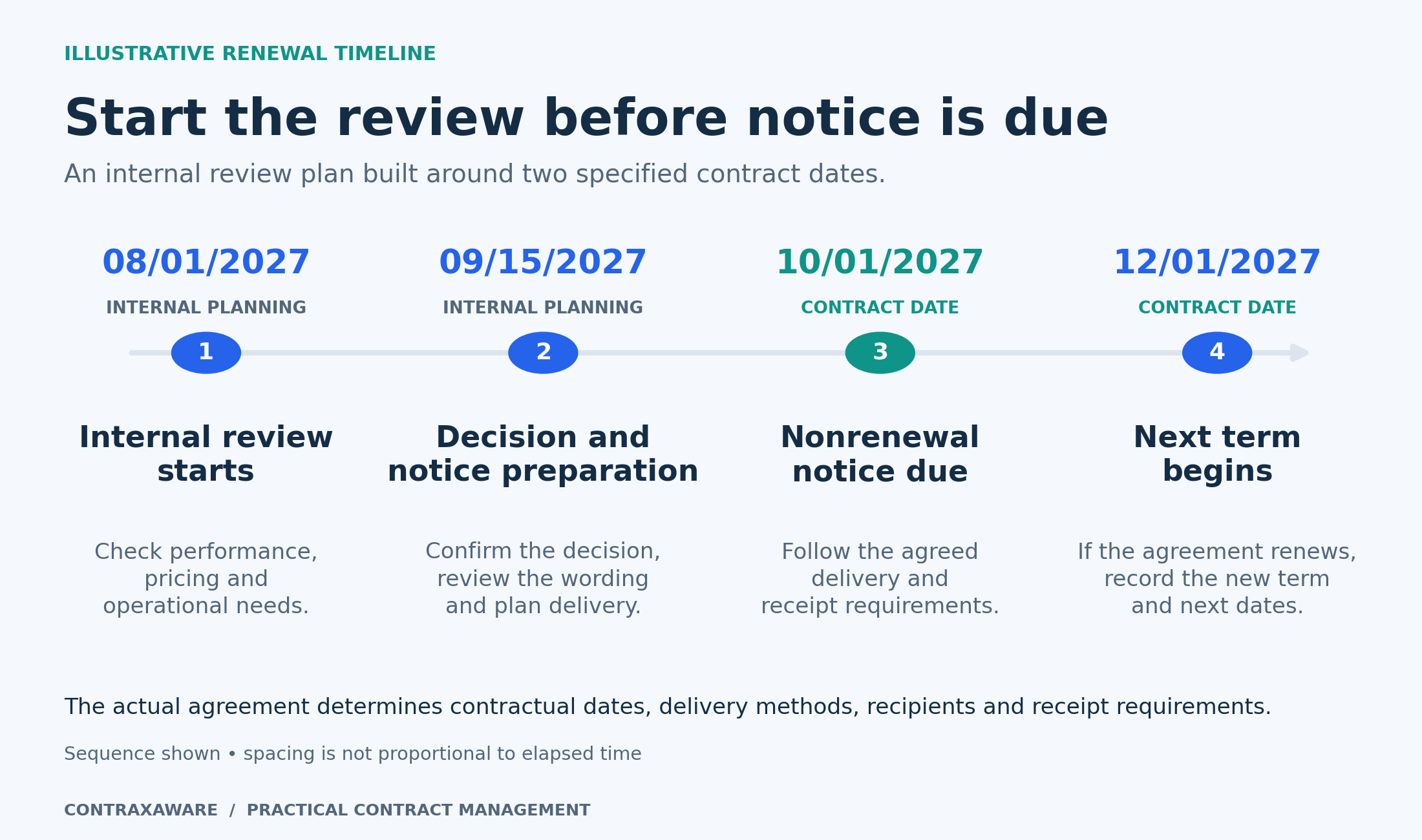
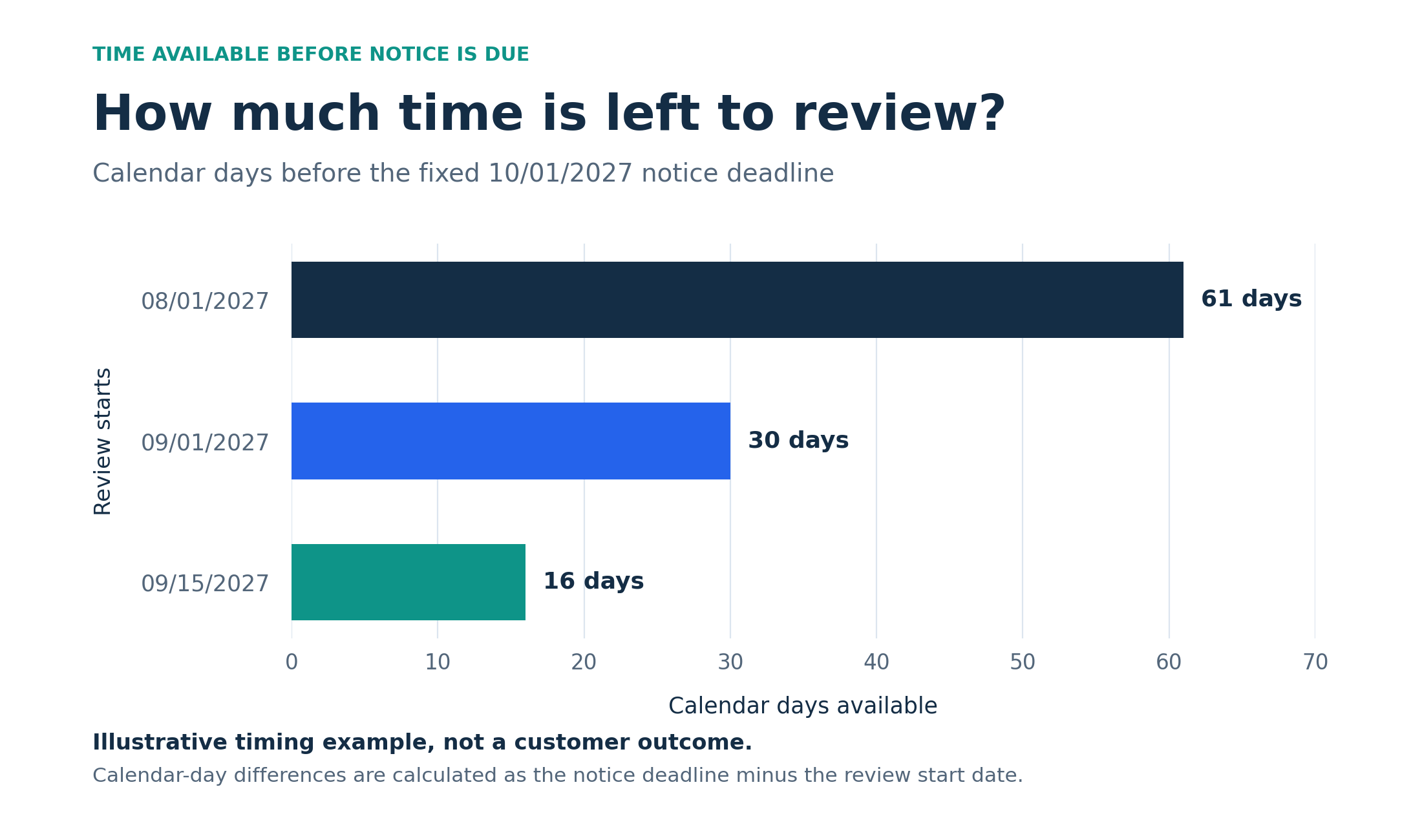
The timeline and comparison chart use an illustrative contract with a notice deadline of 10/01/2027 and a next term beginning 12/01/2027. Earlier review dates are internal planning choices. Calendar differences are simple date subtraction; the actual agreement determines its notice requirements.
Back to article contentsProblems 55–63
Obligations and vendor evidence
A signed agreement can create work for several teams. Give important commitments enough detail to assign, schedule, and verify, while keeping the underlying contract available when a question arises.
55A supplier’s promise disappears after signature
How a system helps. Turn the commitment into a trackable obligation with a responsible party, internal owner, timing, and source wording. Make the expected result understandable to someone who did not negotiate the contract. A task called “check vendor” gives the owner too little information to follow through reliably.
In ContraxAware. Create an obligation on the ContraxAware contract record or from selected contract text. Keep its source clause, owner, and timing available with the agreement.
56A deliverable is marked complete without anyone checking it
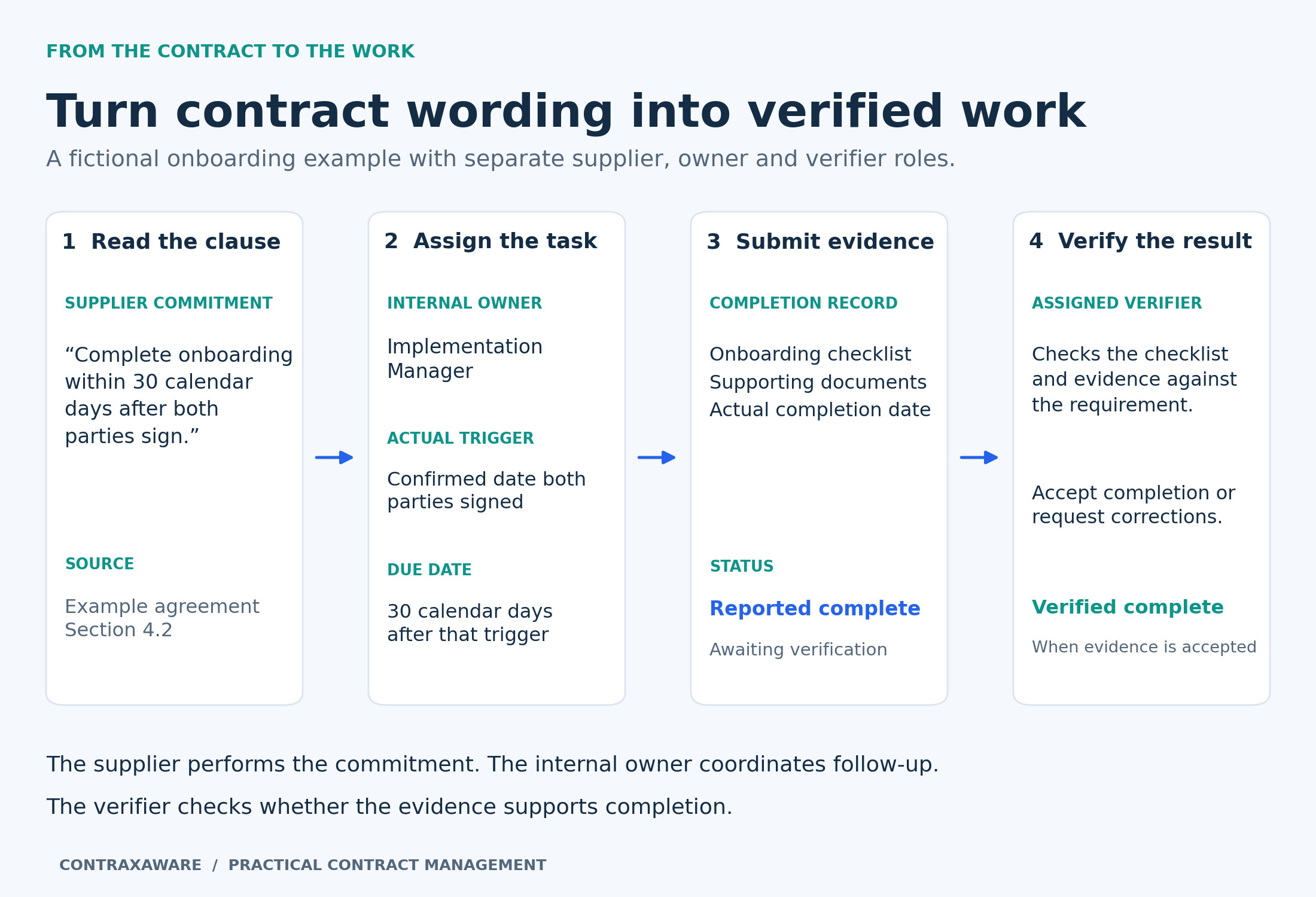
How a system helps. Separate reporting that work is finished from accepting the result. Identify the evidence and the person who will evaluate it. This is especially useful when the supplier reports completion but the business must confirm that the deliverable meets the agreement before the next step begins.
In ContraxAware. ContraxAware distinguishes reported completion from verified completion. The assigned verifier can review the submitted evidence and actual date before accepting the obligation as complete.
57A deadline starts from an event that has not happened
How a system helps. Base the due date on the contractual trigger, such as signing, a recorded service date, or an earlier milestone. Avoid using the day a task was created simply because it is available. The event and the calculation should remain clear to anyone checking the obligation later.
In ContraxAware. ContraxAware supports fixed dates, signing-based timing, saved contract dates, and timing after a verified preceding commitment. Select the basis that matches the actual requirement.
58Recurring service visits live in one person’s calendar
Individual scheduled obligations
How a system helps. Record the required service occurrences with the agreement and identify who checks delivery. Keep the schedule and supporting reports available to the team. Recurring operational work deserves the same clear owner and evidence as a one-time milestone, especially when responsibilities change during the term.
In ContraxAware. Create a dated obligation for each scheduled service occurrence in ContraxAware. Keep the owner, completion evidence, and verification with that occurrence so the team can follow the agreed schedule.
59The vendor’s insurance expires while the contract remains active
How a system helps. Track the relevant policy expiration independently from the agreement term. Name a follow-up owner, allow time to obtain updated evidence, and identify the person who will review it. A contract remaining active does not establish that its supporting insurance evidence is still current.
In ContraxAware. ContraxAware’s insurance certificate tracking connects files, dates, owners, and verifiers to the agreement. Use replacement history to retain earlier evidence as updated documents arrive.
60One insurance certificate lists several expiration dates
How a system helps. Review each relevant policy period instead of selecting the latest date on the page. Different coverage lines can create separate follow-up requirements. Link each tracking entry to the shared certificate so the reviewer can identify which policy and date a reminder concerns.
In ContraxAware. Create separate relevant insurance tracking items in ContraxAware where policy periods differ. Keep the certificate and source requirement available so the owner can check the correct coverage entry.
61Receiving a certificate is treated as proof of adequate coverage
How a system helps. Route the evidence to the appropriate insurance or risk reviewer and record unresolved questions. ACORD explains that a certificate does not itself change the underlying policy or create coverage. Tracking a file is therefore different from confirming that the agreement’s insurance requirements are satisfied.
In ContraxAware. ContraxAware organizes the certificate, follow-up, and verification record. Your designated reviewer assesses the insurance evidence and any endorsements or other supporting documents needed.
Insurance certificate tracking · ACORD certificate of insurance FAQ
62Repeated service problems disappear between review meetings
How a system helps. Keep service reports and unresolved exceptions connected across the review period. Identify repeat problems, document the follow-up, and bring that history into the next performance or renewal discussion. Recording each report separately helps preserve evidence, while the owner still needs to assess the pattern across them.
In ContraxAware. Keep the relevant service reports and follow-up with ContraxAware obligations. Review recorded exceptions together when assessing performance or preparing a renewal decision; this is a human review of the evidence.
63Complete onboarding means something different to every team
How a system helps. Describe the acceptance requirements and keep the source wording with the task. Specify the deliverable, relevant dependencies, and evidence the reviewer expects. Clear criteria let the owner and verifier discuss a real gap instead of arguing over a vague completion label.
In ContraxAware. Use the obligation description, source clause, owner, and verifier in ContraxAware to establish a common reference. Record evidence and the actual outcome when onboarding is finished.
Problems 64–72
Collaboration and accountable ownership
Make responsibility visible without requiring everyone to become a contract specialist. A colleague should be able to understand why the agreement exists, whom to ask, and what action comes next.
64Everyone assumes someone else owns the agreement
How a system helps. Assign one accountable business owner for the relationship, even when several departments contribute. Distinguish that person from the employee who uploaded the document. Review ownership periodically and when people move roles so an agreement does not become orphaned after the original project ends.
In ContraxAware. Assign the responsible people in ContraxAware and use owner-based portfolio views to review the work. For renewals, make the person responsible for the decision explicit.
65Several departments participate but their responsibilities are unclear
How a system helps. Define who handles commercial decisions, legal review, service performance, and administration. Assign each step to the role that can complete it and explain the handoff. A workflow should help people see their responsibility without making every participant responsible for everything.
In ContraxAware. ContraxAware’s Visual Workflow Designer connects steps with owners and team roles. Configure conditions, approvals, signatures, and reminders around the responsibilities your organization has agreed.
66Contract correspondence is disconnected from the agreement
Google available and Microsoft planned
How a system helps. Connect relevant messages to the contract record so decisions and context remain available after an email conversation ends. Evaluate the actual mail platform your team uses, the permissions needed, and how messages are selected. A promised integration is not the same as an available connection.
In ContraxAware. ContraxAware currently supports Gmail-related contract correspondence and Google integrations. Outlook and Microsoft 365 connections are listed as planned; confirm availability before relying on a Microsoft workflow.
Google Drive, Gmail and Calendar integrations · Current availability and planned integrations
67Two employees contact the vendor about the same issue
How a system helps. Keep the follow-up owner, latest communication, and next action visible to colleagues. Check that record before making another request. This gives the team a practical way to coordinate the conversation and avoids confusing the other party with different instructions or duplicated questions.
In ContraxAware. Use the ContraxAware agreement’s responsible people, correspondence, and recorded follow-up to coordinate the next contact. Agree which owner updates the record after the conversation.
68The contract exists but the business purpose has been forgotten
How a system helps. Record why the organization entered the agreement, what the relationship supports, and the assumptions behind the purchase or sale. That context becomes valuable when personnel change or a renewal arrives. It helps reviewers assess whether the agreement still serves the business rather than evaluating price alone.
In ContraxAware. Add business-purpose and service-category fields to the ContraxAware record. Keep the relevant supporting material with the agreement so a future owner can understand its role.
69Questions keep going to an outdated vendor contact
How a system helps. Maintain the right contact for each purpose and review details when the relationship changes. Distinguish a service contact from billing contacts and the formal notice recipient specified in the agreement. A familiar account manager is not automatically the correct person for every contractual communication.
In ContraxAware. Keep current company and contact information with the ContraxAware agreement, and review notice-recipient details during renewal planning. Verify formal notice requirements against the document before sending.
70A colleague joins halfway through and needs the entire story repeated
How a system helps. Prepare a short handoff covering the agreement’s purpose, current stage, unresolved issues, important dates, and next decision. Link the relevant documents and decisions. This lets the new participant begin with the current position while retaining access to the history when a question requires it.
In ContraxAware. Use ContraxAware’s contract record, saved review history, and connected map to orient the colleague. Give them the access needed for their role and identify their next action.
71One agreement serves several locations and local responsibilities are unclear
How a system helps. Capture the locations covered and the operational contact at each, while keeping central ownership explicit. Review which schedules or service commitments apply to which site. This makes it easier to coordinate changes without assuming every location receives the same service under identical terms.
In ContraxAware. Use ContraxAware custom fields and related agreements to represent the relevant locations and schedules. Create a saved view for the team coordinating the relationship.
72Everyone is waiting but nobody knows what happens next
How a system helps. Keep the current stage, next action, owner, and expected date visible. Clarify whether the agreement is waiting for information, an internal decision, another party, or signature. A generic “in progress” label can conceal very different kinds of work and prevent useful follow-up.
In ContraxAware. ContraxAware offers portfolio and personal action views, including work needing attention or a person’s action. Use them with the agreement’s workflow and responsible people.
Problems 73–81
Pricing and financial visibility
Make the commercial terms easier to inspect without pretending a contract register is an accounting system. Capture the source, definitions, and conditions behind the numbers so finance can use them responsibly.
73The actual price is buried in a schedule nobody opens
How a system helps. Capture the agreed charges in a structured schedule or clearly defined fields, with the source document available. Include the basis of each amount, such as per user, per location, or per month. A visible price is more useful when colleagues can understand what it buys.
In ContraxAware. ContraxAware pricing tables can record products, services, quantities, unit prices, discounts, and tax. Keep the schedule with the agreement and preview its details before saving.
74A low headline price hides setup charges and other fees
How a system helps. Separate one-time charges, recurring fees, usage charges, and optional services. Review the components together before approving the agreement. When an amount depends on future activity, record the assumption rather than presenting a single total as an unconditional commitment.
In ContraxAware. Use ContraxAware pricing items and billing frequencies to distinguish the charge types. Keep conditional charges and assumptions clear in the record and the supporting agreement.
75Volume discounts depend on assumptions nobody recorded
Human financial review
How a system helps. Capture the qualifying volumes, measurement period, tier boundaries, and any conditions attached to the discount. Compare those terms with verified operational or purchasing data when reviewing eligibility. Recording a discount without its conditions can make expected savings look more certain than they are.
In ContraxAware. Keep pricing details and qualifying conditions with the ContraxAware agreement. The contract owner checks eligibility against verified purchasing or operational records.
76A multiyear agreement is evaluated using only its first year
Human financial review
How a system helps. Record the scheduled charges across the term, including implementation costs, planned increases, and any minimum commitments. Review the full commercial arrangement with finance. Keep assumptions about optional renewals or variable usage separate from amounts already committed under the signed agreement.
In ContraxAware. Use ContraxAware’s pricing schedule and custom fields to preserve the commercial details. Export relevant records for finance-led analysis when the required calculation extends beyond the contract register.
77Nobody knows how the annual price adjustment works
How a system helps. Record the actual mechanism, including a named index, cap, calculation date, notice condition, or agreed fixed increase where applicable. Keep the clause available when a proposed adjustment arrives. A field that merely says “annual increase” gives finance too little information to check it.
In ContraxAware. Capture the adjustment wording and relevant dates in ContraxAware, then assign the review and reminder. Verify the proposed calculation against the agreement before accepting it.
78Contract values in different currencies get added together
Human financial review
How a system helps. Record currency explicitly and distinguish transaction currency from reporting currency. Keep amounts separated unless finance supplies a consistent conversion method and date. A portfolio figure should make its assumptions visible so readers do not mistake a mixed-currency sum for a meaningful total.
In ContraxAware. Use clearly labeled currency and value fields in ContraxAware and export the relevant records. Finance can apply its chosen exchange-rate date and reporting rules to that data.
79Different departments pay for overlapping services
How a system helps. Group agreements by supplier and service category, then review potential overlap with the owners. Check scope, locations, usage, and exit requirements before drawing a conclusion. Similar product names can conceal different business needs, so the report should identify questions for investigation rather than declare savings.
In ContraxAware. Use ContraxAware’s searchable register, custom fields, and grouped views to assemble the candidate agreements. Open the underlying contracts with department owners to assess the overlap.
80A negotiated rebate or service credit is forgotten
How a system helps. Record the entitlement, its qualifying conditions, the relevant period, and the evidence required to request it. Assign an owner and any applicable deadline. Follow the agreement’s process when assessing eligibility instead of assuming every missed service target automatically creates an available credit.
In ContraxAware. Create a ContraxAware obligation or follow-up item with the source wording, responsible person, timing, and evidence. Keep the assessment and resulting action connected to the agreement.
81An invoice does not appear to match the agreed terms
Human financial review
How a system helps. Compare the invoice with the applicable pricing schedule, amendments, service period, and acceptance requirements. Investigate the difference before deciding whether it is an error. A contract system can support the review, while payment reconciliation and accounting treatment may still belong in finance’s systems.
In ContraxAware. ContraxAware supports AI-assisted comparison of invoices or sales commitments with contract wording. Review the cited findings to investigate discrepancies; finance completes invoice matching and payment reconciliation.
Problems 82–90
Reporting and portfolio insights
Useful reporting starts with questions the business needs to answer and records it can trust. Define the population, fields, and dates before treating an attractive chart as evidence of improvement.
82Leadership cannot distinguish active contracts from drafts
How a system helps. Use consistent lifecycle statuses and make the report’s scope explicit. A count of all stored records may include unsigned drafts, historical agreements, and active commitments. Define which group the decision concerns, then ensure the underlying records match that definition.
In ContraxAware. Filter ContraxAware’s contract register by stage and include historical agreements when relevant. Open a result to inspect its document and recorded status before relying on a material conclusion.
83Every meeting requires rebuilding the same spreadsheet
How a system helps. Save the filters, columns, sorting, and grouping used for recurring reviews. Keep the source records current and agree who maintains the view. Reusing the same question helps the team spend its meeting on decisions rather than reconstructing the report each time.
In ContraxAware. ContraxAware supports saved portfolio views and CSV export of the current view or selected agreements. Return to the underlying record when a decision depends on contract wording.
84Two reports give different answers to the same question
How a system helps. Define the date range, contract population, status filters, and value fields behind each report. Check whether one report counts documents while another counts agreements. Consistent definitions make differences explainable and help prevent a change in reporting logic from masquerading as a business trend.
In ContraxAware. Use explicit ContraxAware filters and visible columns, then record the definitions used for the review. Preserve dated exports when a later comparison needs the exact earlier population.
85A supplier relationship is spread across the organization
How a system helps. Review agreements by supplier, business unit, and covered location to understand the relationship’s footprint. Identify which teams depend on the services and which documents govern them. This helps coordinate a service change or review without assuming that one department represents the entire relationship.
In ContraxAware. Use ContraxAware custom fields and grouped views to bring the relevant records together. Contract Map and linked agreements help reviewers inspect the relationships behind the summary.
86An organizational change affects contracts nobody has identified
How a system helps. Record the business units, legal entities, and locations associated with agreements. Use those fields to assemble a review population when a department moves, an entity changes, or a location closes. The resulting list identifies documents to assess; it does not determine their legal effect automatically.
In ContraxAware. Filter ContraxAware records using the maintained fields, then assign the necessary review. Keep any resulting amendments or related agreements connected to the original contract family.
87Missing information disappears behind reassuring totals
Configure and verify
How a system helps. Create a practical review for records missing essential details, such as a named owner or verified action date. Assign follow-up and distinguish an unknown value from a genuine zero or not-applicable field. A report should help the team discover incomplete information rather than conceal it.
In ContraxAware. Review the essential fields in ContraxAware’s contract register and use available filters to organize follow-up. Check how blank or unknown values appear, and assign someone to complete the records.
88Reviews feel slow but nobody knows where the time goes
Reporting requirement to verify
How a system helps. Measure elapsed time between defined events, such as request received, review started, approval completed, and signed copy returned. Separate active review from waiting for information. Examine the underlying cases with the team before deciding which stage to redesign or whether a headline average is meaningful.
In ContraxAware. Use ContraxAware’s recorded workflow and approval history to support the analysis. Confirm which events and dates are available, then calculate the measure from that defined dataset.
89Work is unevenly distributed across the contract team
How a system helps. Review active matters by owner, stage, complexity, and next action. Discuss the results with the people doing the work before reallocating it. A simple count can hide the difference between many routine agreements and a smaller number of demanding negotiations.
In ContraxAware. Group ContraxAware portfolio records by owner and stage, using custom fields where useful. Review the queue together and update responsibility when the team agrees on a better allocation.
90Nobody can show whether the process is improving
Reporting requirement to verify
How a system helps. Establish a baseline and use consistent measures over time. Useful candidates include owner coverage, time to find a governing agreement, and renewal decisions completed before notice deadlines. Define the calculation and review the exceptions so speed does not conceal missing records or skipped work.
In ContraxAware. ContraxAware’s saved views, exports, and recorded workflow information can support the review. Confirm the data behind each measure and retain dated snapshots when historical comparison is required.
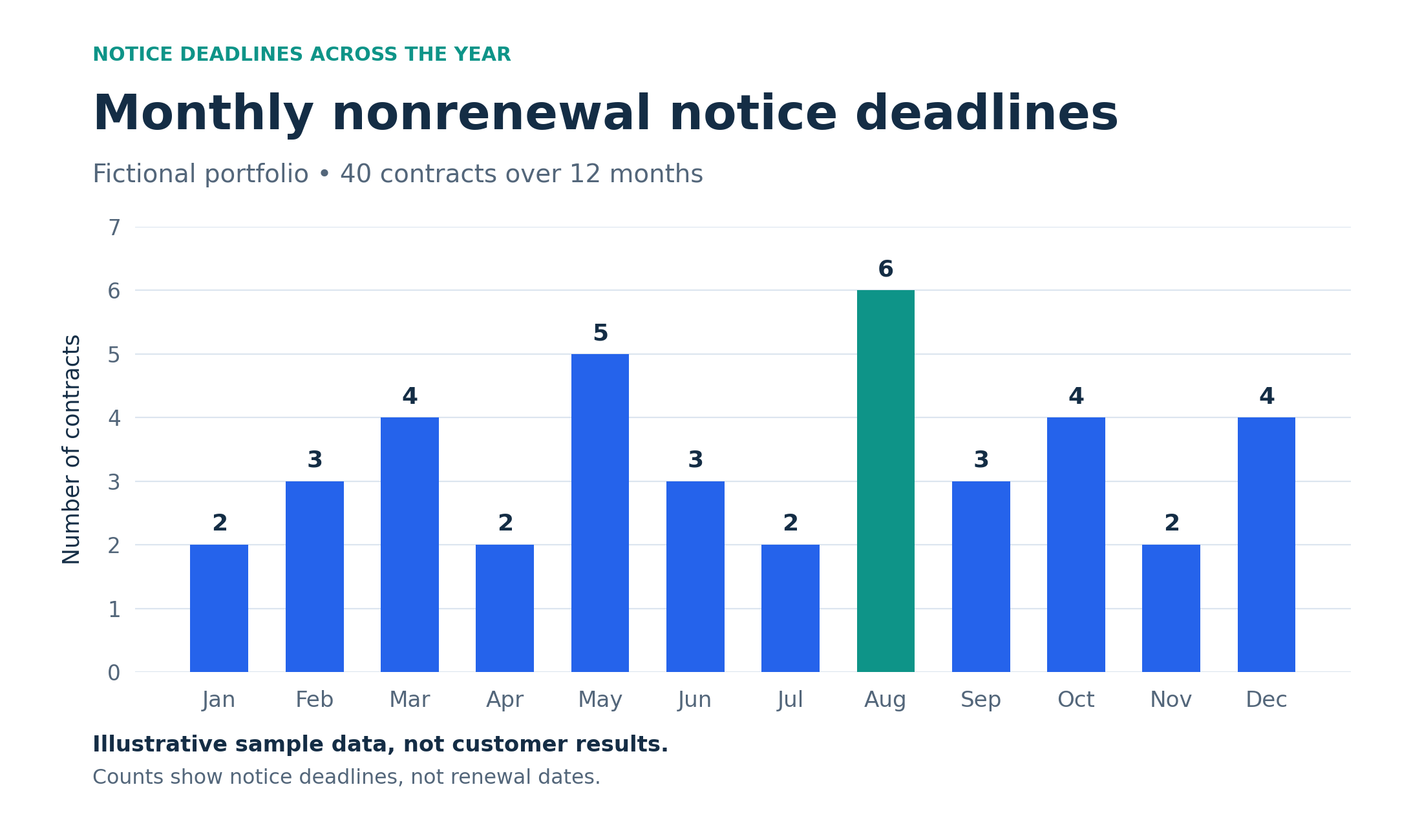
The monthly chart contains 40 fictional notice deadlines. It illustrates workload planning and is not a built-in ContraxAware chart or a measured customer result. Build the real review from verified portfolio dates.
Back to article contentsProblems 91–99
Adoption access and continuity
A system earns its place when people can use it, appropriate access is maintained, and the organization can keep control of its information. Include these practical questions in the implementation plan.
91The new system feels too large to start using
How a system helps. Choose one useful workflow and a manageable group of agreements. Agree the essential fields, owners, and first outcomes before adding more configuration. Let the people who will do the work try realistic tasks, and expand once the process is useful and understandable.
In ContraxAware. Start ContraxAware with a small batch of active PDF or Word agreements, verify the records, and configure the first reminders or obligations. Use the available migration assistance where helpful.
92Sensitive agreements are visible to too many people
How a system helps. Match access to responsibility and test the resulting permissions with representative accounts. Check both records and documents, including shared review copies. Access design should reflect how people participate in the agreement, rather than assuming everyone who joins a workspace needs the same visibility.
In ContraxAware. ContraxAware documents workspace roles, server-side access checks, and scoped external review access. Configure the supported controls and verify the intended experience before introducing confidential documents.
93Former employees or contractors retain unnecessary access
How a system helps. Include the contract platform in offboarding and role-change procedures. Review workspace membership, external invitations, and ownership of pending work. Removing an account and handing over its responsibilities are related but separate tasks, and both matter when a person leaves the organization.
In ContraxAware. Review ContraxAware membership and revocable review access. Enterprise includes directory-driven provisioning and deprovisioning configured during onboarding; confirm your plan and setup before depending on that automation.
94Shared logins obscure who performed an action
How a system helps. Give participants individual accounts and appropriate permissions. Use supported activity records to understand what happened, while checking which events are actually captured. A useful history needs clear identity and context; it should not be described as recording every action unless the system demonstrably does so.
In ContraxAware. ContraxAware records supported changes and workflow events with the agreement. Use individual sign-in accounts and review the documented coverage rather than assuming a complete immutable audit of all activity.
95New users need a long explanation before doing basic work
How a system helps. Design the everyday tasks for the people who perform them. Use clear field labels, short instructions, sensible starting points, and realistic training examples. Observe a new requester submitting an agreement or completing a review to find the places where the process needs clearer guidance.
In ContraxAware. Use ContraxAware’s guided Contract Portal and tailored forms for requesters. Demonstrate a small set of real tasks using fictional agreements, then refine confusing labels and steps.
96The administrator leaves and nobody understands the setup
How a system helps. Document the purpose of custom fields, contract types, templates, roles, and workflows. Name a second person who can explain and maintain them. Review the configuration after major process changes so the documentation remains a usable handoff rather than a historical design record.
In ContraxAware. Keep a configuration register alongside your ContraxAware operating procedures. Use the Visual Workflow Designer to review the actual process and test proposed changes before activation.
97The team can export data but has not proved it can recover
Current limitation
How a system helps. Evaluate retrieval and recovery separately. Check which records, documents, versions, relationships, and permissions an export includes, then test a supported restoration process in an isolated environment. A downloaded archive is useful, but recoverability needs a demonstrated path from that archive back to working information.
In ContraxAware. ContraxAware documents an encrypted manual archive download for authorized administrators, with stated exclusions and capture limits. Restore functionality is not currently available; confirm recovery requirements before relying on the archive.
98Nobody has checked whether the platform suits the data
How a system helps. Review the provider’s documented controls, terms, retention, identity options, and supported data uses against the organization’s needs. Ask how required controls are configured and verified. A feature list or a hosting provider’s certification does not establish that every proposed use is appropriate.
In ContraxAware. Review ContraxAware’s security information and plan distinctions. Enterprise identity controls are configured during onboarding; the public overview does not establish regulatory compliance or an independent SOC 2 or ISO 27001 certification.
99The system becomes another place where information goes stale
How a system helps. Assign responsibility for the process as well as individual contracts. Review ownerless agreements, incomplete records, unresolved tasks, and fields nobody uses. A short maintenance routine can keep the working record aligned with business reality and reveal where the process itself needs to change.
In ContraxAware. Use ContraxAware’s saved views, assigned owners, and connected contract work to support a regular review. Start with the exceptions that affect the next decision and keep the process manageable.
Frequently asked questions
What is contract management software?
Contract management software helps a team organize agreements and manage the work connected to them, from a request through review, approval, signature, and ongoing follow-up. It can bring together the original document, amendments, responsible people, dates, and commitments. The useful test is what your team can accomplish: find the governing agreement, identify the next action, or check an outstanding obligation. NCMA’s Contract Management Standard describes the broader lifecycle as pre-award, award, and post-award, reinforcing that the work extends beyond signing.
How is it different from a shared drive or spreadsheet?
A shared drive can store documents, and a spreadsheet can track owners and dates. Those tools may be enough for a simple process when someone maintains them carefully. Contract management software connects the information to review, approvals, reminders, signing, and follow-up. For example, a person can move from an approaching notice deadline to the agreement and its decision history. Evaluate the amount of manual coordination your team needs today, especially when documents change or several people must act.
Current ContraxAware feature availability · ACC guide to choosing a CLM system
Can we manage contracts that have already been signed?
Yes. Existing signed agreements can be imported for ongoing management without drafting or signing them again. ContraxAware supports PDF and Word imports and retains the original document. Review the parties, current term, renewal language, owners, and important obligations against the signed copy and amendments. Then configure the relevant dates and follow-up. Importing is a starting point for building a reliable working record; it does not automatically verify every extracted detail or complete the business review.
Does a small business need contract management software?
The practical trigger is the coordination problem, not a particular employee count. A small team may benefit when agreements are difficult to find, renewals depend on memory, or important work becomes ownerless. Begin with a few real tasks: retrieve a current agreement, verify its notice deadline, assign its owner, and identify its next obligation. If your present process does that reliably at an acceptable effort, keep the evaluation proportional. If it does not, use the failures to define your software requirements.
Which features should we prioritize first?
Choose the features that address frequent or consequential problems in your own workflow. Searchable originals, reviewed contract data, ownership, date reminders, and suitable permissions are a useful starting set. Add templates, approvals, redlining, signatures, and obligation verification where they solve an identified need. Ask the provider to demonstrate an entire task using a representative agreement. The ACC software-selection guide offers useful questions about fit, implementation, and ongoing costs; confirm current product and plan details directly.
Current ContraxAware feature availability · ACC guide to choosing a CLM system
Does AI replace a contract manager or legal reviewer?
AI can help locate wording, propose fields and obligations, and surface possible departures from company guidance. People still need to verify the outputs and make authorized decisions. A date may belong to the wrong event, an exception may qualify a clause, or a later amendment may change the answer. In ContraxAware, review proposed data and source-linked findings against the saved agreement. Escalate unclear or material issues to the appropriate business or legal reviewer instead of treating an AI answer as approval.
What is the difference between expiration renewal and notice dates?
An expiration date marks the end of a term. A renewal date identifies when a further term begins or takes effect. A notice deadline specifies when a party must take an action under the agreement, such as giving notice to prevent renewal. These dates may be different. Record the applicable dates separately and schedule an earlier internal review. Check the exact wording, amendments, delivery method, and any receipt or counting requirements before relying on a calculated deadline.
How should certificates of insurance be managed?
Keep the certificate connected to the agreement’s insurance requirement. Record each relevant policy expiration, assign an owner to obtain updated evidence, and identify the reviewer who will assess it. A certificate listing several policies may require several tracking entries. ACORD explains that a certificate does not itself change the underlying insurance policy or create coverage. ContraxAware can organize the evidence and follow-up; the appropriate insurance or risk reviewer decides whether the supporting documents satisfy the requirement.
Insurance certificate tracking · ACORD certificate of insurance FAQ
How do approvals differ from signatures?
Approval is a decision within your organization’s review process that an agreement is acceptable for the relevant purpose. A signature records a party’s assent to the document. Budget owners, legal reviewers, and authorized signers may be different people. Configure the process so each understands the version and decision involved. ContraxAware supports approval stages and signing workflows, but the organization still determines who has authority and which agreements require review. Reassess approval when the wording changes.
Contract approval workflows · Electronic signatures for contracts
What should we check about security and recovery?
Start with the information you intend to store and the people who need access. Review permissions, authentication, data handling, retention, export, and recovery arrangements against your requirements. Confirm which controls exist in your chosen plan and test their configuration. For ContraxAware, distinguish the documented encrypted manual archive download from a restore feature: restoration is not currently available. Also verify the scope of activity history and any Enterprise identity setup instead of inferring capabilities from a broad security label.
How do we get started without a large implementation?
Choose a manageable initial workflow, such as active supplier agreements and their next notice deadlines. Select a small contract set, agree the essential fields, and name an owner for each record. Verify the source documents, configure the reminders, and have real users try the process. Correct confusing steps before expanding. Keep a simple definition of success, such as being able to find each agreement and identify the next action without assistance. Add complexity when a demonstrated need justifies it.
Bulk contract import and data review · Contract intake and Word templates
How do we measure whether the system is helping?
Establish a baseline and retain consistent definitions. You might measure time to retrieve a governing agreement, the share of active records with named owners, decisions completed before notice deadlines, or elapsed review time. Record the population and date range, and preserve evidence for the calculation. ContraxAware’s saved views and exports can support the review, but verify the required data and history first. Combine the numbers with user feedback so an apparent speed improvement does not hide incomplete work.
Start by solving the problems your team feels every week
A better contract process begins with a question someone needs answered and a task someone needs completed. Choose a real agreement and test the whole path: find the governing document, confirm its owner, check the next action date, identify the obligation, and record the decision or completion evidence.
ContraxAware brings those activities into a connected contract workspace through imports, search, templates, review, approvals, signing, renewals, and obligations. The strongest evaluation uses your own representative workflow, including an amendment, a changed date, or an unanswered review, so you can see how the process behaves when the work becomes less straightforward.
Start with one agreement, one owner, and one next action. Then expand the approach to the rest of the portfolio. You may still have a busy inbox, but the next contract question should be easier to answer.
Explore ContraxAware with a 14-day free trial, with no credit card required, or request a walkthrough using the contract problems your team wants to solve.
Professional resources for a stronger contract process
- NCMA Contract Management Standard
A professional framework for the pre-award, award, and post-award lifecycle. The standard is available as a free download from NCMA.
- WorldCC checklists and guides
A collection of contracting checklists and guides covering preparation, negotiation, governance, and delivery. Access requirements vary by resource.
- WorldCC Contracting Principles
Guidance for clearer drafting and negotiation positions. The overview is public; full access and samples have their own requirements.
- CIPS contract management cycle
A procurement perspective on managing agreements through their lifecycle and coordinating the people responsible for the relationship.
- ACORD certificate of insurance FAQ
A focused explanation of what certificates of insurance do and do not establish.
- ACC guide to choosing a CLM system
A practitioner guide to evaluating software needs and implementation costs. Apply the durable evaluation questions and confirm current vendor details.
The two alternative-provider references address specific documented capabilities, not an overall ranking or endorsement. Verify current availability, licensing, and workflow fit with the provider.