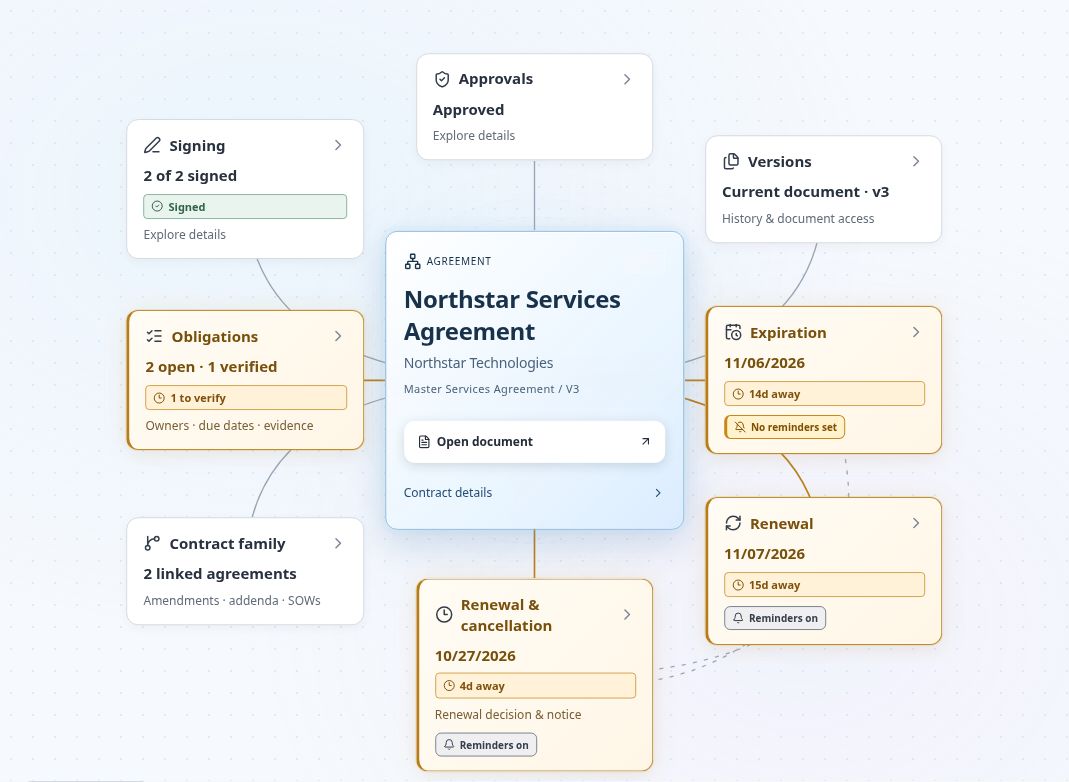
FROM SIGNED DOCUMENT TO NEXT ACTION
How a nonprofit team can work in ContraxAware
- Bring in the agreement. Use Batch Import & Onboarding for existing PDF and Word files. Review proposed values beside the original with AI Contract Data Extraction.
- Make it findable. Record the program, agreement type and owner. Use AI-Powered Contract Search to find agreements in plain English, then open the source document to check the context.
- Set the next action. Record reporting commitments as obligations with owners and evidence. Use Dates, Reminders & Renewals to plan around verified notice deadlines and earlier internal reviews.
- Keep the team connected. Route approvals to the selected people and keep related documents and commitments visible in Contract Map.
Setting up your process? Read the practical guide to contract management for nonprofits for a shared register checklist, approval questions and handoff steps.
01
Preserve context when responsibilities change
Nonprofit contract management preserves context when an agreement outlasts the person who negotiated it. Program staff need deliverables, finance needs payment conditions, and leadership needs visibility into the decisions still ahead.
Store the original alongside its contract details and owner. Use configurable fields for the program, funding relationship, or agreement type. Search the record and available document text, and keep related agreements connected so a new team member can follow the history without reconstructing it from email.
02
Track grant obligations without losing the wording
A funding agreement may call for progress reports, delivery milestones, or supporting records on particular dates. Capture each contractual commitment as an obligation, attach the relevant clause, and assign the person who will prepare the evidence. Review the extracted wording before relying on it.
Keep a submitted report or other supporting file with the obligation. Distinguish work that has been reported from work someone has verified. This supports contract follow-through; it is not a replacement for grant accounting, funder portals, or a determination that funding rules have been satisfied.
03
Bring approvals to the people responsible
A program partnership may need an operational review and a finance decision before the authorized person signs. Build the approval route around your organization’s process, choose reviewer participation, and make the saved document version clear.
Internal approval does not replace a board resolution or any authority required by your organization. Keep relevant supporting records and confirm who can sign. When a proposed change affects the agreement, review and approve the wording that will actually move to execution.
04
Plan the next funding and renewal conversation
The end of a grant period, a consultant extension, and the deadline to cancel an office service are different events. Record the dates that are supported by the agreement and assign owners for the decisions. Contract reminders and calendar views help a small administrative team plan its workload.
Evaluate nonprofit contract management with one program’s active agreements. Import the originals, review proposed fields, check document permissions, and create a saved view for follow-up. Assign the people who will maintain the records as the program develops.
A USEFUL FIRST TRIAL
Test one program’s agreements before expanding
Bring a representative agreement and ask a colleague to complete this checklist with you:
- Find the current signed document and any linked amendment.
- Verify one reporting or notice requirement against the source wording.
- Assign the responsible person and check the reminder plan.
- Open the evidence of a completed commitment and identify the next action.
Use the nonprofit contract software evaluation checklist to review the results. Compare the current Complete and Enterprise pricing, then choose a setup that fits your team.
Start a 14-day free trial — no credit card required →Questions about nonprofit contract management
Can we start with existing signed agreements?
Yes. Import PDF or Word agreements, review the saved details against their sources, assign owners and set the next actions. Free migration assistance is available; agree the scope with the team.
Can grant documents and reporting dates be tracked?
Yes. Store agreement documents and record contractual milestones as dates or obligations with owners and evidence. Confirm each requirement from the source.
Does this replace grant management or accounting software?
No. ContraxAware tracks agreement workflows and commitments. It does not provide fund accounting, grant eligibility decisions, or funder reporting submission.
Is there a nonprofit discount?
See the published pricing for current plans and contact us about your requirements. Contact the team to discuss your organization’s needs.