01
Make the handoffs visible
Contract lifecycle management connects the work around an agreement, from the initial request to decisions after signing. A status label helps, but the team also needs to know who must act, which document is involved, and what is preventing the next step.
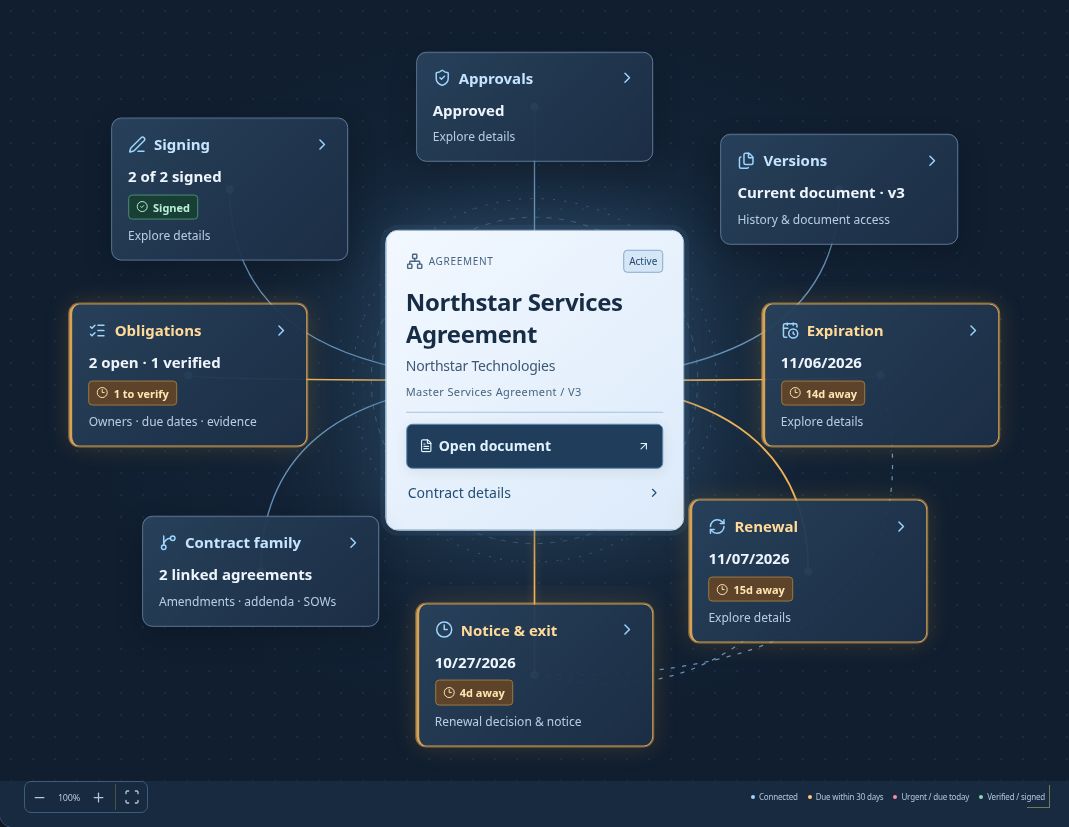
ContraxAware brings the saved agreement, responsible people, approval progress, signing status, dates, and obligations into one workspace. Use the contract record for detail or Contract Map to explore how the work connects. Keep stages and next actions grounded in the saved agreement.
02
Review the document that will be signed
A draft can pass through several people before it is ready. Use internal approvals and invited external reviews to collect decisions on a saved version. Configure the stages, participants, rules, and document permissions that fit the agreement.
Approval and signature are separate milestones. Adopted redlines create a new version that needs fresh approval. Prepare the approved signing copy, choose the signers, and review the request before sending it. Keep the resulting signed document and signing history with the contract.
03
Treat signing as a milestone, not the end
A signed agreement may still need activation requirements completed or an effective date confirmed. The next action should reflect that work rather than imply that a signature alone proves every operational requirement is satisfied.
Once the agreement is being managed, track the responsibilities it creates. Record obligations with owners and dates, collect completion evidence, and distinguish reported work from verified completion. Event-based commitments can follow actual recorded events rather than dates someone guessed at the start.
04
Carry context into the next decision
Renewal review should bring the original terms and notice requirements back into the conversation. Keep the decision owner, cancellation deadline, and expiration or renewal date visible together. Record the outcome while following the agreement’s separate notice-delivery requirements.
Linked amendments and statements of work retain their own records and history. Review an executed amendment before applying parent date changes. Keep historical agreements available for reference without mixing them into everyday working views unless the user chooses to include them.
Questions about contract lifecycle management
Does a completed signature automatically activate every contract?
No. Activation may require confirmation of dates or completion of other requirements. Follow the next action shown for the saved agreement.
Can we see related agreements?
Yes. Link amendments, addenda, and statements of work to the parent agreement and explore their connections in Contract Map.
Does recording a renewal decision send notice?
No. Follow the agreement’s delivery requirements and retain the actual communication.