Key takeaways
- A matching legal entity and matching limits resolve two concrete checks.
- June 30 is the general liability expiration supplied in the example; other policies need their own dates.
- The endorsement remains outstanding, so the packet alone cannot close the contract evidence review.
What should a contract manager check after AI reads an insurance certificate?
In a fictional outpatient group, Kite Mechanical is due onsite in three days. Its maintenance schedule requires general liability limits of $1 million per occurrence and $2 million aggregate. The schedule also calls for evidence of a particular additional-insured endorsement.
AI reads the certificate and suggests June 30 as the general liability expiration. The contract manager checks the name, Kite Mechanical Services LLC, against the signed schedule and finds both required amounts on the certificate. The packet contains no copy of the specified endorsement. The risk reviewer needs an answer to a precise question: who can obtain that item before the visit, and who may decide whether the visit proceeds?
Split the contract requirement into checks
Read the signed insurance schedule before opening the certificate. Make a row for each policy, required limit, defined entity, and supporting item. If onsite and remote services have different requirements, flag which scope applies to this visit. Ask the contract owner to identify the team's authorized insurance reviewer so an administrative check does not turn into a coverage opinion.
What the received packet establishes
| Coverage check | Supporting file | Decision or next action |
|---|---|---|
| Entity | Schedule and certificate name Kite Mechanical Services LLC | Entity check complete in sample |
| Limits | GL row has $1M occurrence and $2M aggregate | Record checked values and policy date |
| Additional insured | Specified endorsement absent from packet | Request document and assign risk review |
Read the certificate line by line
Compare each proposed AI field with its actual policy row and column. The certificate’s issue date serves a different purpose from a policy expiration. An umbrella policy can have a different period from general liability. Keep separate records when a combined date would cause someone to request the wrong renewal or assume two policies renew together.
Request the missing endorsement by reference
Tell the vendor which certificate you reviewed and identify the clause or exhibit requiring the endorsement. Ask for a copy identifying the relevant policy and scope. Keep the request with the received certificate. Record the evidence as outstanding until the designated reviewer assesses what the vendor sends.
Hand off the business decision
ContraxAware's insurance tracking workflow connects the supporting document, responsible person, and follow-up date. Have the authorized reviewer record what was checked, what remains open and who decides whether the visit proceeds. If the risk team permits an exception under internal policy, record its scope and review date so a later user can understand the decision.
Check the certificate against the requirement
Open Insurance certificates on the vendor record and select View certificate. Compare the original file with the extracted policy row. In the contract management system, give the June 30 policy date its own reminder and assign the endorsement follow-up through the obligation record.
For an example of the distinction between a certificate and the underlying policy, see the New York Department of Financial Services guidance.
Check the insurer, limits and policy dates returned by AI contract data extraction against the certificate, then ask the vendor for the endorsement needed to clear the onsite work.
For the full workflow, read how to check insurance evidence against contract requirements.
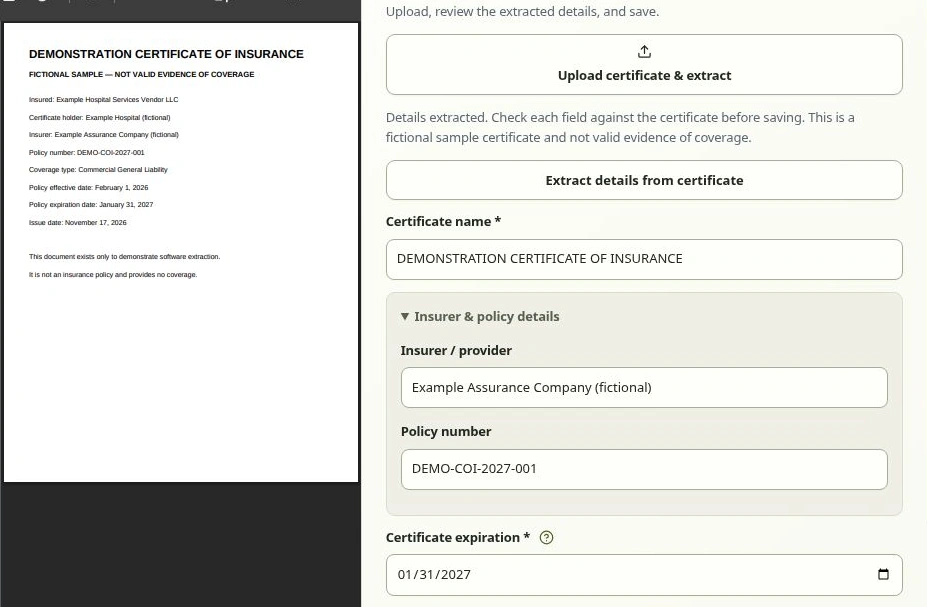 View full-size screenshot
Review a vendor certificate of insurance
See a sample upload, a preview of reminder settings, and the saved certificate on its vendor contract. In the last ten seconds, look for View certificate to open the original.
Read the video transcript
- 0:00
Choose a PDF or image. ContraxAware stores the original certificate with the agreement.
- 0:10
ContraxAware extracts information from the certificate. The edit shortens processing time.
- 0:20
Compare the original PDF with the extracted insurer, policy number, and expiration date.
- 0:30
Choose more than one recipient or role for a reminder in the unsaved example.
- 0:40
Set one reminder 30 days before expiration and another seven days before. Choose recipients for each.
- 0:50
Back on the vendor contract, Insurance certificates lists the saved COI as On file.
- 0:55
Select View certificate to reopen the original document from this contract any time.
Vendor certificate requirement-to-evidence worksheet
Compare specific contract requirements with the certificate and supporting documents. Assign every unresolved item to the qualified reviewer.
Preview a completed worksheet row
- Requirement or check
- Named insured
- Contract evidence expected
- Contractor entity named on the signed schedule
- What the packet shows
- Kite Mechanical Services LLC matches the sample contracting entity
- Review result
- Matched for this review
- Responsible role
- Contract manager
- Next action
- Retain the source schedule and reviewed certificate.
Frequently asked questions
Does the certificate itself change the policy?
New York's Department of Financial Services explains that a certificate should reflect coverage and should not be used to alter the actual policy terms. Refer questions about coverage or endorsements to a qualified insurance professional.
Can all certificate reminders use the latest expiration on the file?
Read every coverage row the contract requires. Set the relevant follow-up dates separately where the policy periods differ so an earlier expiration stays visible.
Who can approve an exception before the site visit?
Follow the customer's delegated authority and risk procedures. Capture who approved the exception, its limits, the reason and when the decision must be revisited.
How should a reviewer handle an entity-name mismatch?
Record both legal names and request clarification or supporting evidence from the vendor and insurance reviewer. Preserve the mismatch until the authorized person resolves it.