Start with the decision someone needs to make
A contract reminder is useful when it tells someone what to do, by when, and where to verify the reason. “Vendor agreement expires on Friday” gives the reader a date. “Decide whether we’re keeping Northstar by October 20. Check Section 2.2 before the October 27 notice cutoff” gives the reader work they can finish.
Set up a reminder for the action, then link it to the agreement and current signed version. Legal can confirm the wording, Procurement can prepare the decision, and the business owner can weigh in while there’s still time to do something about it.
Watch a clause become a contract reminder
Read the transcript
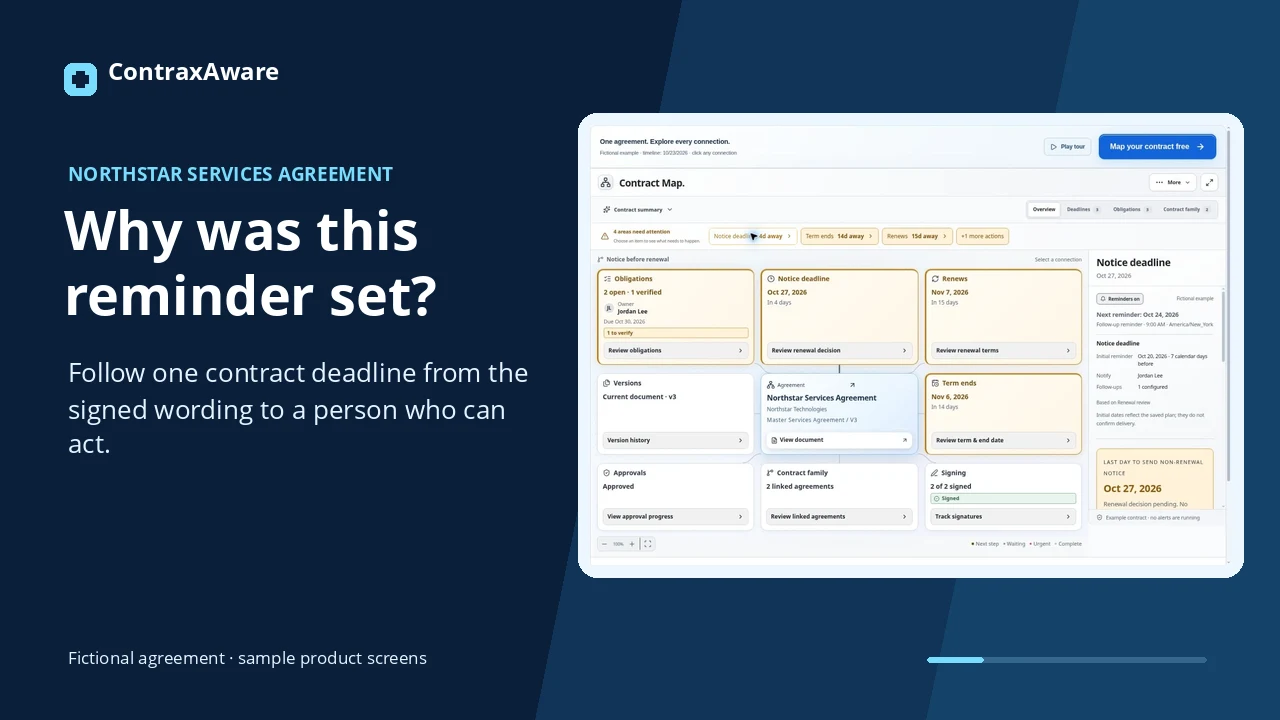
Here is how a contract reminder gets its context. We will use the fictional Northstar services agreement.
Start with the signed agreement. Section two point two says either party must give written notice at least ten calendar days before the current term expires.
Northstar's term ends on November sixth. Counting back ten calendar days gives an October twenty-seventh notice deadline.
The plan gives Jordan Lee an initial reminder on October twentieth. The October twenty-fourth follow-up comes before the contractual deadline.
In the signed-in renewal decision panel, open Saved terms and source wording to check an attached clause. Then record the decision and keep the evidence of what happened.
Work backward from the clause
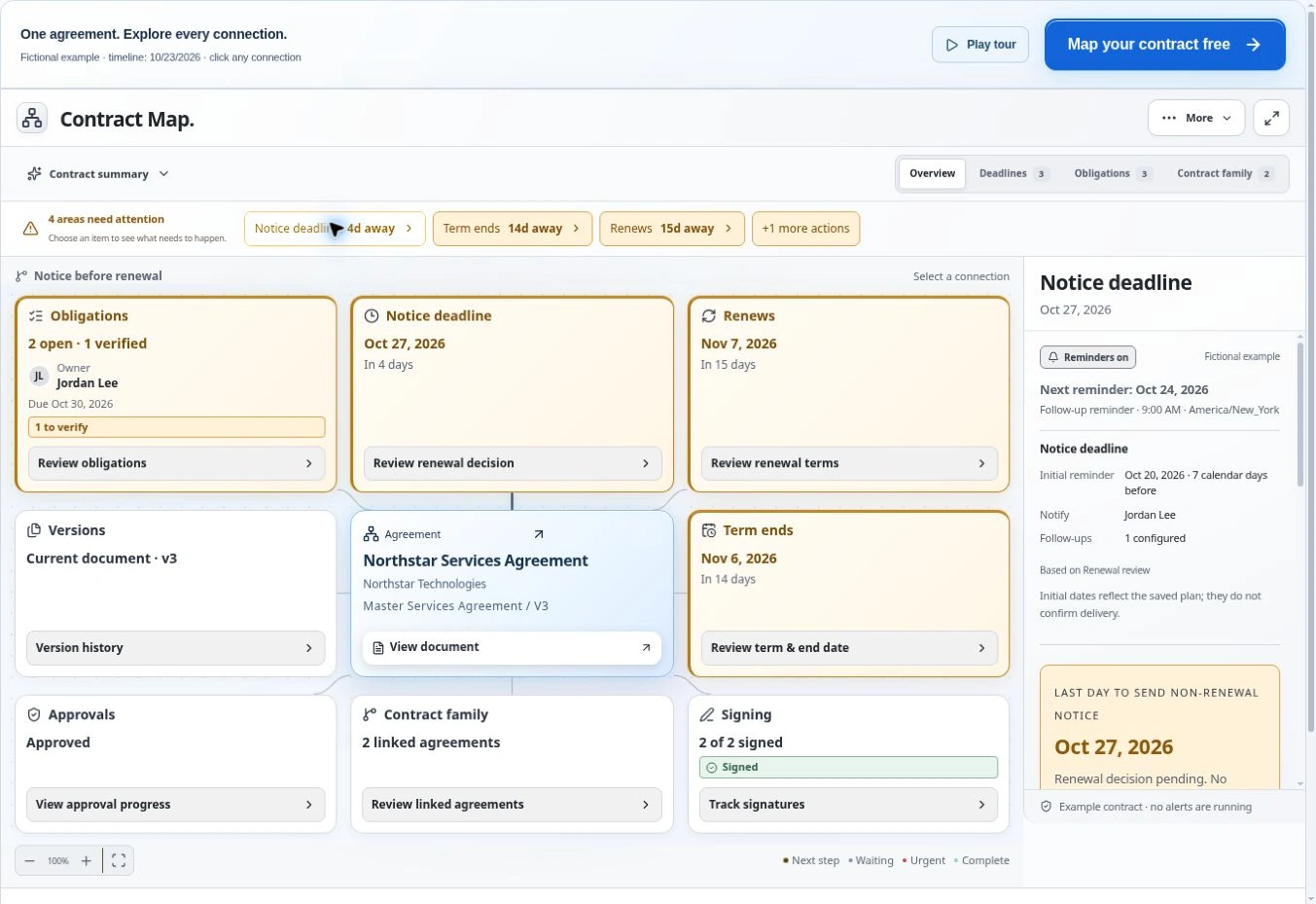
In this fictional Northstar services agreement, Section 2.2 says the agreement renews automatically on November 7 unless either party gives written notice at least ten calendar days before the current term expires. The term ends on November 6. Counting back ten days makes October 27 the notice deadline in the example.
- Owner reminderJordan Lee starts the review.
- Follow-upCheck whether the decision is open.
- Notice deadlineTen days before term end.
- Term endsThe next term is scheduled for Nov 7.
Three dates matter most. The notice deadline comes from the agreement. The internal review date gives your team time to decide and prepare. The term end or next renewal date tells you when the business arrangement changes. Give each date its own label in your register.
Before setting reminders on a real contract, check the executed amendments, notice recipient and address, permitted delivery method, and whether notice must be sent or received by the deadline. Confirm how the agreement counts days and check how holidays or time zones affect your plan. The renewal notice deadline guide walks through those details.
Show why the reminder was set
Think of the alert as a handoff. In the notification, tell the person what needs attention. In the record it opens, keep the supporting wording and the current decision close enough to check without digging through old email.
- Keep the clause and its location. Record the source section or page, signed version, and a short excerpt. Include the document and relevant amendment so the reviewer can read the surrounding terms.
- Explain the date. Say whether it’s written into the contract, calculated from a notice period, or triggered by an actual event. If the source is uncertain, put the record into review before relying on the schedule.
- Send it to the person who can act. Give the recipient a concrete request such as confirm budget, decide whether to renew, or request a replacement insurance certificate. Set a follow-up for any unresolved decision.
- Define what closes the work. A saved approval, a verified certificate, an executed renewal, or evidence of notice delivery can close different steps. Assign who records each outcome.
In ContraxAware, open the contract from the reminder and review the renewal decision. Saved terms & source wording displays an attached clause excerpt and page when available. An alert can point you to the agreement even if a source excerpt hasn’t been attached yet. In that case, open the document to check the wording.
After an amendment, compare the saved excerpt and scheduled dates with the new signed version. Review any earlier version or Needs review label before relying on a source. Then verify the owner and future reminders against the revised deadline. See the full source-clause verification process.
When a standard reminder app stops being enough
A shared calendar can work for a few agreements with stable dates and one owner. Teams usually outgrow it when the same event has to survive an amendment, an owner change, or a question from Legal. The problem is answering “why this date?” after the pop-up arrives.
| Situation | Standard calendar or task reminder | Contract reminder workflow |
|---|---|---|
| Someone asks why | Open the event and look for a current document link. | Review the agreement’s saved clause, version and action date in context. |
| An amendment changes the date | Find each copied event and update its date and notes. | Review the new source, update the contract record, and recheck the reminder plan. |
| The owner leaves | Track down who owns the event or shared list. | Confirm the agreement’s new owner and the reminder’s configured recipients. |
| Someone says they acted | Search email or chat for what happened. | Check the recorded decision, delivery evidence, or completed obligation. |
Use a realistic test when comparing contract reminder software. Ask a colleague to open an alert and explain the next action and its source without your help. Then give them an amendment that changes the deadline. See how quickly they find the current version and review who gets the next alert.
Roll out your reminder system with five contracts
- Pick five active agreements where a missed date has a cost. Include one auto-renewal, one fixed end date, and one recurring obligation.
- Reconcile the signed versions and amendments. Identify which types of contract reminders apply, then record the trigger or verified due date.
- Assign an owner, a decision maker if needed, and a backup. Build the first review and the follow-up around their real lead time.
- Check the recipient and next scheduled date in the tool. Use a sample record to test how someone opens the reminder and finds the source.
- At the end of the first month, count items resolved before the action deadline and items missing a valid owner or source. Tune follow-up timing using those results.
Download the contract reminder register (CSV)Includes editable sample rows for notice, insurance, and an event-based obligation.
Already know the notice deadline? Use the reminder date planner to work backward. For a renewal decision workflow, see the renewal reminders checklist.
Questions about setting up contract reminders
How early should contract renewal reminders start?
Work backward from the verified notice or option deadline. Add time for budget review, negotiation, approvals, and preparing any required notice. The right lead time depends on the work needed to decide.
What if the agreement has no expiration date?
Record that it’s open-ended if the terms support that conclusion. If the contract calls for a price review, certification, or another recurring commitment, track that obligation using its own trigger.
Can one agreement have more than one reminder?
Yes. One agreement can need an initial review, a notice follow-up, a term-end handoff, and separate obligations. Give each reminder a distinct action and owner so multiple alerts don’t ask people to solve the same problem twice.
How do I know a reminder was acted on?
Decide what proof the step needs. A renewal decision can be a recorded approval. For notice, keep evidence of the required communication. For a certificate, distinguish the upload from the review that checks it against the agreement.