Key takeaways
- Count each PDF once by document disposition and separately by scan quality; these totals describe different properties of the same files.
- Review signatures, attachments and applicability before linking an amendment to a parent and changing a date.
- Keep exceptions, late arrivals and the original calendar owner visible until a colleague accepts the new record.
How do you account for 400 PDFs before opening the import queue?
At fictional Elm Road Services, Procurement finds 400 PDFs in a shared directory. A preliminary inventory classifies 210 signed base agreements, 76 signed amendments, 34 signed orders, 45 unsigned drafts and 35 duplicate copies. Those five groups sum to 400. The archive also includes 300 PDFs with native text and 100 scans. The scans are part of the first count. Adding them again would make a 400-file project look like 500 files.
Give each source file a stable inventory ID and keep the original path, filename, page count, source owner and proposed disposition. A row can change classification as evidence improves. Preserve the original ID when that happens. Record who moved it from pending review to signed amendment and why.
Separate an agreement's business owner from its file custodian. The person who maintained the shared drive may recognize the right folder, while a regional buyer remembers that an order covered two facilities. Ask both to help resolve uncertainties before treating folder names as agreement families. For a cautious first batch, choose a signed master, an amendment, an unsigned draft and a scan with a difficult clause. That small group tests the process before a large upload hides its weaknesses.
Read the price table and notice clause on the page image
Treat optical character recognition as a way to produce searchable text from an image. Searchable text can still contain a broken digit, a swapped table column or a missing handwritten adjustment. A clear English paragraph on the cover page tells you little about the sideways pricing exhibit on page twelve. Scan the page edges, check the sequence and verify that the exhibit referred to in the master actually arrived.
Use a concrete acceptance test. Suppose a fictional rate table shows $18.50 per carton, while its searchable text says $1850. Correct the field against the original image, log the page and unit, and ask the reviewer to check adjacent rows affected by the same layout. If page four of the source packet is missing, log an incomplete source and contact the custodian. Improving OCR on the remaining pages will never supply that missing page.
For the 100 scans, prioritize the ones supporting near-term notices, active charges and commitments already due. Identify which samples need a new capture, which need human transcription and which can proceed with a verified field. Track employee review time per batch as well as file count.
Link the amendment to its actual parent and recalculate the affected date
Elm Road’s fictional facilities master ER-017 covers North and South. Both service terms end June 30, 2027. The master requires written notice at least 60 calendar days before term end. Signed Amendment 2 replaces the interval with 30 days for North only. Reading the latest document in isolation can leave South with a date that is a month too late.
Build one record for the master and identify the signed change by its document ID, date, parties, parent reference and exact facility scope. Compare party names against any predecessor name in the original file. If an amendment refers to “Order 17” and the folder contains two possible parents, preserve both candidates in the exception queue. A guessed relationship makes a bad date look well documented.
In this example, counting back 60 calendar days gives May 1 for South. Counting back 30 gives May 31 for North. Check how the agreement handles receipt, recipients, permitted delivery and any applicable weekend or holiday rule before scheduling real action. Give each facility its own internal review date and owner. Someone checking the migration should be able to explain both cutoffs without relying on the person who linked the files.
Decide what to do with the next file
| File or finding | Evidence to inspect | Migration decision |
|---|---|---|
| Signed Amendment 2 | References ER-017 and changes North only. | Attach to the master and verify the separate North cutoff. |
| Unsigned draft | Negotiation copy with blanks in the execution block. | Retain its identity and confirm status with the owner. |
| Missing exhibit or unreadable price | Reference in the master, incomplete pages or dubious OCR. | Request a complete copy and hold affected fields from operational use. |
Inspect one proposed record beside its original before accepting a batch
The actual ContraxAware import-review screenshot shows an unsigned Northstar Word draft beside proposed record details. Look at the document heading and its status before reading the extracted company name. In a mixed archive this check can keep a straightforward draft out of the signed portfolio. The screen illustrates review with a fictional source; the 400-file Elm Road inventory is a separate worked exercise.
Use bulk contract import on a representative supported PDF or Word document. Have a second person verify the party, document state, effective date and one actionable term against the source. Ask them to find any relevant amendment. Log the accepted values and the specific sections behind them. If extraction returns no value for a term, check whether an exhibit holds that term, the document is incomplete, or the field really does not apply.
Keep pending drafts available to their authorized owners if they form part of the organization's negotiation records. Mark duplicate copies with the verified source ID they duplicate. Check signature pages, attachments, page count and wording before relying on a filename match. Resolve its disposition before anyone counts it as a duplicate.
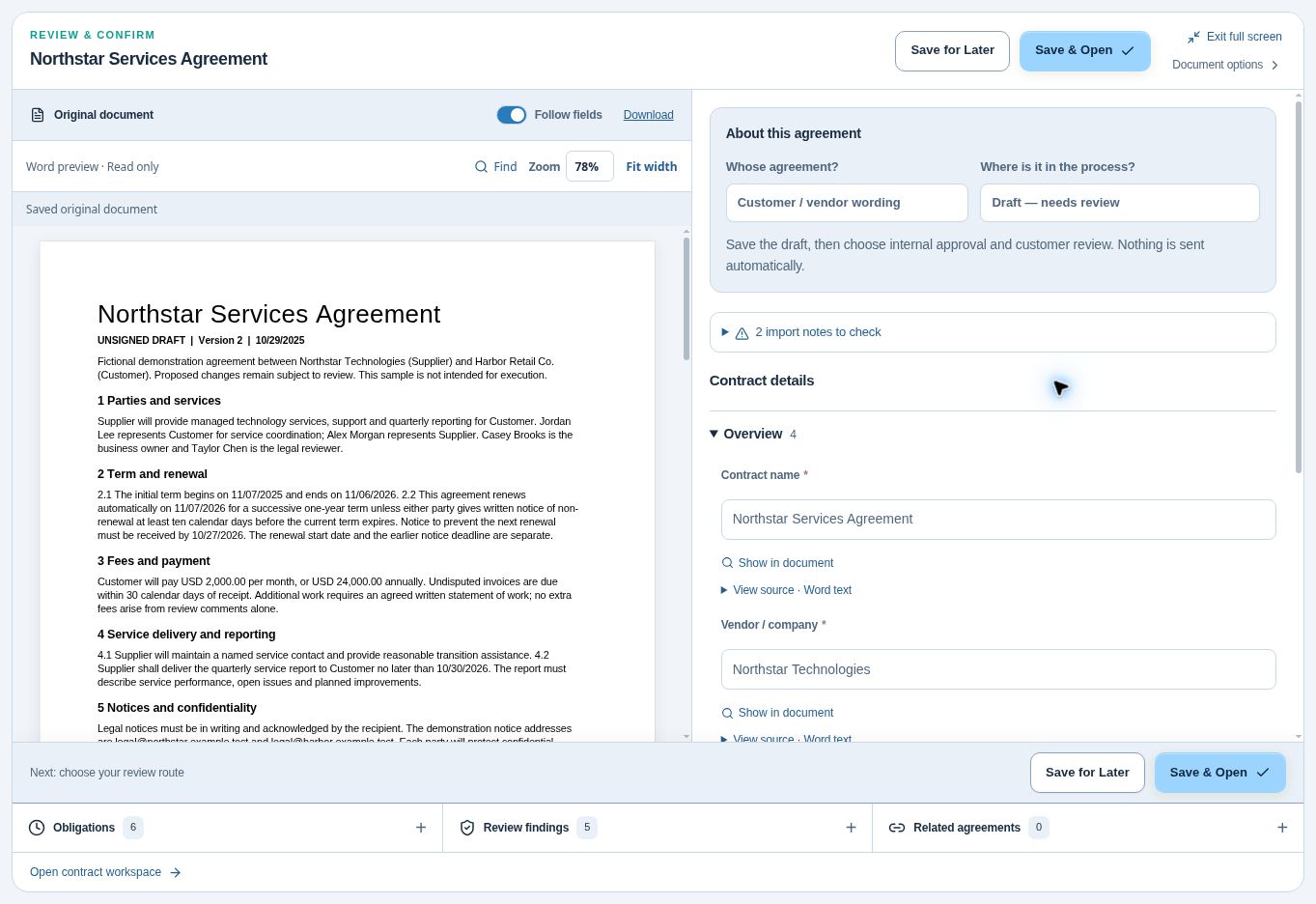 View full-size screenshot
Reconcile batch outcomes and transfer the calendar to a named owner
At the end of each batch, compare the source IDs selected with those accepted, deferred, or held for correction. Expected signed business documents in this example total 320 before unresolved exceptions: 210 bases, 76 amendments and 34 orders. That total measures documents, not master contracts, and it does not tell you how many dates are safe for action. Keep the 45 drafts and 35 duplicate-copy dispositions in the source inventory so procurement can account for all 400 files.
Reconcile the material fields separately. Ask a colleague from the procurement contract management team to retrieve ER-017, show the North-only exception, and open the source behind South's May 1 cutoff. Have the old calendar owner confirm which reminders have moved and which still require manual follow-up. Keep a short log of amendments arriving during migration. A signed rider received after the batch was exported can invalidate leaf-level dates even when every original file balanced perfectly.
The migration owner signs off the imported inventory, the access owner checks representative permissions, and the business owner accepts the operational answers. Retain the source archive according to your records policy and make the destination for future signed changes explicit.
Use the contract handoff for Operations to assign each unresolved item before releasing the batch.
Legacy Contract Migration & Triage Batch Log
Assign a source ID, verify parent and document state, and record the source for each date. Reconcile outcomes against the batch inventory.
Preview a completed worksheet row
- Source ID
- ER-017
- Document state
- Signed master
- Parent
- Base agreement
- Source check
- 60-day notice; June 30 term end
- Outcome
- Verify South cutoff May 1
- Responsible role
- Procurement owner
Frequently asked questions
Are 400 PDFs the same as 400 agreements?
No. The sample contains 210 signed base agreements plus related orders, amendments, drafts and duplicate copies. Agree what the repository will count as a document, agreement family and active contract before reporting migration completion.
Should unsigned drafts be imported with signed records?
First confirm their business purpose, access rules and required treatment under your records policy. A draft can belong in negotiation history with a clear status. Reserve active terms and reminders for records the responsible owner can verify.
Which records should be reviewed by a second person?
Start with actionable dates, high-value rates, uncertain links, restricted agreements and files whose page images conflict with the extracted text. Give the reviewer the source and a known question so the result can be reproduced later.
When can we retire the old renewal spreadsheet?
Transfer responsibility only for the records whose fields, sources, recipients and next actions have passed review. List the exceptions, keep a named owner on the old calendar, and confirm what happens when the next signed amendment arrives.