Key takeaways
- Give Finance authority over any hold and test the configuration in the edition you will buy.
- Trace an override through to the final invoice status.
- Test the backup reviewer and missing-evidence path before month-end puts the queue under pressure.
What does meaningful human review look like in an AI vendor contract?
Grey Elm, a fictional manufacturer, pilots a service that compares supplier invoices with purchase orders. Two invoices for $12,400 from the same supplier trigger a duplicate alert. The delivery tickets show that one shipment went to each of two sites. A hold would delay payment for goods the company received.
Finance approved a recommendation queue. The vendor also offers an automatic payment hold. For this pilot Grey Elm keeps automatic holds disabled and gives Accounts Payable one business day to review each flag. The acceptance test follows the two invoices through to the payment system and checks who acts when the assigned analyst is absent.
Name who can act on an invoice
List the flag, payment hold, release, supplier message and final disposition. For each action identify who has authority and which setting controls it in the purchased edition. Have the vendor demonstrate which actions an ordinary analyst, a supervisor and the AI service can perform.
What the invoice reviewer should do in each case
| Decision step | Evidence to review | Decision or next action |
|---|---|---|
| Legitimate same-price invoice | Two delivery tickets identify distinct sites. | Reviewer clears the flag and records the supporting ticket identifiers. |
| Actual duplicate | The invoice number, delivery receipt and amount repeat. | Reviewer follows the buyer’s authorized hold process. |
| Absent reviewer | A flagged invoice remains in the queue at the handoff deadline. | Backup reviewer takes ownership and records the disposition. |
Give the analyst evidence for an override
Show both invoices with their purchase orders and site-specific receiving tickets. Ask the analyst to clear the false alert and record the two ticket IDs. Check the resulting invoice status in the downstream payment workflow. A note in the review queue cannot release a payment if the hold remains active elsewhere.
Test the duplicate and the unanswered case
Use one real duplicate in the fictional data, the legitimate same-price pair and an invoice missing its receiving record. Watch the analyst hold, release or request evidence in each case. Reassign the unanswered case to a backup and check that the review target still holds at month-end. Save who acted and which evidence supported the outcome.
Name the person who can accept the exception
Route the vendor clause and the proposed acceptance test through your contract management system. Use an obligation with a verifier for delivery of the test evidence. Payment status and invoice release remain with the accounts-payable team and its payment workflow.
For the decision to accept the contract after testing, see approval workflows and lifecycle management.
For background, see NIST AI Risk Management Framework.
For the full workflow, read how to assign backup reviewers and record decisions.
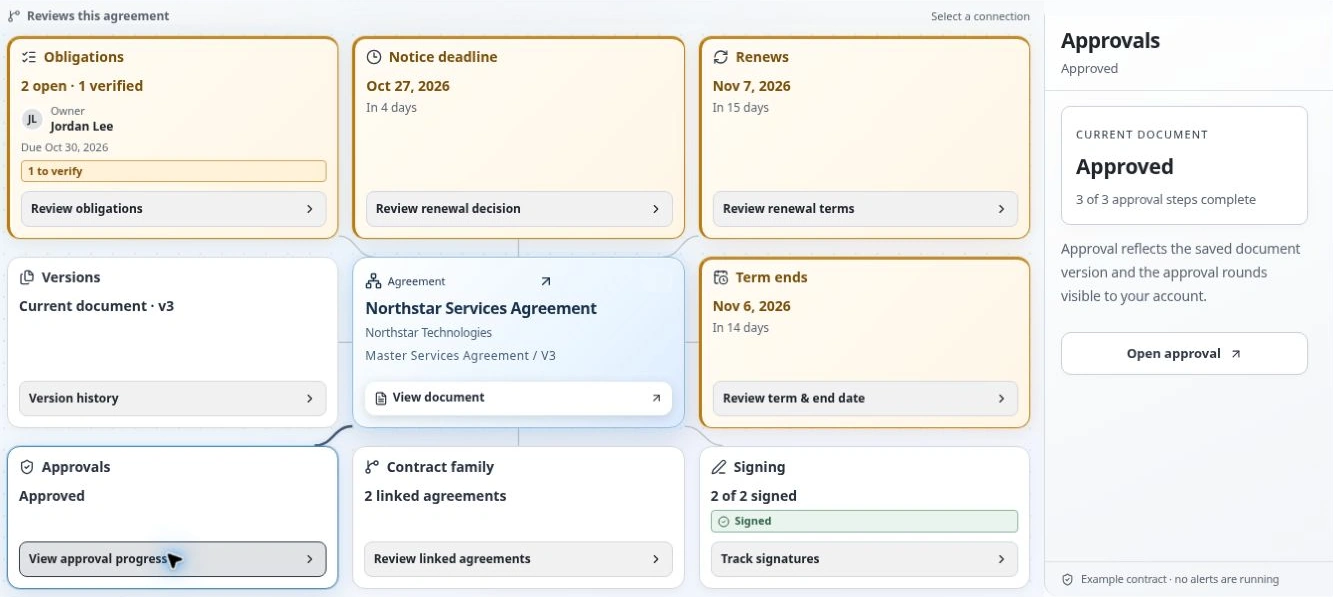 View full-size screenshot
Read the decision dates in an approval history
20 seconds. This edited walkthrough opens the completed approval history of a fictional Northstar agreement and identifies the saved version covered by all three decisions.
Read the video transcript
- 0:00
Open View approval progress on version 3 of the Northstar Services Agreement.
- 0:05
The current document shows Approved with three of three steps complete. Choose Open approval.
- 0:10
The business owner approved on October 27, 2025. Legal approved on October 29.
- 0:15
Final approval followed on October 31. All three decisions apply to version 3 before signing.
Human review and override acceptance test
Run the test cases in a controlled workflow. Record who can act, what they can see and which record demonstrates the final outcome.
Preview a completed worksheet row
- Test case
- Two invoices of $12,400 at separate sites
- AI recommendation
- Flag potential duplicate
- Reviewer evidence
- Two site-specific delivery tickets and purchase orders
- Authorized action
- Release after human verification
- Decision owner
- Accounts payable analyst
- Acceptance evidence
- Ticket IDs and override history
- Follow-up
- Track false-positive reason at next vendor review
Frequently asked questions
Does a human approval button prove human review?
Observe a person doing the job with the evidence available in the queue. Ask them to reverse a mistaken suggestion and trace the result. Record decision authority and review time as well as the existence of the button.
Who handles a supplier challenge?
Assign a named function to receive the question and obtain the underlying records. Identify who can correct the recommendation and who can reverse any action already taken. Give procurement a way to escalate repeated errors during service reviews.
Who sets the review deadline?
Have Finance, the contract owner and the supplier-facing team identify when a missed review becomes costly. Align the internal target with applicable payment obligations and the team’s actual capacity during vacations and month-end.
Should the vendor notify the supplier directly?
Identify that communication as a separate action. If the customer retains authority over supplier relationships, record which actions require its approval and test that the product configuration reflects the agreed boundary.