
Key takeaways
- Identify the contracting entity, facility, equipment, and service owner at intake.
- Distinguish the approval to sign from the department’s decision to release the first work order.
- Keep evidence, reviewer decisions, service reports, and follow-up dates tied to the relevant requirement.
Start with the site and the service the department actually needs
“Maintain our equipment” leaves a contract administrator with a surprising number of ways to prepare the wrong agreement. Ask the requesting department for the facility, asset list, service window, work the vendor may perform, and name of the person who will accept completion. Get the proposed commercial terms and the documents the vendor expects the hospital to sign. A campus nickname is a helpful location description. Finance still needs the right legal entity for the purchase.
For a shared vendor, find out whether an existing master agreement already covers this entity and service. Identify the applicable schedule, amendment, and quote. Ask the department to reconcile the asset list with the vendor’s list before the paperwork circulates. A service quote for three devices and a purchase request for four are a scope question, however neatly the numbers line up in the budget.
Keep a place for unanswered questions. “Vendor proposed remote diagnostics. Access method unconfirmed.” gives the privacy and information security teams a concrete issue to assess. An unexplained yes-or-no answer about data access makes it harder to route the work.
Give each reviewer a specific decision
Procurement can confirm which documents and price schedule belong together. The department and clinical engineering or facilities can verify devices, service windows, access arrangements, and how they will accept completed work. Finance can confirm who funds the commitment. Legal reviews the wording and unresolved exceptions under the hospital’s policy. Actual roles depend on the equipment and how your organization delegates authority.
Send the privacy office a description of the service when a vendor requests system access or may handle protected health information. Explain what the technician would access, the purpose, and which organization receives it. Have the designated privacy and legal reviewers determine what documentation or restrictions apply. A hospital affiliation by itself is too little information to make the call. HHS explains the business associate relationship and the functions that can give rise to it.
Agree on the document version going to signature. If a vendor adds a remote service option after the original review, show reviewers exactly what changed. Keep the approval decision with the revised scope and any conditions. The person scheduling the visit should be able to tell whether that option was authorized.
Create a release record for the first visit
After execution, the contract manager gives the site lead a short, operational record. Include the executed agreement and relevant schedule, effective date, authorized work, vendor contact, unresolved prerequisites, and who can give the go-ahead. Identify any separate access or work-order system where the operational approval must occur. The person preparing the contract record may have no authority to issue a badge or release equipment.
For each prerequisite, capture three facts separately. What does the agreement or approved internal process require? What evidence arrived? Who reviewed it and what did they decide? A file may arrive on time and still refer to a different entity or service period. Specify which prerequisites stop scheduling, which stop entry, and which can be satisfied after the visit. The site owner can then act without interpreting a contract in the loading dock.
Give the vendor one administrative contact for missing material. Record the actual decision and time once the gate is cleared. If a visit must move, preserve the original requested date, new appointment, and reason. The next reviewer can then tell a scheduling delay from a vendor performance issue.
Who moves a hospital service agreement to its first visit?
- Department request
Site lead identifies the asset, service window, and acceptance owner.
- Scope and approvals
Procurement assembles the governing documents. Assigned reviewers resolve terms and access questions.
- Executed agreement
Contract manager records the signed scope, conditions, and site-specific prerequisites.
- Permission to attend
Designated site authority confirms required checks and releases a defined visit.
- Service acceptance
Service owner checks the report against the work order, logs exceptions, and identifies the next action.
Verify evidence at the point where it changes the decision
If the signed agreement calls for current insurance evidence before a visit, keep the source requirement with the vendor’s file. In ContraxAware, the certificate screen can show the source alongside extracted details. Check the named entity, the policy information, and the expiration date against the document. Assign the qualified reviewer to decide whether the evidence satisfies the requirement. Record the reviewer’s decision and follow-up separately from receipt.
Use the walkthrough below for this part of the handoff. A record with extracted fields still leaves a decision for the reviewer. When additional evidence is required, note who requested it and how the decision affects the visit. This same approach works for a service plan or required training confirmation, using the evidence appropriate to that obligation. See the hospital COI tracker and its renewal example.
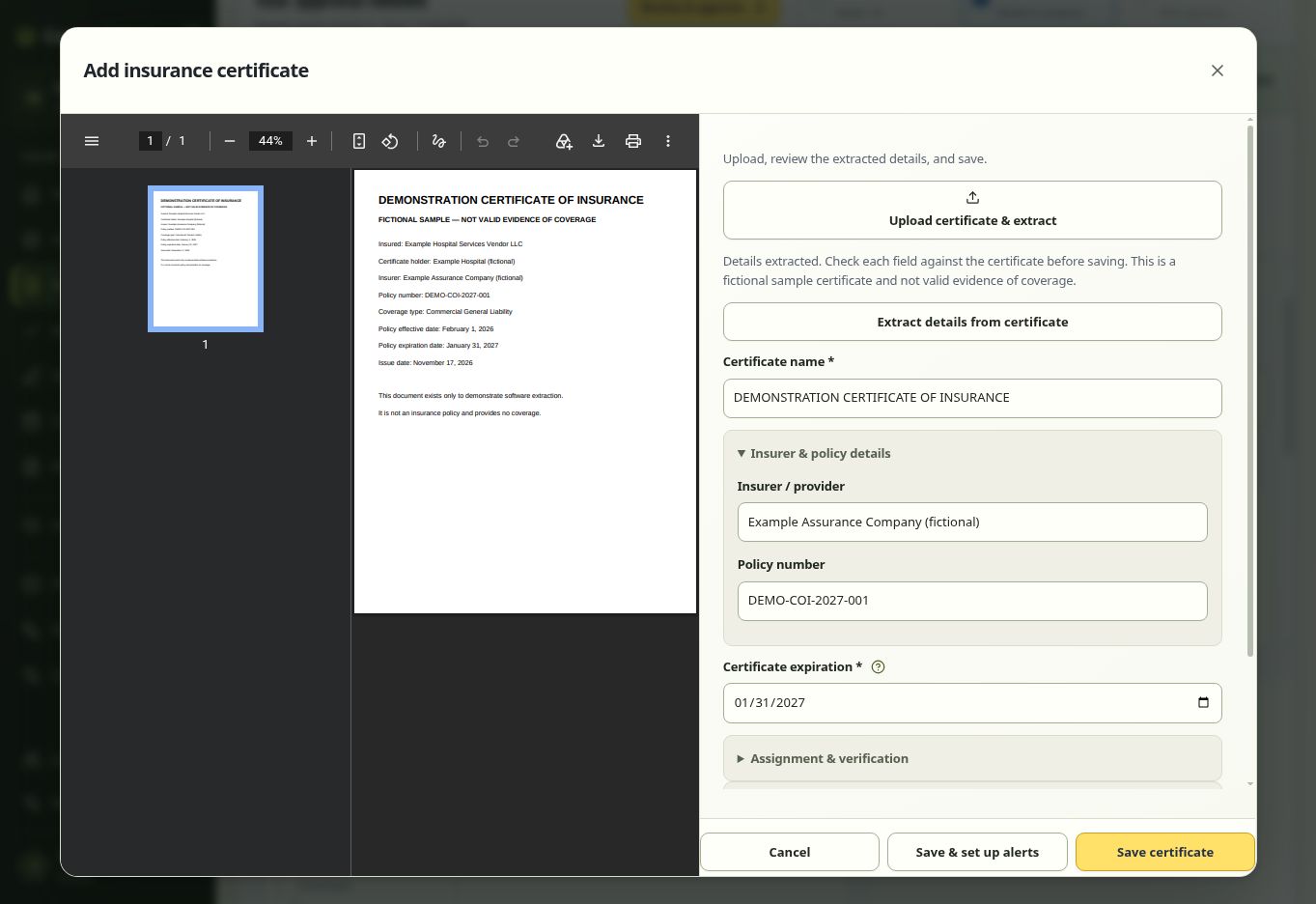 View full-size screenshot
Review a vendor certificate of insurance
60 seconds. An actual ContraxAware walkthrough uses a fictional vendor certificate. Processing time is shortened and the example reminder settings were left unsaved.
Read the video transcript
- 0:00
Choose a PDF or image. ContraxAware stores the original certificate with the agreement.
- 0:10
ContraxAware extracts information from the certificate. The edit shortens processing time.
- 0:20
Compare the original PDF with the extracted insurer, policy number, and expiration date.
- 0:30
Choose more than one recipient or role for a reminder in the unsaved example.
- 0:40
Set one reminder 30 days before expiration and another seven days before. Choose recipients for each.
- 0:50
In-app alerts run during enabled workflow checks when a reviewed plan is saved. No demonstration alerts were saved.
A service agreement for two locations, with one visit ready
In this fictional example, Lake Row Medical Center signs a maintenance agreement for equipment in its East Pavilion and outpatient center. The service schedule covers on-site inspection at both locations. A vendor email also offers remote diagnostics. The executed schedule contains no such authorization, and the access review is still open.
The contract administrator links the executed schedule to both locations. The East Pavilion site lead confirms the equipment IDs, escort, service window, and accepted prerequisites. The designated site authority releases an on-site inspection for that location only. The outpatient center waits for its own escort arrangements. The work order explicitly limits the technician to the agreed on-site scope. A request to enable remote access goes back to the responsible reviewers.
After the East Pavilion visit, the technician supplies a report listing the serviced devices and a follow-up recommendation. Clinical engineering matches the identifiers to the work order and records its acceptance. Procurement keeps the approval reference with the contract record and verifies the invoice against the authorized location and scope. One accepted report closes one visit. The other site still has work outstanding.
What the next contract owner should be able to find
- The signed parent, site-specific schedule, and any amendment that changed the work.
- The named site owner and alternate, approval conditions, required source evidence, and relevant work-order reference.
- The authorized service visit and unresolved exceptions, each with an owner and next decision date.
- The service report, who accepted it, any corrective action, and the next date requiring attention.
Review those records with the site lead after the first visit. An unexplained delay, a second quote, or a missing acceptance signature is often the best clue that the next handoff needs a different field. See how ContraxAware connects an obligation, its owner, and completion evidence.
Hospital vendor first-visit release checklist
Use one row per site-specific requirement. Replace the examples with the signed scope and your hospital’s decisions. Keep the authorization for a visit distinct from the evidence a reviewer received.
Download the worksheet (.xlsx)Frequently asked questions
Who owns the contract after signature?
Assign a contract owner for agreement changes and renewal decisions and a site or service owner for performance. Record who may release visits, who accepts a service report, and who can decide an exception. One person may fill several roles in a smaller organization.
Does every hospital vendor need a business associate agreement?
That depends on the relationship and functions involved. Gather what the vendor does and what information it creates, receives, maintains, transmits, or might be given. Route the facts to the hospital’s privacy or legal office for its determination.
What if a vendor submits a single certificate for multiple sites?
Record which contracting entity and work the certificate identifies. Ask the qualified reviewer to compare it against the signed requirements relevant to each site. Log the outcome and any open questions, so one accepted location does not silently release another.
Should an equipment visit go into the contract management system or the work-order system?
Use the operational system designated by your hospital to release and manage the visit. Keep its reference, responsible owner, acceptance evidence, and any contract exception with the agreement. That lets someone follow either record to the decision they need.