
Key takeaways
- Send counsel and business reviewers the same identifiable baseline with a specific question for each.
- Compare each return against that baseline before combining edits. Record who can decide a conflict.
- After the wording is settled, compare the signing copy with the approved version, including exhibits.
How do you give each reviewer the same starting point?
Say procurement sends version 6 of a maintenance agreement to outside counsel on Tuesday. Finance gets a copy Wednesday. By Thursday there are two returns, one clean PDF and an email approving “the latest.” The first thing the contract manager needs is Tuesday’s actual file. A filename containing the word final supplies surprisingly little evidence.
Keep the outbound draft and its exhibits together in the central contract repository so both reviewers can identify their starting version. In the review request, name the contract, saved version, reviewer, scope and return date. Give counsel a precise question about the exception that triggered the review. Give finance the price schedule and payment proposal it needs to decide. Limit external access to the material the reviewer needs and give the invitation an end date that fits this round.
A useful request might read, “Please review version 6, section 4 and Exhibit B. Flag any change to the event that starts the payment clock and return tracked wording by Thursday. Priya will reconcile responses.” A reviewer joining late can now tell which file to open, what to review and where the decision goes.
How do you compare two reviewers’ redlines against the same draft?
Compare counsel’s return with version 6. Then compare finance’s return with version 6. Comparing only the two returns makes a deletion in one copy look much like an addition in the other. The shared starting point lets you attribute each change to the person who proposed it.
- Keep each return intact. Record the reviewer, received date and baseline. If someone started from an older draft, ask them to confirm which edits they still propose.
- Review the entire package. Look at defined terms, tables, exhibits, cross-references and ordinary text as well as tracked changes. A revised fee table can change the economics without changing a single word of the main agreement.
- Write one line per decision. Identify the clause, proposed wording, reason, decision owner and current disposition. Keep a reviewer’s question open until someone with authority answers it.
A reviewer may return a clean Word document. Preserve both originals and produce a separate comparison. Word’s legal blackline option can generate a third document showing differences between two files. Microsoft’s guide to comparing two Word documents.
Worked example — when do two “net 30” clauses pay?
In this fictional negotiation, West Quay buys equipment maintenance. Version 6 says undisputed charges are due 30 calendar days after receipt of a valid invoice. Outside counsel returns the supplier’s proposed alternative, 30 calendar days after service acceptance, for the team’s decision. Finance returns a revised invoice-dispute procedure and assumes the existing receipt trigger still applies.
Priya, the contract administrator, puts both proposals on the same decision row before accepting either. She picks an actual-looking transaction to test the wording. Operations accepts a repair on July 1. Accounts payable receives a valid invoice on July 8. Counting the following day as day one under these sample assumptions, the proposed dates are July 31 and August 7. Now finance can see the seven-day difference, and operations can explain what counts as acceptance and where it is recorded.
For this example, the finance director has delegated authority to retain the invoice trigger. Counsel makes the dispute procedure consistent with that decision. Priya records the director’s decision, the affected exhibit and the new version number. If the supplier insists on the acceptance trigger, the exception returns to the person authorized to approve that concession. A comment marked “resolved” describes the state of a conversation. The decision row shows which wording survived it.
Who decides each kind of returned change?
| Change in the return | Person who can answer | Record that closes the loop |
|---|---|---|
| A business term moves | Owner of the affected budget or operation | Decision, rationale and accepted wording |
| A clause departs from the approved position | Counsel or the designated exception approver | Approved fallback or written escalation outcome |
| An exhibit changes after approval | Contract owner and appropriate approver | New version, comparison and approval decision |
How do you reconcile returned copies in ContraxAware?
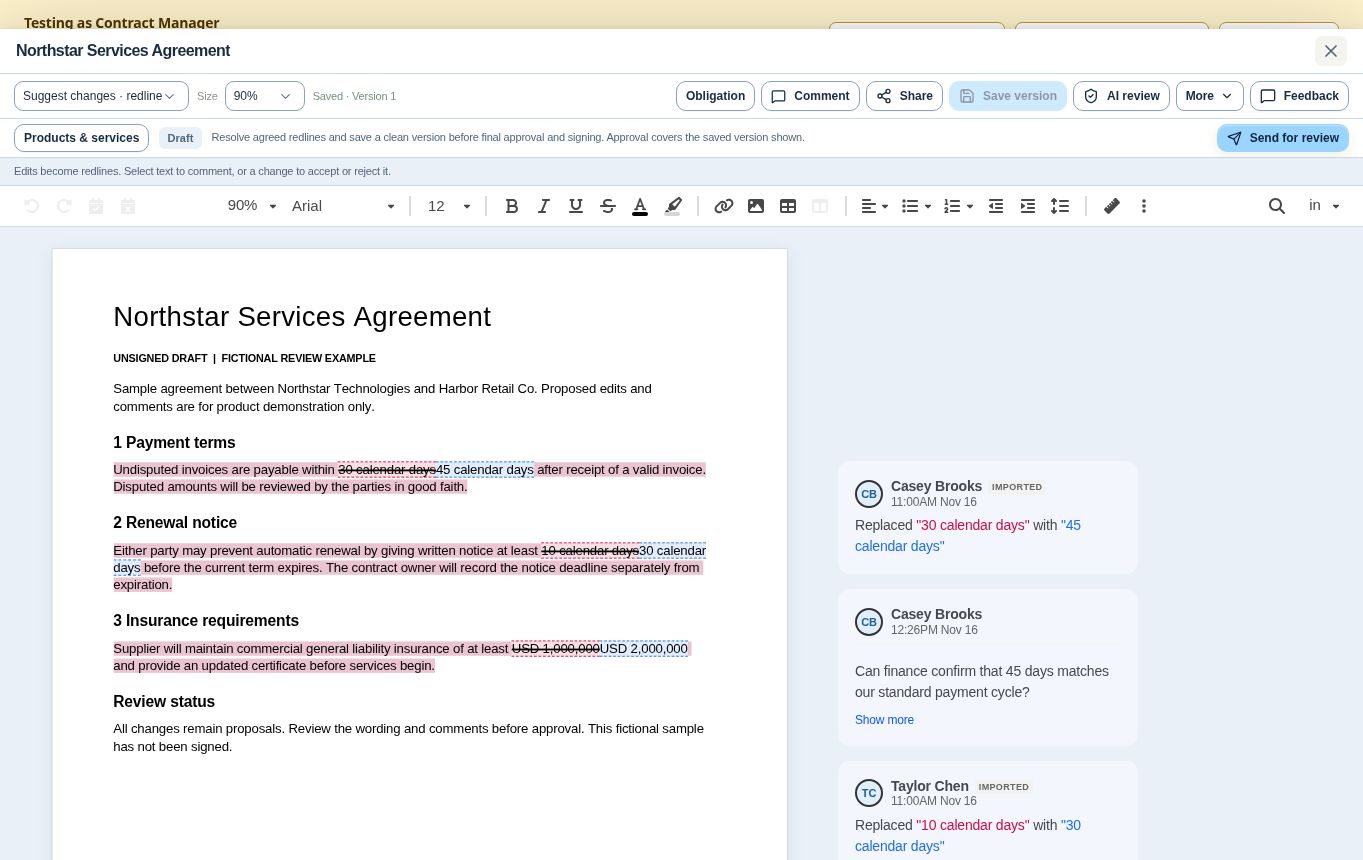
Open an unsigned Word draft in ContraxAware’s editor. Use suggested changes for replacement wording and anchor a comment to the passage when someone needs to answer a question. In the product example below, payment, renewal notice and insurance each have a visible redline. The payment comment gives finance a concrete question to answer before anyone adopts the edit.
Invite the relevant reviewers and choose the access each needs. External reviewers can verify their invited email and work from their saved review copies. Reviews can run in parallel. The contract owner compares the returned proposals and adopts the chosen copy as a new version. That adopted version requires fresh approval. This workflow uses separate saved copies, so assign someone to handle conflicting returns. See the external review and redlining workflow.
 View full-size screenshot
How do you match the approved version to the signing copy?
Before starting approval, read the clean proposed contract from the point of view of the person who will administer it. Does the body use the same payment trigger as the exhibit? If you used contract data extraction to record the payment terms, check the saved trigger against the final wording. Did the parties resolve the comment about disputed invoices? Are the schedules the right revisions? Look at the actual clean output as well as the markup. A correct decision in a worksheet cannot repair wording accidentally left in a signing copy.
Use your contract management system to tie the approval decision to the exact saved version and the person authorized to approve it. Retain the marked return and the comparison where your team can reconstruct the negotiation under its records policy. If a different attachment appears after approval, stop the send and identify what changed. Route the revised package under your approval policy, then verify the clean signing file once more. Review the contract’s version history.
External redline decision log
Use one row per clause decision and reviewer return. Add a second row if the same clause has two proposals. The sample rows belong to the fictional West Quay review. Replace the names, dates, authority and references with your own.
Download the worksheet (.xlsx)Frequently asked questions
Which return should become the master when reviewers disagree?
Start the next draft from the saved baseline or an explicitly chosen return. Apply the authorized decisions, compare the result against the baseline and account for every open item. The last email to arrive has no special status.
What if outside counsel sends comments in an email?
Keep the message with the review record as your policy permits. Record the clause, the question and the reviewer’s answer in the decision log. If the answer changes the deal, reflect it in the saved draft and identify who approved the change.
Can our reviewers co-edit the same live Word draft in ContraxAware?
The documented external review workflow gives each invited reviewer a saved copy. They can review in parallel, and the contract owner reconciles the returns. Plan the round around that handoff.
What if the clean signing PDF differs only in pagination?
Check what caused the difference. Confirm the parties, clauses, exhibits, cross-references and signature blocks match the approved substance. Record which files you checked. If wording or pricing changed, use your approval route for the revised version.