
Key takeaways
- Separate the requested signature date from the event that makes it important.
- Ask whose wording is on the table before asking someone to upload or generate a draft.
- Let a requester identify an unknown and name the person who can resolve it.
Write the first question from the reviewer’s side of the desk
Imagine opening a request called “Vendor agreement.” You have a PDF, a name in Sales, and the word “urgent.” You still have to find out whether the company wants a first draft, a review of the vendor’s terms, a change to an existing deal, or somewhere to file a signed copy. Those are four queues with different first actions.
Give the requester those choices in ordinary business language. For a change to an existing contract, ask for the parent agreement or enough information to find it. For a signed copy, ask who owns performance. For a new company draft, collect the fields that populate the approved template. For outside paper, request the exact file or document set the counterparty expects you to consider.
Try the form on three past requests. Ask the person who actually received each one to say what they did first. A question that would have changed that action earns its place near the top.
Five pieces of information that earn their space
- The parties and the work. Ask which company entity will sign, the name the counterparty uses on the draft, and what is being bought or sold. Request the business owner who can confirm the scope. A helpful account contact may have no authority to commit the budget.
- The document and its status. Capture whose wording it is, which version is current, and whether anyone has already agreed to or signed anything. Invite the order form, exhibit, or parent agreement when it supplies the price or the terms the draft refers to.
- The money and the assumption. Separate one-time charges, recurring charges, and committed term. An intake field labeled “value” can turn $2,000 per month for twelve months into a $2,000 approval. Let Finance confirm the basis it uses.
- The date and its reason. Capture the requested completion date and the business event behind it. “Installation crew booked for June 12” gives the reviewer something to act on. Record who can confirm or move the booking.
- The question that needs a decision. Ask what changed from the last approved deal, what the other side rejected, or which point remains unsettled. Give the requester an “I need help identifying this” option.
Let the answer determine the next question
A department asking for a standard confidentiality agreement has little to say about an implementation budget. A department renewing a software subscription may need to identify the existing agreement, the proposed term, and the notice deadline. Add these questions to the relevant agreement type. Keep the initial choice short enough that an occasional requester can recognize their situation.
Give incomplete requests somewhere to go. If the supplier has not sent its referenced schedule, record who is chasing it and the next follow-up date. The team can begin an initial review and flag which decision must wait. An unanswered data-access question should reach the person who knows the service design. Asking the requester to make a privacy determination encourages confident guesses.
Use the downloadable worksheet to challenge every required field. If no one can name the decision that consumes the answer, make it optional or remove it. If a downstream approver routinely emails for the same missing fact, add a conditional question and try it on the next few requests.
Route the first useful piece of work
| Request selected | Ask for | First owner |
|---|---|---|
| Prepare our draft | Contract type, parties, scope and commercial inputs | Template owner checks merged wording |
| Review their draft | Current file, referenced schedules and business issue | Contract manager identifies reviewers |
| Change an existing deal | Signed parent, proposed change and intended effective date | Contract owner tests impact |
| File a signed copy | Executed copy, effective date and performance owner | Administrator checks the record for activation |
The print order with a missing exhibit
In this fictional example, an events manager requests signature on a $24,000 trade-show printing order. The supplier sent a two-page order form referring to a production and freight exhibit. The requester enters June 12 as the delivery date and June 5 as the requested signature date because the supplier will release the production slot that afternoon.
The intake coordinator can already identify the supplier, the business owner, the document source, and the real consequence of delay. The exhibit is missing. The coordinator assigns the events manager to obtain it and asks Procurement to confirm the slot hold in writing. Legal can review the cancellation paragraph while Finance waits for the delivered price.
The exhibit arrives with an additional $4,800 freight charge. The coordinator records $28,800 as the proposed total, links both documents, and sends Finance the revised decision. The events manager confirms the delivery scope. The contract manager retains the checked version, the confirmation of the slot, and the pricing decision together. The record now explains why the request changed hands twice.
Check the intake answers against the incoming paper
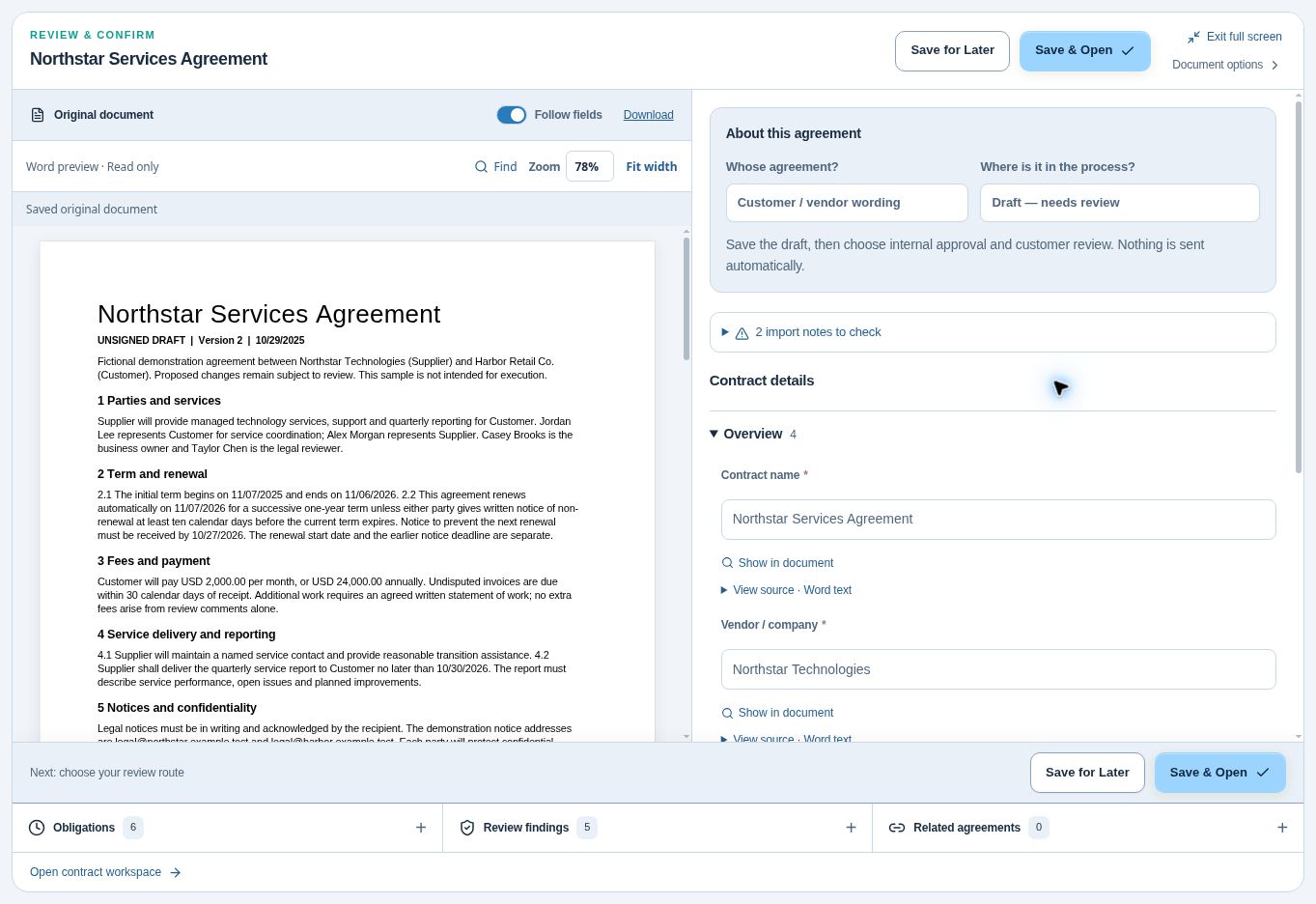
ContraxAware’s contract management software includes a Contract Portal that collects information by agreement type. For company paper, a connected Word template uses the values the requester supplies. Check the generated wording before review. For counterparty paper, bring in the supplied file and compare key fields with the document before choosing a review route. See the intake and template options.
In the sample below, the reviewer can see that the Northstar agreement is an unsigned draft supplied on customer or vendor wording. Compare that with the request. If someone described the same file as a signed renewal, resolve the discrepancy before routing it for activation. The visible file and recorded answer make a useful starting point for that conversation.
After the first month, look at requests that bounced back. Separate requests missing a document from requests awaiting an internal decision. The former may need a better upload prompt. The latter may need a named budget owner. Fixing the field is worthwhile only when it fixes the cause.
 View full-size screenshot
Contract intake field-design worksheet
Use one row per question. Replace the sample decisions, owners, and examples with your own. Review any required field whose answer has no recipient.
Download the worksheet (.xlsx)Frequently asked questions
How many fields should a contract request form have?
Count decisions before counting fields. Start with the requested action, parties, owner, document, commercial basis, and timing. Add conditional questions for a particular contract type when an actual reviewer can explain why they need the answer.
Should Legal reject every incomplete request?
Define which work can start safely. A missing price exhibit can block spend approval while a lawyer reviews the proposed wording. Assign the missing item, the person expected to supply it, and the next follow-up.
What if a requester emails the agreement anyway?
Capture the request once in the same queue and send back its reference and any focused questions. If repeat senders choose email, watch one attempt at the form. They may be missing a suitable request type or an obvious place for attachments.
How do we know the redesign helped?
Compare similar requests before and after the change. Track how many needed a follow-up for the same missing fact, how long it took to assign the first reviewer, and whether staff started choosing an inaccurate answer to get through a required field.