 ContraxAware
Core chapter 7 of 18
Collaborative Authoring, Redlining and Version Control
Manage proposed changes, explain decisions and identify the exact document being approved.
Executive summary
- Identify the decision. A redline proposes different wording. The reviewer must understand its effect and have authority to accept it.
- Preserve the chain. Keep the received draft, proposed changes, adopted version and approval evidence connected. A filename containing “final” proves very little.
- Control the audience. Give each reviewer the access needed for a defined task. Check what an external recipient will receive before sharing.
- Finish with evidence. The signing copy must match the content approved. A material late change returns to the relevant decision owners.
Part A · The Why
Understand the negotiation record
Original wording, proposed change and accepted result
A useful negotiation record separates three things. The starting text establishes what the parties were considering. A proposed change describes a different position. The adopted text shows the outcome after authorized reviewers decide. Keep all three understandable, especially when a return contains many small edits.
For each material change, record its location, business effect, decision owner and disposition. A reviewer should be able to explain why a proposal was accepted, rejected or left open. “Looks fine” is weak evidence when another team later asks whether a requirement was intentional.
The WorldCC Contracting Principles provide an industry reference for more consistent drafting and negotiation. Apply principles within the organization’s approved positions. Neither a general guide nor a colored markup grants an administrator authority to settle legal or commercial risk.
Comments versus binding contract language
A comment can ask a question, explain a concern or recommend wording. The agreement’s text must still carry the intended commitment. If a reviewer writes “supplier will provide monthly reports” in a comment, inspect whether an authorized person actually adds that requirement to the document.
Close the discussion only after its outcome is reflected in the appropriate place. Sometimes the result is a changed clause. Sometimes it is a recorded decision to retain existing wording. Sometimes the answer belongs in an operating instruction rather than in the contract.
Use precise comment language. State the passage, explain the concern and ask for a defined decision. Avoid leaving instructions such as “sort this out” on a draft that another person may reasonably mistake for ready to sign.
Internal discussion, external disclosure and privilege boundaries
Before circulating a document, decide which discussion belongs inside the organization and which can be shared with the other party. Internal negotiation limits, legal advice and personal information may require different treatment from an external wording proposal. Do not assume every comment is suitable for every recipient.
Ask legal counsel to establish the organization’s rules for privileged material and external disclosure. Labels and access restrictions can support that policy, but the presence of a label alone does not settle legal privilege. An administrator’s practical responsibility is to follow the approved sharing process and raise uncertainty.
Inspect the outgoing file or recipient preview. Check comments, tracked changes, attachments and document properties according to policy. Record which version was supplied and to whom, so the next return has a known reference point.
Keep versions and authority clear
One working copy and controlled external exchanges
Name the person responsible for consolidating the working draft. Reviewers can work on separate proposals, but somebody must decide which returned copy becomes the next controlled version. Otherwise two apparently reasonable changes can produce incompatible obligations when combined.
Give each external exchange a reference. Record the sent version, recipient, date and purpose, then connect the returned file to that exchange. Preserve the received file even if its filename is unhelpful. Rename a managed display label if needed without losing the original provenance.
Set an explicit handoff rule. Reviewers should know whether they are commenting on a frozen copy or editing the current working draft. When another version becomes current, tell affected reviewers which review remains valid and which needs to restart.
Named versions, comparison and decision history
Version names should help people distinguish purpose and state. A practice naming pattern might include the agreement identifier, sequence and review purpose. The sequence is a reference, while “draft,” “approved” and “executed” describe different states that need supporting evidence.
Use comparison to identify candidate differences, then read the changed text in context. Formatting, renumbering, moved paragraphs and embedded tables can make a comparison harder to interpret. A short change summary helps reviewers focus, but it cannot replace the document when the wording matters.
Keep the decision history with contract version history. Someone taking over the agreement should be able to identify the current draft, the prior reference and the reasons for material decisions without reconstructing a private email conversation.
Amendments to executed agreements versus draft edits
An unsigned draft can contain proposed changes that have no agreed operational effect yet. After execution, a later change requires the applicable contractual and organizational process. Preserve the signed original and connect any authorized amendment to it rather than silently replacing its historical wording.
An amendment record should explain which agreement it modifies, which provisions change and when the change takes effect. Check whether the original specifies a change procedure, authorized representatives or required form. Legal counsel determines the requirements for the transaction and jurisdiction.
Keep operational data consistent with the effective documents. A proposed higher insurance limit should not become a verified supplier obligation merely because someone redlined it. Equally, an effective amendment should not remain hidden while the portfolio continues to report outdated terms.
A fictional case — the attractive insurance edit
The fictional Northstar Services Agreement concerns managed technology services supplied by Northstar Technologies to Harbor Retail Co. Its practice fee is $2,000 per month, or $24,000 annually. An unsigned draft proposes increasing commercial general liability coverage from $1 million to $2 million.
The higher number may look safer, but it creates several questions. Can the supplier obtain the required coverage? Does the insurance wording match the intended risk? Is the proposed requirement consistent with other provisions? Which person may accept the commercial consequences? An administrator should organize those questions rather than assume the larger number is automatically better.
In this practice case, the contract manager records the proposed change and asks the designated risk reviewer to assess the requirement. Procurement asks whether the supplier’s offer changes. Legal reviews any related wording. The record remains a proposal until the authorized decisions and adopted document establish the result.
The useful output is a short decision record with source clause, proposed limit, reviewers, unresolved evidence and final disposition. The sample screenshot does not establish that the $2 million limit was accepted. Keep the limit marked as proposed until the authorized review establishes the accepted wording.
Review changes in context
Commercial, legal and operational consequences
Read a changed clause through the work it creates. A reporting requirement affects the team that produces the report. A payment change affects finance. A shorter notice period affects the person responsible for renewals. Invite the relevant owner before accepting a promise they will need to perform.
Consider cost and capability together. A supplier may accept a new service commitment only by changing price, staffing or delivery dates. Record that dependency so the legal wording and commercial approval remain aligned. A clause accepted in isolation can become an unfunded operating requirement.
For the Northstar insurance proposal, the administrator’s useful contribution is identifying these affected decisions and assembling evidence. The software can organize the review, while the authorized people determine whether the proposed arrangement is suitable.
Defined terms, cross-references and related clauses
A small edit can have a large reach when it changes a defined term. Follow references to the changed term throughout the agreement and relevant schedules. Check singular and plural forms, exceptions, incorporated exhibits and any order of precedence that legal counsel identifies as relevant.
Read paired provisions together. A service commitment may interact with a remedy, an exclusion or a notice requirement. Changing the commitment while leaving the remedy untouched can produce a result the reviewer did not intend.
After substantial editing, perform a structural pass. Confirm section numbers, schedule references, party names and blanks. Review tables and signature blocks as well as paragraphs. Record unresolved discrepancies as open issues with owners rather than letting formatting cleanup become an excuse to change substance without review.
Escalate outside authority and preserve the reason
Escalation should contain a decision request, not merely an anxious forwarded document. Identify the clause, proposed departure, business reason, affected stakeholders and deadline. State what the current reviewer is authorized to decide and where that authority ends.
Give the next reviewer enough evidence to act. For Northstar, include the proposed insurance wording and the specific question requiring a qualified decision. Avoid presenting a recommendation as accepted policy unless the approved playbook supports it.
Preserve the response and its scope. Approval of one exception does not automatically create a standard position for future contracts. Record whether the decision is limited to this agreement, this counterparty or stated conditions. Bring recurring exceptions to the policy owner for deliberate review.
Part B · The How
Open and review the working draft
Identify the current source and saved version
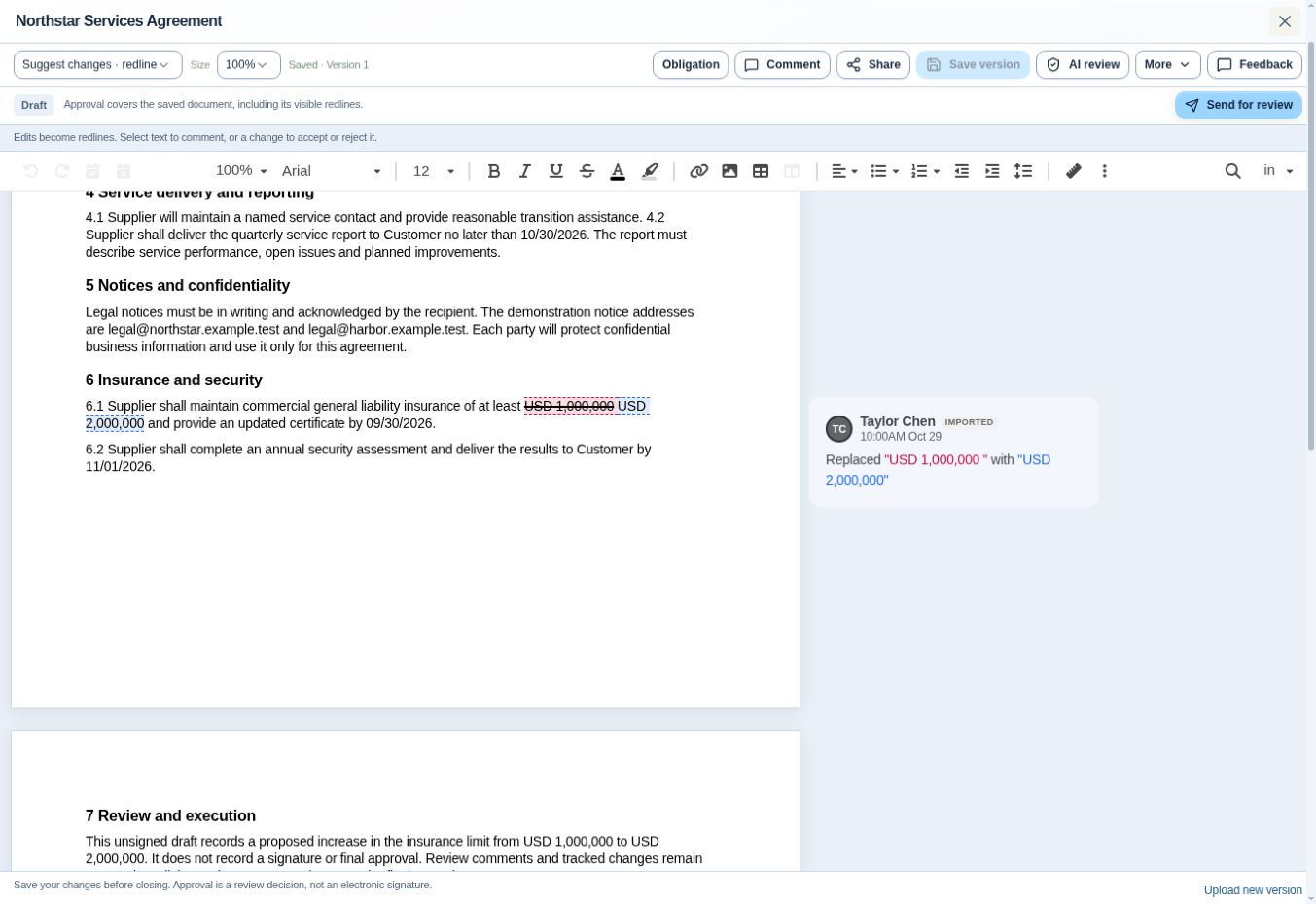
Begin with a training copy you are authorized to use. Identify its agreement title, document state and saved version before editing. In the verified screenshot below, the title is Northstar Services Agreement, the status is Draft, and the editor displays Saved · Version 1.
The editor example and the import-review example elsewhere in the book use different saved versions. Treat each as a separate practice record. In your own review log, write down the version actually visible and preserve the source used for comparison so you can trace any later change.
- Identify the draft. Read the title and state at the top.
- Record the reference. Note the visible saved version in your review log.
- Confirm your task. Decide whether you are inspecting, commenting or authorized to adopt wording.
Inspect the proposed Northstar insurance redline
The screenshot shows Suggest changes · redline near the upper left. In clause 6.1, the deleted amount is USD 1,000,000 and the inserted amount is USD 2,000,000. The surrounding sentence concerns commercial general liability coverage and an updated certificate.
Read the complete clause and the related provisions in your practice document. Record the old wording, proposed wording and the decision needed. Do not create an accepted $2 million obligation from this image. The draft itself says proposed changes remain subject to review.
Use the contract redlining software workflow to inspect the proposal in the product. Explain the change and its unresolved status in your review log. A visible insertion establishes a proposal, not the reviewer’s authority or the counterparty’s agreement.
Distinguish an imported change card from a reviewer comment
On the right, the screenshot shows Taylor Chen, IMPORTED, and a card describing replacement of the insurance amount. That card records an imported change. It does not display a separate free-text explanation of why the new amount is appropriate.
The toolbar includes Comment, which is a different control. If a reviewer needs a decision, write the issue in plain language and connect it to the relevant passage. Keep the change itself and the explanation of its business effect distinguishable.
Ask the designated reviewer to confirm the required limit and identify the approved source for the decision. Leave the question open until that reviewer records an answer. Your practice note should identify the relevant wording, the person responsible for deciding and the evidence still needed.
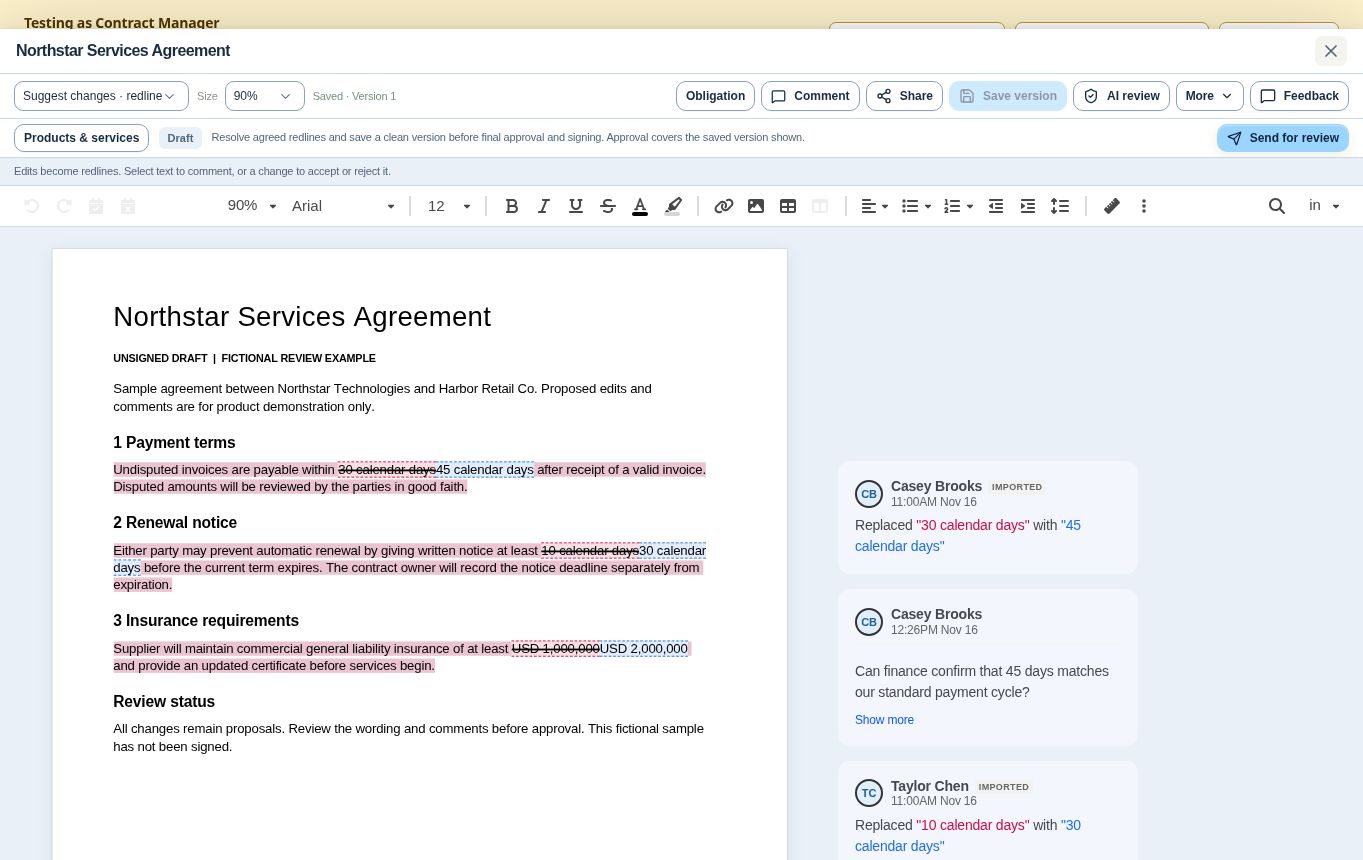
This second screenshot uses a separate fictional review draft. Its payment clause proposes changing 30 calendar days to 45. On the right, Casey Brooks appears beside an IMPORTED replacement card and a separate comment asking finance to confirm whether 45 days matches the standard payment cycle. The first records changed text. The second asks for a business decision.
This draft also proposes a longer renewal notice and higher insurance limit. All remain proposals, and the document explicitly identifies itself as unsigned. Keep its proposed 30-day notice separate from the earlier Northstar deadline exercise. Read the finance comment as an open question and record the answer needed before the payment proposal can be resolved.
Collaborate with controlled access
Share only with appropriate reviewers
Prepare a review roster before using Share. Name each practice reviewer, their responsibility, the information they need and the permitted activity. A reviewer assessing payment terms may need commercial context without unrestricted access to the rest of the repository.
Use Share in your authorized training account and inspect the available access choices. Select the access appropriate to the reviewer’s assignment, then check the recipient’s view using a controlled training account. Confirm the recipient can open the intended saved copy and perform only the permitted review activities. Record the document version and review scope.
Add a clear question or decision note
Select the relevant passage in your training draft and use Comment to prepare a focused question. Enter the question using the controls available in your editor. After saving it, confirm that the comment remains attached to the intended passage and is still present when you reopen the draft.
A useful practice comment reads, “Clause 6.1 proposes $2 million. Please confirm the organization’s approved requirement for this service and whether supporting evidence is needed before acceptance.” Assign the decision through the supported review process and record any due expectation separately.
Check the saved result from the recipient’s perspective. The reviewer should see the relevant passage, the question and enough context to answer. If the passage becomes disconnected after editing, repair the reference rather than leaving a misleading annotation.
Check the collaboration model before inviting reviewers
Parallel review means several people can consider a contract during the same period. It does not by itself establish that their keystrokes appear together in one live document. Explain the actual collaboration model before asking a team to work concurrently.
ContraxAware’s current public editing guidance describes separate saved review copies for parallel external review and identifies shared-document live co-editing as planned. Give each practice reviewer the agreed reference copy and confirm who will consolidate their responses. Check the returned proposals against that reference before adopting changes into the working draft.
For practice, have the contract owner reconcile two returned proposals against the same reference. Record which changes were adopted and which remain unresolved. If both reviewers changed the same clause, make that conflict an explicit decision before creating the next controlled version.
Finalize the review handoff
Accept or reject only within authority
Before adopting a proposed change, check the applicable position and your delegated authority. For a routine correction within policy, record the reason. For an exception, obtain the required decision and preserve its conditions. Convenience is not a substitute for approval.
Select the proposed change in your training draft and inspect the available actions. Choose the action that matches the authorized decision. If the action or its effect is unclear, leave the change unresolved and consult your administrator. After the decision, inspect the complete clause and confirm the intended wording in the saved result.
Avoid bulk acceptance unless every included change has been assessed. A returned document may combine harmless formatting edits with a material commercial change. If you cannot explain the effect of a proposal, leave it unresolved and route it to the appropriate person.
Resolve open comments and save the approved version
Resolve a discussion only after recording its outcome. A closed comment should not be the sole evidence of the accepted wording. Confirm that the document expresses the decision and that any remaining condition is visible to the next reviewer.
The reference toolbar shows Save version in a disabled state and includes Upload new version at the bottom right. Record your current version before making an authorized practice change. After saving through the available editor controls, reopen the draft, check the wording and record the resulting version identifier. Confirm the saved content before handing it to another reviewer.
Recheck the version used by approval and signing
Before using Send for review, compare the intended review copy with the version in your decision log. Confirm the material wording, attachments and unresolved conditions. The reference screen describes approval as covering the saved document, including visible redlines, so reviewers must understand exactly what remains in that copy.
At the later signing handoff, repeat the content check against the approved version. Keep evidence of any changes between approval and preparation for signature. A late edit may require renewed approval even when the document’s filename stays the same.
Practice — build a defensible redline decision
Use a fictional copy of the Northstar services draft. Your task is to prepare the insurance proposal for a decision, not to decide that $2 million is universally appropriate. Keep the $2,000 monthly price unchanged unless the practice scenario expressly introduces a separately labeled variation.
- Identify the source. Record the title, saved version and clause 6.1. Confirm that the practice document remains unsigned.
- Explain the proposal. Describe the increase from $1 million to $2 million and list the people whose decisions are needed.
- Prepare the evidence. Connect the wording, relevant policy position and any requested supplier evidence. Mark missing material as unresolved.
- Write the question. Create a focused review note with a decision owner. Explain what answer would allow the task to proceed.
- Record the outcome. Use a facilitator-supplied practice decision. Adopt or retain wording only within that decision, then verify the saved result.
- Prepare the handoff. Identify the version requiring approval and the conditions that must be satisfied before signature.
Keep the decision attached to the document
Fictional Northstar insurance review. Follow the evidence through distinct document states.
- $1 millionSource draft
Identify the original insurance wording and saved version before reviewing the proposal.
- $2 million proposedProposed change
Record the requested increase, affected decisions and authorized reviewer. The displayed redline is unresolved.
- Exact saved versionApproval handoff
Connect adopted wording to required decisions. Recheck material changes before preparing signature.
- After signingExecution evidence
Retain the completed agreement separately from drafts and connect it to the approved content.
The displayed Northstar redline does not prove acceptance, approval or execution. Each later state needs its own evidence.
Your evidence pack should contain the reference draft, change description, decision request, recorded response and resulting version. Another learner should be able to reconstruct the reasoning without asking you which “final” file you meant. A complete pack also states what has not yet happened, including execution.
For the advanced challenge, a new payment edit arrives after legal approval. It changes invoice timing while the business owner is preparing signature. The strong response pauses the handoff, compares the edit, identifies finance and legal impacts, obtains the required renewed decisions and confirms a new signing copy. Merely keeping the old approval because the price stayed unchanged misses the altered commercial obligation.
Check your work against four observable results. Can you identify the right source, explain the proposed effect, show the authorized decision and trace the version chain? Ask a peer to follow the evidence. If a result is missing, repeat that part of the practice before completing the review.
John's Builder Note
A well-designed review screen should make the agreement, proposed change and next decision easy to find. I would judge a workflow by whether another person can pick it up confidently tomorrow. If they need the original reviewer to explain which file counts or why a clause changed, the process still depends on memory. Keep the decision close to the wording and make the current state explicit.
Questions from the field
Can I accept a change because the counterparty calls it standard?
Treat that statement as context, then check your organization’s position and the clause’s effect. A common term can still be unsuitable for a particular service, entity or risk. Record the authorized decision instead of treating the label “standard” as evidence of acceptance.
Should every returned file become the current version?
Preserve received material, but adopt a new working version deliberately. A returned file may be incomplete, based on an obsolete draft or contain conflicting changes. Identify its relationship to the sent copy and resolve those issues before making it the review reference.
Is a comparison report enough for final approval?
It can focus attention, but reviewers need the document and relevant context. Compare the correct versions, inspect material changes and verify the final wording. The NARA records framework is a useful government information-governance reference for retaining understandable records, not a private-sector approval rule.
Optional knowledge check
Choose your answer, then open the explanation.
Show answer
No; it is a proposed change in the draft. A proposed draft edit and a legally effective amendment are different states and need different evidence.
Show answer
Review its impact and repeat the required approval. Approval applies to the reviewed content. A material change can invalidate the basis of earlier decisions.
Show answer
A clear issue, requested decision and context. Comments should help the responsible reviewer understand and resolve the issue; they do not execute the agreement.