 ContraxAware
Core chapter 1 of 18
Foundations of Contract Management
Describe the lifecycle, assign accountability and identify the first control worth improving.
Executive summary
- Manage the commitment. Keep the agreement, responsible people, decisions, deadlines, and evidence together. A filed document is only the starting point.
- Separate the milestones. Internal approval, signature, effective date, and readiness to perform answer different questions. Record the evidence for each.
- Give every handoff an owner. Someone must accept the next assignment, know when it is due, and have authority to make or escalate the decision.
- Start with one controlled record. Validate its source, assign ownership, and run a daily review before adding complex fields or automation.
If you inherit a folder of contracts and a spreadsheet of dates, start by opening one agreement. Find the current terms, identify the next decision, and name the person responsible. That exercise exposes the operating gaps faster than a discussion about software features.
This chapter teaches you to describe the contract lifecycle, assign accountability, and choose a worthwhile first improvement. You will then build a controlled training record in ContraxAware. No previous contract management experience is required.
Part A · The Why
From stored documents to managed commitments
Contract administration, commercial management and legal advice
Contract management turns an agreement into work that people can perform, monitor, and prove. The document establishes the terms; the operating process connects those terms to decisions. A useful contract management system supports both.
Three responsibilities often overlap:
- Contract administration: Maintain accurate records, coordinate reviews, track deadlines, and preserve evidence.
- Commercial management: Evaluate price, performance, demand, alternatives, and the business effect of proposed changes.
- Legal advice: Interpret legal uncertainty, assess enforceability, and advise on rights, remedies, and legal risk.
An administrator can coordinate all three without having authority to decide all three. A renewal may need a service owner’s recommendation, a budget holder’s approval, and legal review of disputed wording. Write down those boundaries before an urgent request tests them.
Pre-award and post-award responsibilities
Before award, the team establishes what it needs, chooses terms, evaluates risk, and obtains the required decisions. After award, it makes sure the promised work happens and prepares for change, renewal, or exit. Neither responsibility ends when someone uploads a PDF.
Plan the handover before signing. Identify service owners, reporting dates, acceptance criteria, payment dependencies, and insurance requirements while the people who negotiated them are available. If a promise cannot be assigned or measured, resolve that problem before relying on it operationally.
For a supplier agreement, ask who checks delivery. For a customer agreement, ask who ensures your own team meets its commitments. Contract management applies to both sides of the transaction.
Where spreadsheets and shared drives lose context
A spreadsheet can be an effective starting register. Its weakness appears when a row must stay synchronized with amended wording, approval history, responsibilities, and evidence held elsewhere. Someone changes the document while another person continues using the old date.
Shared drives create a related problem: the most recently saved file may be an unsigned draft. A filename containing “final” does not establish which terms govern. The reader needs document status and the relationship between the original agreement and later changes.
Before replacing these tools, identify the missing connections. Typical failures include an owner who left, a notice deadline confused with expiration, or an approval email separated from the version it approved. Buy or configure software to close those gaps.
The lifecycle and the people who own it
Intake, drafting, review, approval and execution
Use a lifecycle that describes observable work. Each stage needs an input, an owner, and evidence that the next stage can begin.
- Intake: Capture the business need, requesting team, counterparty, and intended timing. Resolve missing essentials before routing the request.
- Drafting: Select the appropriate template or identify third-party paper. Preserve the source and the working version.
- Review: Evaluate commercial, legal, operational, and security questions with the appropriate specialists. Record unresolved issues.
- Approval: Obtain the decisions required by your delegation policy against the identified document version.
- Execution: Complete the required signing formalities and preserve the resulting agreement and evidence.
Approval does not automatically authorize someone to sign. A change after approval may require another decision before execution. Legal determines questions about whether an agreement is binding; a software status records the evidence and process your team has established.
Mobilization, performance, change, renewal and exit
Mobilization prepares the team to perform: establish contacts, confirm start conditions, arrange access, and communicate obligations. The signed date, effective date, and service start date may differ. Record what each date means.
During performance, compare delivery with the agreed standard. Keep a supplier’s statement that work is complete separate from your verification that it meets acceptance criteria. Financial approval should follow the applicable terms and your organization’s controls.
Treat changes as controlled decisions. Preserve the proposed wording, required approvals, and resulting signed amendment where applicable. Update the operating record only when the change has the appropriate authority and effect.
Prepare renewal decisions before the notice deadline. Plan exit work too: transition services, recover assets, address data return, settle outstanding items, and identify obligations that continue afterward. Closing a record should not erase unfinished responsibilities.
What must travel with a contract?
At each handoff, give the next person the evidence they need to act.
- RequestIntake and draft
The request owner supplies the business need, parties and source wording.
- DecisionReview and approve
Reviewers resolve exceptions. Authorized approvers identify the version they approved.
- EvidenceSign and activate
The administrator matches the signed copy to the agreement and confirms the handoff.
- ActionPerform and renew
The business owner tracks obligations, decides on renewal and records the outcome.
If an amendment changes the obligation or commercial terms, take that change back through the appropriate review.
RACI roles and the difference between owner and approver
RACI distinguishes four relationships: Responsible performs the task; Accountable owns its outcome; Consulted provides input; Informed receives the result. For this book’s exercises, assign one accountable role to each activity so disagreements have a clear destination.
The contract owner maintains continuity across the relationship. An approver makes a defined decision within delegated authority. The same person may do both, but approval of a document does not silently transfer responsibility for its future renewals.
The following illustrative assignments concern a supplier agreement:
| Activity | Responsible | Accountable | Consulted | Informed |
|---|---|---|---|---|
| Verify record details | Contract administrator | Contract manager | Business owner | Procurement |
| Accept a service deliverable | Service lead | Business owner | Technical specialist | Contract administrator |
| Coordinate renewal decision | Procurement lead | Business owner within delegated authority | Finance and legal as needed | Contract administrator |
Confirm that the named people accept these assignments and have appropriate authority. RACI describes responsibility; it does not grant access, spending authority, or signature authority.
This government framework distinguishes Foundation, Practitioner, and Expert capabilities. Use it as a competency reference, adapting it to your organization rather than treating it as a universal private-sector requirement.
Risk and value before automation
Segment by criticality, complexity and exposure
Contract value helps determine financial oversight, but it cannot carry the whole risk assessment. Consider operational dependency, sensitive information, difficult exit arrangements, unusual obligations, and the consequences of failure. Also consider how quickly the supplier or service could be replaced.
A $24,000 annual technology service could support every store in a retail business. A $200,000 purchase of standard equipment might have readily available substitutes. The smaller agreement can deserve more frequent operational attention even when the larger purchase requires higher financial approval.
Use a small number of risk tiers with written reasons. A single severe exposure may justify specialist review regardless of an otherwise low score. Avoid an average that hides a business-stopping issue beneath several harmless answers.
Baseline cycle time, missed actions and incomplete records
Measure the problem before choosing the fix. Define cycle time precisely: for example, elapsed calendar days from a complete request to the required signatures. Track time waiting for missing information separately so a faster-looking number does not conceal work pushed onto requestors.
Sample records for identifiable gaps: missing owners, unverified dates, unavailable governing documents, and overdue decisions. Record the sample size and selection method. Twenty conveniently selected agreements do not establish the condition of an entire portfolio.
Mini case study — Harbor Retail Co. Harbor is a fictional 350-person retailer with 120 supplier agreements. In this teaching scenario, an administrator reviews 20 active records: eight lack a named renewal owner and six contain an expiration date without a verified notice deadline. The groups overlap.
Harbor starts with those 20 records. It assigns owners, checks the source wording, and schedules the next decision early enough for review and notice delivery. A second person checks the corrected records against the documents.
At the follow-up, all 20 have an accepted owner; 18 have verified notice requirements and two remain flagged for legal clarification. That result demonstrates better control of the pilot records. It does not prove savings, portfolio-wide completeness, or fewer missed renewals until later evidence supports those claims.
Decide what needs human judgment and escalation
Automate a defined rule only after you know its source, owner, and exception path. Sending a reminder on a verified date is different from deciding whether disputed wording permits termination. Keep the second decision with someone authorized to make it.
An escalation should state the issue, business consequence, decision needed, supporting source, and latest useful response date. “Please review urgently” leaves the recipient to reconstruct the work. If the first reviewer is unavailable, identify a backup rather than letting the request disappear.
WorldCC offers a useful reference for drafting and negotiation consistency. Its principles preserve room for professional judgment and local requirements; full access requires membership, while non-members can request a sample.
Part B · The How
We will apply these controls to the fictional Northstar Services Agreement, between Northstar Technologies and Harbor Retail Co. We’ll use ContraxAware’s contract management software to follow the agreement through each handoff. I founded ContraxAware. You can practice the same checks in the system your team uses.
Use a training workspace and a fictional PDF or Word document. The book’s sample is an unsigned draft with historical dates, not an agreement to activate or send to real counterparties. Screen labels and available actions can vary with configuration and permissions.
Orient the team in ContraxAware
Locate the portfolio, contract record and source document
First, establish the route between the list of agreements and the underlying document. Keeping that route short matters because administrators will use it repeatedly.
- Find the agreement. Open the contract portfolio and search for “Northstar.” If the training record does not exist, complete the creation exercise below, then return here.
- Open the record. Confirm the counterparty and agreement title before reviewing dates or actions.
- Open the source. Locate the attached agreement and confirm that it is the intended draft. Check for related files that could affect interpretation.
Give another learner the agreement name and ask them to retrieve the same document. If they cannot identify which version to use, improve the naming and status information before adding more records.
Identify owner, status, next action and key dates
Read the record as someone covering for an absent colleague. You should be able to identify the owner, the current stage, the action required next, and the deadline driving that action.
For the training draft, use Casey Brooks as the fictional business owner. The next decision is review of the proposed terms. Do not describe it as an active service simply because the imported document contains effective and renewal dates.
When information is missing, assign someone to resolve it and record a follow-up date. Avoid filling uncertainty with a plausible value. An openly unresolved field is safer than a confident-looking date nobody has checked.
Use Contract Map to connect related work
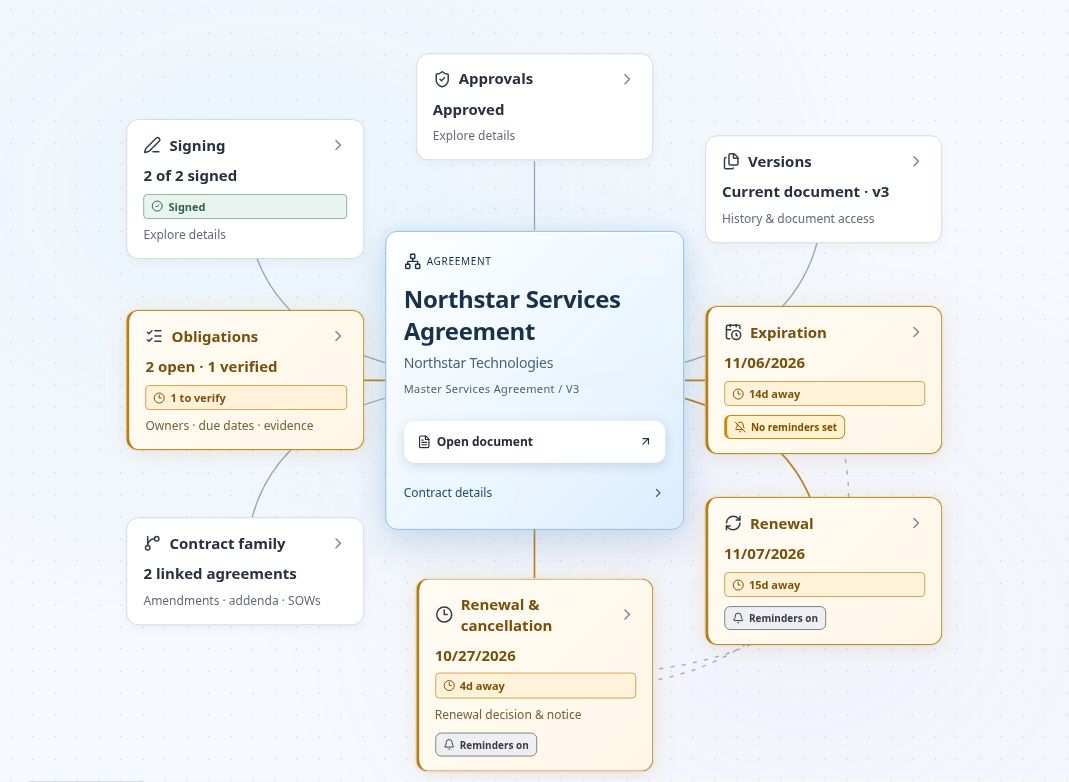
Open Contract Map for the agreement and inspect its connected documents, dates, approvals, signatures, and obligations. Select a relevant connection to open the supporting detail. Use the map to understand dependencies before deciding where to act.
For Northstar, compare the notice date with the renewal date, then inspect an associated obligation. Explain what the responsible person must do and which source supports it. If a relationship or date looks wrong, investigate it before using it in a decision.
The map helps you navigate the record; it does not settle disputed wording. When Contract Lens provides matching text or an AI explanation, read the cited passage and surrounding terms yourself.
Build a first controlled record
Choose a contract type and responsible department
Use the import workflow to bring in the fictional agreement. Select or confirm the contract type and responsible department during review. Use your training workspace’s appropriate services category; the Northstar example concerns managed technology services, not a confirmed SaaS subscription.
Choose the department that owns the business relationship. The administrator entering the file may work elsewhere. Assign Casey as the business owner and identify who coordinates the review.
Keep the initial configuration small. Require information that drives access, routing, deadlines, or a real management decision. Leave optional descriptive fields for later rather than forcing users to invent answers to finish entry.
Check the participants’ access for this training record. Someone who needs to review one agreement does not automatically need administrative control over the workspace.
Attach a fictional source document and validate key facts
Verify an imported agreement
Start on REVIEW & CONFIRM for the Northstar Services Agreement. The Original document is on the left. The proposed contract record is on the right.
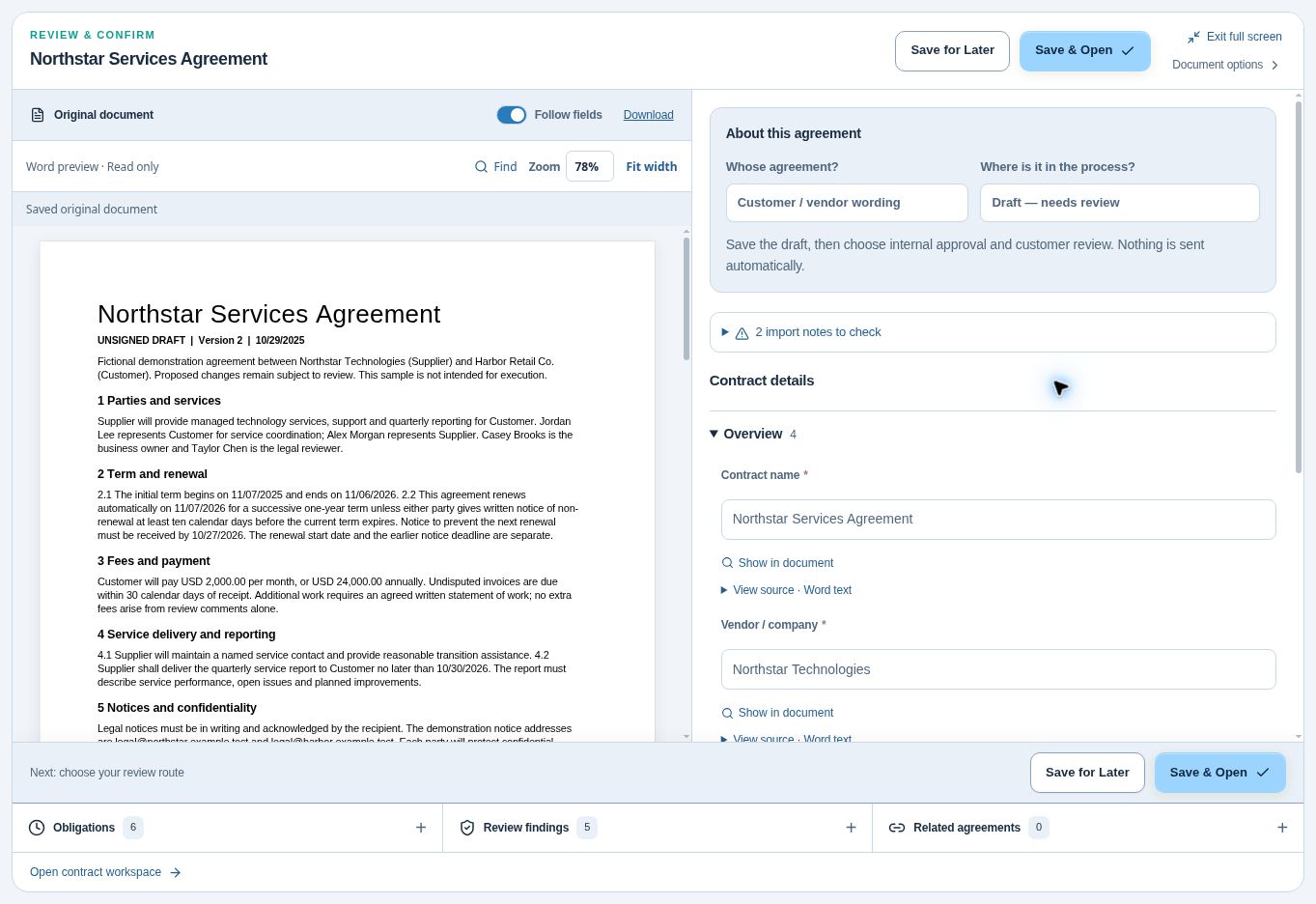
- In About this agreement, find Whose agreement? and leave Customer / vendor wording selected for this sample.
- Under Where is it in the process?, leave Draft — needs review selected. The document is marked “UNSIGNED DRAFT.”
Why this matters. The draft already contains dates and fees. Those details alone do not establish that anyone signed it.
- Under Contract details, look in Overview. Compare Contract name * with the title on the left. Both read “Northstar Services Agreement.”
- Compare Vendor / company * with the opening sentence on the left. Northstar Technologies is the supplier. Harbor Retail Co. is the customer. If you need the source for this field, click Show in document beneath it.
- Click 2 import notes to check. Read each note against the original before deciding whether the draft is ready to save.
- If a note still needs investigation, click Save for Later. Once you have checked the draft and are ready to continue, click Save & Open. Choose one.
Why this matters. Saving the draft sends nothing automatically. Choosing the review route is a separate decision.
The draft quotes $2,000 per month, or $24,000 for twelve months. Preserve both the amount and billing frequency. A separate editing example proposes increasing insurance from $1 million to $2 million. That proposed change still needs review.
Distinguish a draft, an approved draft and an executed contract
Practice explaining the difference before practicing the buttons:
- Draft: Terms are being prepared or reviewed. Outstanding questions remain visible.
- Approved draft: Required internal decisions cover the identified version. Signing still requires the appropriate authority and process.
- Executed contract: The applicable signing requirements have been completed and the resulting evidence is retained. Effective dates and activation conditions still need attention.
Keep Northstar in draft for this exercise. Record the insurance question for the authorized reviewer rather than promoting the record to make the screen look complete. Later chapters will work through approval and signature with matching training states.
For an already signed import, locate the signed evidence and applicable amendments before classifying it accordingly. A record’s status should describe what the team can substantiate.
Run a simple daily operating routine
Review due work and unresolved exceptions
Start each day with approaching decisions, overdue work, and unresolved questions. Review the available portfolio, date, and task views for your role. Sort attention by the consequence of delay and the time needed to respond.
Check both upcoming deadlines and items without a reliable date or owner. A neatly sorted calendar can hide incomplete records. For each exception, establish who will investigate it and when you will follow up.
Use historical Northstar dates only as teaching data. If you demonstrate reminder delivery, create a separately labeled exercise deadline in the training environment and use approved test recipients. Keep the source agreement’s dates unchanged.
Open the source before acting on a field
Before recommending renewal or issuing a notice, open the governing wording and relevant amendments. Confirm the required action, responsible party, delivery method, and deadline. A reminder helps you start the work; it does not establish that notice has been validly delivered.
For Northstar, explain why a reminder before 11/06/2026 could still be too late for a 10/27/2026 receipt requirement. Work backward from the earlier date to allow decision and delivery time. Chapter 4 develops that calculation and its exceptions.
One renewal clause, three dates
Read section 2 of the Northstar draft. Which date controls the decision to give notice?
- Oct 27, 2026Notice must arrive
Last day for the other party to receive written nonrenewal notice.
- Nov 6, 2026Current term ends
The expiration date falls ten calendar days after the notice cutoff.
- Nov 7, 2026Renewed term begins
The next one-year term starts if the agreement renews.
Work backward from October 27 to leave time to decide, deliver the notice and confirm receipt. All dates come from the fictional Northstar draft.
Assign and record the next decision
Close each review by recording a specific assignment in the record’s task or note area, as available. Include an owner, due date, source reference, and expected output. Confirm that the assignee can see the relevant information.
For Northstar, a useful assignment is: “Casey to confirm the proposed service scope and budget; authorized reviewer to resolve the insurance change before approval.” Give each decision its own owner and deadline. Record the decision and supporting evidence when it is made, then identify the next handoff.
John's Builder Note
My design rule is simple: every required field and extra click must earn its place by helping someone make a decision or complete necessary work. If the team cannot explain why it needs a field, I want it challenged before it becomes mandatory.
Apply that discipline to ownership too. Establish who acts, what they need, and how they know they have finished. Then automate the repeatable steps. A complicated workflow cannot repair an assignment that nobody has accepted.
Test the setup with the colleague who will use it occasionally. Watch where they hesitate, fix the unclear label or missing context, and test again. Ease of use is part of making the control dependable.
Practice and deeper judgment
Draw a one-page lifecycle for Northstar and add the responsible and accountable roles. Explain three handoffs: administrator to reviewer, approved draft to authorized signer, and completed signing to business owner. For each, identify the document, decision, and evidence the recipient needs.
Then compare the $24,000 technology service with the $200,000 replaceable equipment purchase. Identify which deserves closer operational monitoring and why. Keep financial approval thresholds separate from your assessment of business continuity risk.
Questions from the field
Can I start with a spreadsheet?
Yes. Give each agreement a link to the source, an owner, a next action and a due date. Hand one row to a colleague. Can they find the right document and tell you who needs to act by when?
How early should the first renewal reminder fire?
Work backward from the contractual notice deadline. Suppose Northstar needs five calendar days for an internal decision and two for delivery. Starting October 20 gives the team those seven days before the October 27 receipt deadline. Adjust the buffer for the actual review and delivery process.
What if an extracted value disagrees with the document?
Read the clause and any amendment that changes it. If the wording settles the question, correct the record and note the source. If it is still ambiguous, give a named reviewer the question before anyone uses that field to schedule a notice or approve a payment.
Optional knowledge check
Choose your answer, then open the explanation.
Show answer
An accountable owner and decision process. Storage preserves the document; ownership and a decision process make the commitment manageable.
Show answer
Required parties complete the agreed signing process. Approval and execution are different events. Confirm the required signatures and executed evidence.
Show answer
Observed risk and a measurable process gap. Start with an evidenced business problem and a baseline so the team can evaluate improvement.