 ContraxAware
Core chapter 5 of 18
Contract Intake and Request Workflows
Collect enough information to route a request while keeping the requestor experience simple.
Executive summary
- Start with what the colleague needs. Preparing a company agreement, reviewing somebody else’s draft, and filing a signed copy each require a different first action.
- Give every question a job. Ask who will use the answer, what they will decide, and whether the requestor can reasonably know it yet.
- Make responsibility visible. A submitted form needs a receiving person, a next action, and a way for the requestor to follow up on the same request.
- Count waiting separately. A request can sit with a business owner for a day while a reviewer spends twenty minutes working on it. Both facts matter when you set service expectations.
Part A · The Why
Design an accessible front door
Who may request what and for which entity
A warehouse manager writes, “Can someone look at this before Tuesday?” They know which facility needs the service and what happens if it starts late. They may have no idea which lawyer handles the agreement or which of three subsidiaries operates the facility. A workable intake process accepts the facts the manager knows and gives someone responsibility for finding the rest.
Draw two columns on paper. In the first, list the people who can describe a need. In the second, name who can commit the business, approve spend, or decide a legal exception. A receptionist may be a perfectly good requestor for a copier maintenance agreement. That submission gives Procurement a job to do. It does not grant the receptionist authority to buy the copier service.
Give a colleague who works for multiple entities a useful choice such as the operating location and an “unsure” response. Name the person who will translate that answer into the contracting entity. Resolve it before a draft goes outside. This protects the employee from guessing and the organization from naming the wrong party.
New agreement, third-party paper and approved template paths
“New contract” can describe three different jobs. Ask what the person has in hand. An existing supplier draft needs its original wording preserved. A colleague asking for company paper needs a suitable template and business variables. A colleague returning a signed copy needs a filing and verification route. The first useful deliverable might be a reviewed draft, a newly prepared document, or a record ready for post-award checks.
Some requests fall between those descriptions. A supplier may present its own order form under your existing master agreement. Capture both the incoming document and the identity of the governing agreement. A replacement purchase may depend on an older nonrenewal deadline. A person asking for a price change may actually need an amendment. Give a reviewer the uncertainty to resolve, along with the original files and explanation.
Business purpose, urgency and source documents
Ask for the intended result in one sentence. “Keep the four distribution centers connected while we move the billing service” tells a reviewer more than “IT contract.” Ask for the date by which a particular event must happen and the source of that date. A preferred kickoff, a promised decision, and a binding deadline call for different responses.
Record the consequence if the date moves. A missed internal budget meeting may require a rescheduled review. A supplier’s offer expiring on Friday may require someone to seek an extension. In neither case can a requestor establish the legal meaning of the date by choosing “urgent.” Preserve the attachment or correspondence that gave rise to it and identify the business contact who can confirm the fact.
Ask only what changes the next decision
Required versus conditional questions
For each proposed field, name a consumer and finish the sentence “With that answer, this person will decide whether to …” An operating entity changes the parties. An external draft changes the starting document. The date of the last legal approval probably cannot be known before the first draft exists. Move that question to the stage at which someone can answer it.
Give your intake worksheet a column for the question, the person who knows, the stage when it is needed, its destination and the consequence of an unknown answer. Suppose Finance requests an exact annual value. For a fixed-price supplier draft, the fee and frequency may already be printed on page two. For planned consulting work billed by the hour, a range plus the approved budget owner may be the most accurate first answer. Preserve the difference between an estimate and an agreed price.
Group related questions when the same person has the answers available. Ask for the third-party file only from someone who has one. Use short guidance or a separate form variant if your setup cannot conditionally reveal a field. The design goal is fewer irrelevant decisions for the person holding the request.
Risk indicators and triage criteria
Use observable questions. A project lead can answer “Will supplier staff sign in to one of our systems?” even if they cannot judge whether the contract carries material information-security risk. A buyer may know that subcontractors will work at a site. The specialist who owns security or insurance decides what evidence that answer requires.
Test the boundaries with a pair of almost identical requests. Both buy translation work for the same price. One contains already published marketing copy. The second contains an unpublished personnel investigation. If spend is the sole sorting rule, both reach the same desk with the same checks. A short content or access question gives the triage owner a reason to involve the appropriate reviewer.
What did the requestor bring?
Start with the document in hand. Match the first action to its source and state.
- Prepare company paperNo draft yet
Identify the entity, scope, owner and suitable approved template before preparing a draft.
- Assign reviewSupplier’s unsigned draft
Keep the original wording. Identify any access or risk question that calls for a specialist.
- Verify executionAlready signed copy
Check the signed evidence, effective terms and responsible owner before putting deadlines to work.
- Clarify the sourceUnclear or mixed packet
Name the missing document or answer, its owner and the follow-up time. Keep one request reference.
An urgent date affects how quickly the triage owner responds. The source and the review policy still determine the route.
Sensitive data minimization and clear field help
“What type of information will the supplier handle?” can be answered with categories. Provide examples such as business contact details, employee information, or no access expected. An intake team can decide who should review the work without collecting lists of people, account details, or sample records in a broadly visible form.
Put a help sentence beside the question that causes hesitation. Try “Name the person here who will decide whether the service met our needs.” An internal acronym for business owner may be shorter and far harder to answer. Test the question with a person using a keyboard and, where available, with someone who uses assistive technology. They should be able to identify the field, its purpose and how to correct a mistake. The W3C form instructions tutorial explains how visible instructions and labels work together. Form instructions from W3C
Manage expectations and handoffs
Service targets and prioritization rules
Promise what the receiving team controls. For a pilot you might agree to acknowledge an eligible request by the next business day and identify the first reviewer after essential information arrives. A signature date also depends on authorized decision makers, negotiations, and the other party. Establish who can expedite the first review and how that person will handle competing assignments.
Define where the clock starts. Is it when someone emails Procurement, when the request reaches the agreed route, or when the minimum facts arrive? You may need two observations. Elapsed time from the first request tells you what the business experiences. Elapsed time from a complete packet tells you how the receiving team performs. Display the starting event next to each measure so colleagues can interpret the number fairly.
Incomplete requests and clarification loops
Return a question a person can answer in one pass. “More context needed” sends somebody back to guess what bothered the reviewer. “The attachment names Harbor Retail Co. as customer. Please confirm which Harbor team will own this service and whether supplier staff will access its systems” identifies the gap, the reason for it and the expected answer.
Keep the original request alive while you wait. Record who owes the information and when the receiving person will check again. If three departments each need a fact, let one person collect the questions before responding. Enough information to begin a security assessment may already be available even while Procurement waits for a quantity. Mark which part can move and which depends on the missing answer.
Status visibility and ownership without email chasing
Write each status as a promise about the work. An accepted request means a named team has taken responsibility for the next action. A request waiting for the requestor means that the question and its recipient are identifiable. Two people viewing the same status should be able to explain who moves next and what evidence will close the step.
Separate a request’s progress from the agreement’s legal or operational state. A manager can finish intake on an unsigned third-party draft. Finishing that intake has no bearing on whether the parties have agreed the language. Keep the requester’s progress information proportionate. They may need to know that a specialist has the draft and when to expect an update while a privileged discussion remains within the authorized team.
A fictional case about the cost of a missing question
Redfern Parts supplies packaging equipment to regional manufacturers. Its manufacturing managers regularly buy installation services. Every submission asked for an exact procurement code, but nobody asked whether a technician would enter a production area. Procurement sometimes had to pause a nearly complete review to identify the site and responsible safety contact.
For one month the intake owner counted 30 distinct installation requests. Eighteen were ready for assignment without another conversation. Of the twelve returns, seven lacked a location or the site contact. She moved the procurement-code lookup to the buyer, added a plain-language site question, and named a backup intake owner for days the buyer was away. Local safety staff remained responsible for deciding their review requirements.
The following comparable batch also had 30 requests. Twenty-four could be assigned on the first pass, up from 18. That is a change from 60% to 80%, or 20 percentage points. The owner still examined the six returns. Two concerned an unfamiliar site, and four had unrelated issues. She retained the site question and asked for a clearer way to identify an unfamiliar location. These invented numbers illustrate what to count when trying a change.
Part B · The How
Design intake around the first decision someone must make. If your contract management system asks for a supplier’s insurance details before anyone knows whether the request involves a supplier, move that question to the relevant branch of the form.
Configure the request experience
Select the contract type and suitable form
Begin with a practice department and two representative jobs. Use a supplier services agreement on incoming paper and a request for a routine NDA using company wording. Write down the correct next owner and the minimum evidence for each. In ContraxAware, use the department’s approved agreement types and forms to represent these two jobs. Names used for locally configured types are up to the organization.
- For supplier services, give the receiving contract manager the supplier draft, the business purpose, the intended entity, the owner and the requested timing.
- For company paper, connect the appropriate approved starting template and collect the values it actually consumes.
- Test each form with a member of the intended department. Check which agreement types the person can choose and what they can retrieve after submission.
The product’s contract request portal connects guided intake to the receiving process. Decide what is appropriate for each request before exposing a long catalog of possible types.
Arrange essential questions and conditional details
Put the requestor’s task first. For the supplier exercise, describe the work, identify the other party, and establish which document is supplied. Then ask who owns the service and whether an event creates a genuine deadline. Place specialist questions with the team that can evaluate them. A visible option to report uncertainty gives the receiving person a meaningful exception to handle.
Try two dry runs against the same configuration. In one, the supplier will have system access. In the other, it only delivers a printed maintenance manual. Confirm that the first response reaches a person capable of deciding the access review, while the second produces a usable request without unnecessary technical details. Document any manual referral the manager must make. A referral policy needs an owner even when nobody has automated it.
Provide clear labels and supporting-document instructions
Write file guidance in the terms a vendor or sales colleague uses. For this exercise, “Attach the supplier’s latest draft, including referenced schedules you actually received” is enough. Add a place to identify a missing exhibit. A requestor should be able to report “Exhibit B was referenced but never supplied” without inventing a document or silently treating the packet as complete.
Replace any example that looks real with a recognizable fictional company or address. Read the finished form aloud, remove two questions that ask the same thing, and check how a learner can correct an empty required answer. Save one successful test request for comparison after future form changes. The relevant form should let you find both the input that mattered and the resulting information the manager received.
Submit as a department requestor
Start a Northstar third-party-paper request
Use the Northstar Services Agreement in your practice set. In the requestor role, describe the need as a review of supplier-provided managed technology services for Harbor Retail Co. In Contract Portal, select Request contract, then I have a file to upload. Choose the agreement type that best describes the file. This agreement starts with an existing unsigned supplier document. The company-template route would create another starting document and obscure which wording needs attention.
Identify Casey Brooks as the business owner in this example, Northstar Technologies as supplier, and Harbor Retail Co. as customer. Jordan Lee coordinates the service for Harbor. These roles answer different questions. A service contact can explain an outage or propose a kickoff date while the business owner decides whether the service meets the department’s needs. Keep the requestor’s identity separate if a third person is submitting the paperwork.
Check required fields and attach the source
Use the saved fictional source your practice workspace permits. Attach the original draft in the supported format and check its title and version. If the form asks for value, record USD 2,000 per month or USD 24,000 per year with the appropriate period. Copy the language actually asked for. Entering 24,000 into a monthly field would multiply the annual value by twelve.
Use the import-review capture as a separate manager-side inspection exercise. In REVIEW & CONFIRM, find About this agreement. Check that Whose agreement? shows Customer / vendor wording and Where is it in the process? shows Draft — needs review. Under Overview, compare Vendor / company with the supplier in the Original document. If you need the associated source, click Show in document beneath that field.
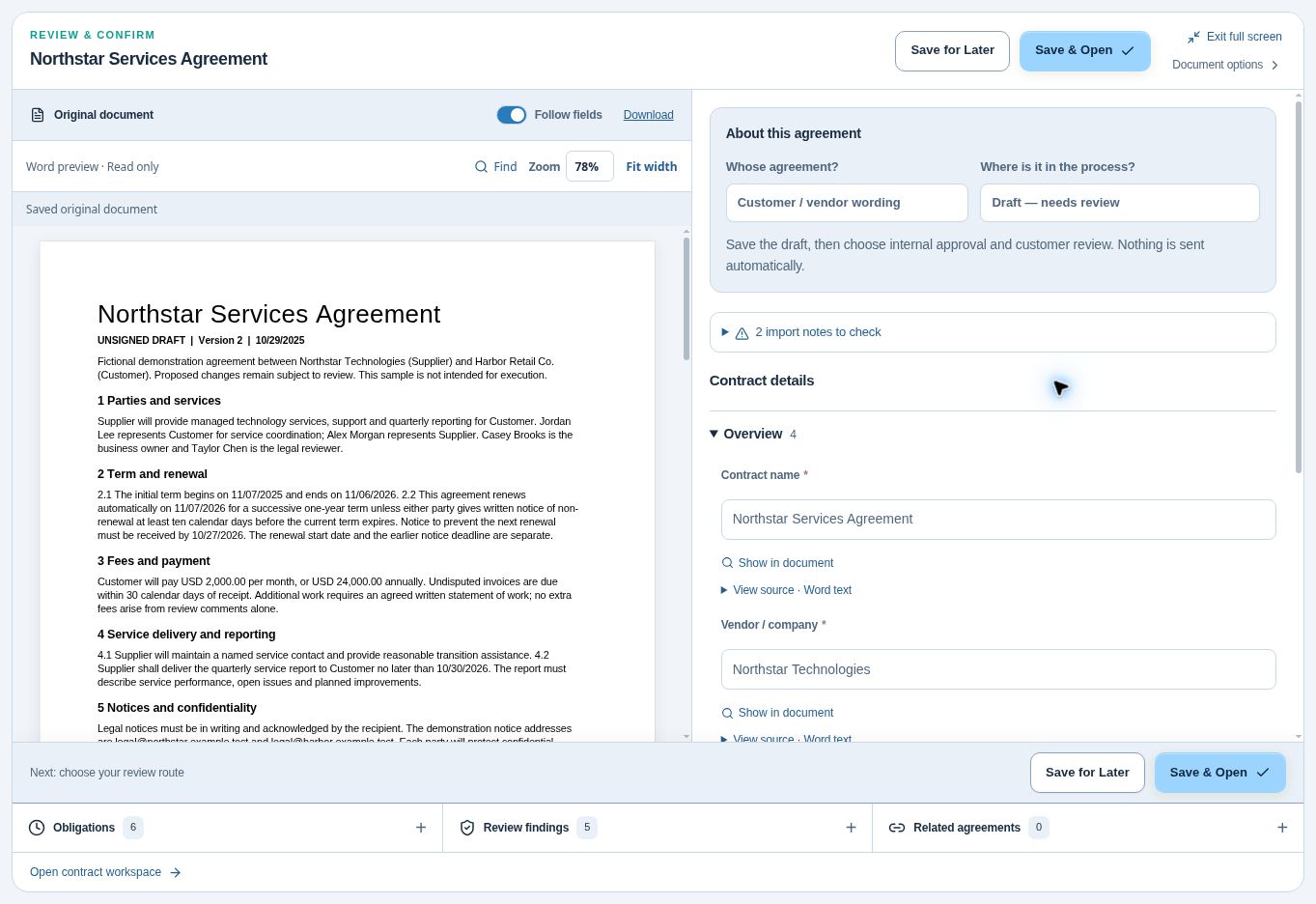
Confirm the visible status and responsible person
Select Check my request and read the summary. Choose Edit answers to correct it or Send to contract team to submit. Check for Submitted and the request reference before leaving the page. Write down the reference or title that allows the receiving person to identify it. Ask the receiving contract manager to locate that same item and read back the supplier, the purpose, and the action they own. That simple test proves the handoff better than a second copy sent by email.
Check what the requestor can see about progress in their assigned view. If the owner’s name is visible only to the manager, give the requestor a role or contact route that can answer a status question. Verify that the colleague can distinguish a successfully submitted request from authorization to sign or begin work. An answer such as “Procurement has my draft and will contact me about missing information” is an effective first outcome.
Practice the company-agreement route
For a second exercise, select Use a company agreement, then Master services agreement (MSA) if your workspace offers it. Give the request a distinctive training title, enter Northstar Technologies as the company, and explain the fictional business need. After submission, a manager with access can select Open in contract management on the request. If you change manager fields, select Save request before Create contract from request. On the next screen, choose the document source and select Create & open contract. Check that the editor opens on your training agreement.
Triage as the contract manager
Review completeness and return one clear request for information
Compare the stated business purpose and source before choosing a reviewer. The Northstar example gives you the parties, fee, service and business owner. It establishes a draft. Imagine that the request still leaves supplier access to Harbor systems unanswered. The contract manager can work with the known facts and obtain an answer about access without asking the requester to resubmit everything.
Send Casey one focused clarification through the normal workspace process. Ask, “Will Northstar sign in to Harbor systems to provide support? If yes, name the internal person who can describe the access.” Record Casey as the person expected to answer and give the manager a follow-up time. Keep sensitive credentials and actual user records out of the response. A specialist can arrange an appropriate evidence channel if necessary.
Assign the right review path
Decide first who can move the request one useful step. A delegated NDA that matches the organization’s approved scope might qualify for the streamlined route under local policy. Incoming supplier wording with an unresolved access question goes to the assigned reviewer. An executed historical agreement takes a third route to verification and ownership. The contract manager records the reason for the choice so a substitute can continue.
For Northstar, the source raises questions about reporting, security, and the wording of an insurance requirement. Give each specialist a concrete question. The business owner can confirm the service and budget. The authorized reviewer can determine how to address the terms. An administrator can prepare that work without deciding whether a proposed insurance change is acceptable. Procurement contract management
Track time waiting for information separately from review effort
Use one clock convention throughout a report. In a fictional same-day example, the complete exercise window is 9 a.m. to noon. A reviewer works from 9 to 9:20, waits for clarification until 11:50, then spends ten minutes routing the draft. The request took three elapsed hours, including thirty minutes of active work and two and a half hours waiting for an answer.
Log the timestamp, who held the action, and the reason at each transition. An elapsed interval between two events cannot tell you how many minutes a person actually worked. Collect active effort only if the team needs it and can record it credibly. An elapsed-time distribution broken down by waiting reason may reveal enough to shorten the process without adding another timesheet.
Practice a two-route handoff
Ask a colleague unfamiliar with the form to submit the Northstar request. Observe silently until they have supplied the source and can tell you what happens next. Write down the exact phrase that produced the longest hesitation. Change that question, keep the task constant, and repeat with a fresh person. Compare the manager’s resulting information as well as the time spent by the requestor.
For the advanced trial, give the same person a routine company NDA and a supplier agreement that urgently requires access to employee information. Ask them to predict the receiving person for each. Check that the correct source reached the record, the learner gave a reason for the deadline, and a reviewer took ownership of the sensitive-data question. Neither learner has to decide the organization’s legal position.
John's Builder Note
My test for a required question is whether somebody downstream will act differently because it was answered. If the best explanation is that we might put it on a dashboard someday, I leave it out of the first screen. A useful label saves the minutes a requestor spends wondering what to type and the minutes a manager spends repairing the guess.
Questions from the field
What if the supplier emailed the agreement to two people?
Identify the current source and use one request reference for both conversations. Compare the attachments before treating them as duplicates. Preserve relevant differences and give the requestor a reliable way to find the surviving work item.
Who owns the request while the manager is waiting for an answer?
Keep one manager accountable for the request through triage. Record the specific person who owes the next input. That division keeps a question from sitting unattended when someone takes leave or an external contact misses a date.
Optional knowledge check
Choose your answer, then open the explanation.
Show answer
Information needed to choose the correct next step. The initial form should support triage. Later stages can gather information that is not yet available.
Show answer
Return a focused clarification and assign priority using the policy. Urgency changes response priority; it should not erase necessary information or accountability.
Show answer
To find ambiguous wording and avoidable friction. A usability test reveals where the form itself prevents a person from providing useful information.